web
You’re offline. This is a read only version of the page.
close
Skip to main content

Notifications

Announcements

No record found.

Community site session details

Community site session details

Session Id :
Customer experience | Sales, Customer Insights,...
Suggested Answer

Business card scanner in D365 retain card image issue

(0) ShareShare
ReportReport
Posted on by 50

Hi,

I am trying to create lead records by using business card scanner feature of D365. I have followed the following link https://docs.microsoft.com/en-us/dynamics365/sales-enterprise/customize-business-card-scan-control and configure the business card scanner AI control in the main form of Lead entity on the OOB business card field. when I scan the business card it populates the fields as per mapping. However, it does not show the card image in the created Lead record. I have enabled the option in the advance settings to retain the card image after scanning.

pastedimage1586003440408v1.png

In records the image is not showing.

pastedimage1586003564258v2.png

Please let me know what I am missing here.

Thanks!

I have the same question (0)
  • Suggested answer
    M.Azwar Alam Profile Picture
    on at

    Hi

    try below link for image location

    community.dynamics.com/.../business-card-file-location-on-d365

    Mark answer as verified if it is feasible for you

  • Martin122 Profile Picture
    15 on at

    Hi,

    I am experiencing the same issue.

    When I save the record, the card is there, when I click refresh / re-open the record, the business card image is gone. My setting to always retain Business Card image is "Yes".

    I studied the thread mentioned by Muhammad Azwar Alam, didn't find a resolution for me there.

  • Suggested answer
    Wahaj Rashid Profile Picture
    11,321 on at

    Hello,

    Please make sure you set Cleaned Image property in the Business Card Scanner control configuration. This property must be mapped to a Multi-line text field.

    You can read more about it here:

    https://docs.microsoft.com/en-us/ai-builder/business-card-reader-component-model-driven#key-properties

    bc_2D00_clean_2D00_image_2D00_prop.png

    Basically, CRM saves the enhanced and cropped version of the image using this property, and this is the image shown on the form.

    Hope this solves the problem.

    Best,

    Wahaj

    (if it helps, mark it verified)

  • Martin122 Profile Picture
    15 on at

    Hello,

    thank you for your reply Wahaj, that is part of the solution, but it's not all, because I already have that setting.
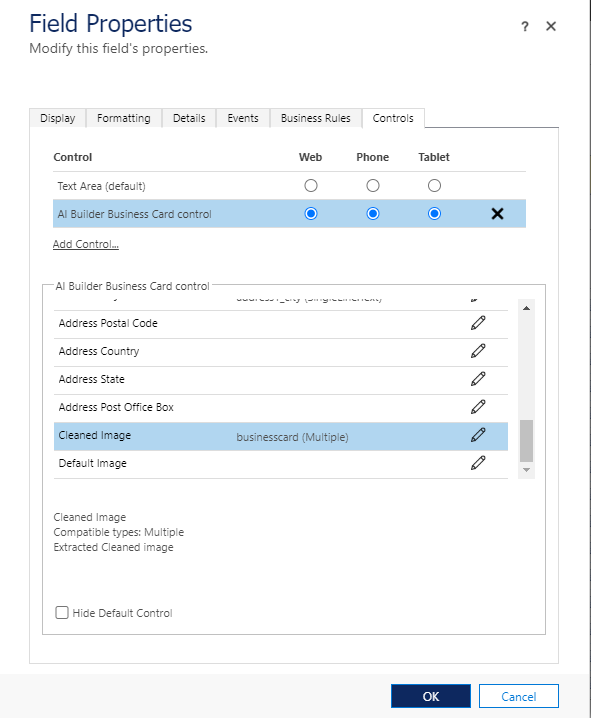
    pastedimage1595337968433v1.png

    I did, however, manage to figure out the behavior, which I can consistently reproduce.

    I must

    a.) use the side-record-selector and select the record for a 2nd time, or

    b.) Refresh on ribbon

    Accessing the record in any other way never shows the Business Card (from regular view, from Advanced Find, via direct link, pop-out-window, browser refresh/F5, Ctrl+F5).

    Additionally, F5 or Ctrl+F5 actually hide the Business Card it if it was previously shown using a.) or b.)

    The behavior is consistent in Chrome, IE, mobile app (Android) and mobile Chrome.

    (So, I discovered that my business cards were actually being saved within the system.)
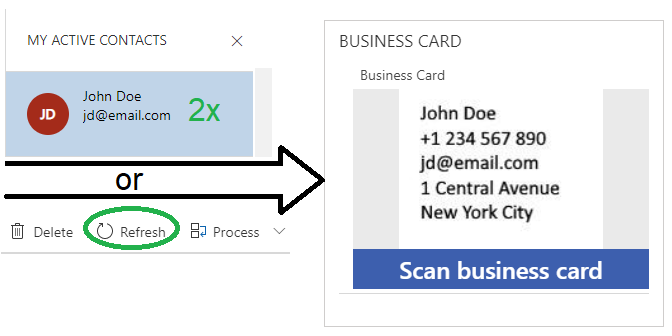
    pastedimage1595338866445v2.png

    I am running online deployment:

    Microsoft Dynamics 365
    2020 release wave 1 enabled
    Server version: 9.1.0000.19857
    Client version: 1.4.1024-2006.4

    Maybe the development team catches on to this and fixes the behavior to simply display the Business Card.

    I hope this helps someone.

    Martin

Under review

Thank you for your reply! To ensure a great experience for everyone, your content is awaiting approval by our Community Managers. Please check back later.

Helpful resources

Quick Links

Responsible AI policies

As AI tools become more common, we’re introducing a Responsible AI Use…

Neeraj Kumar – Community Spotlight

We are honored to recognize Neeraj Kumar as our Community Spotlight honoree for…

Leaderboard > Customer experience | Sales, Customer Insights, CRM

#1
Tom_Gioielli Profile Picture

Tom_Gioielli 70 Super User 2025 Season 2

#2
Gerardo Rentería García Profile Picture

Gerardo Rentería Ga... 33 Most Valuable Professional

#3
Daniyal Khaleel Profile Picture

Daniyal Khaleel 32 Most Valuable Professional

Last 30 days Overall leaderboard

Product updates

Dynamics 365 release plans



