web
You’re offline. This is a read only version of the page.
close
Skip to main content

Announcements

News and Announcements icon
Community site session details

Community site session details

Session Id :
Customer experience | Sales, Customer Insights,...
Answered

Set lookpup field value if another field have a especified value Through javascript funtion

(0) ShareShare
ReportReport
Posted on by 15

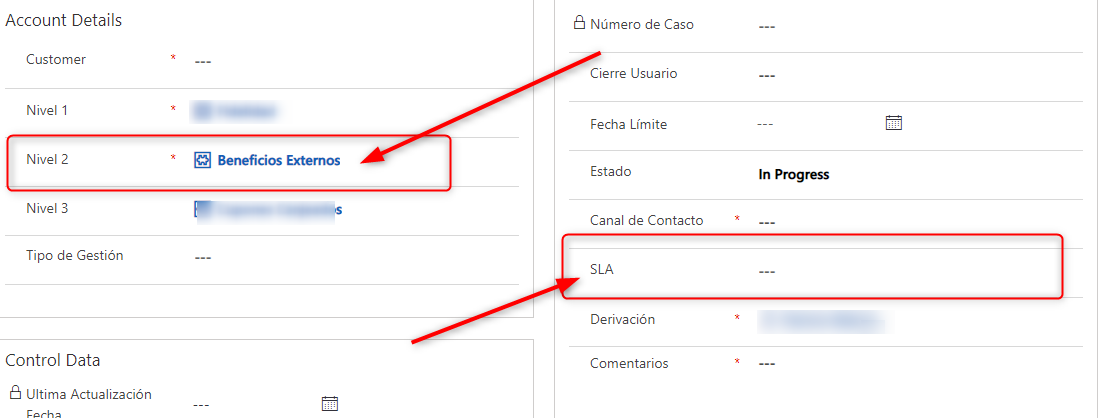
hi ! i need autocomplete a lookup type field in my form if another field have a especified value.

if field "Nivel 2 " = Beneficios Externos

field "SLA" = 24 hs B2C

else " SLA" = 48 hs B2C
pastedimage1647356204906v1.png

this is my code:


// GET Lookup
function RetrieveSLAToCaseB2C(executionContext) {

     var formContext = executionContext.getFormContext();
     var nivel2 = formContext.getAttribute("axnr1_nivel_2").getValue()
// Access the field on the form
     var fieldValue = formContext.getAttribute("slaid").getValue();
// Verify it does exist on the form
     if (nivel2 != null) {
// To get the Id, Name and Entity Name (account/contact)
       if (nivel2 != "Beneficios Externos") {
          formContext.getAttribute(fieldValue).setValue("24 hs B2C");
       }else{
          formContext.getAttribute(fieldValue).setValue("48 hs B2C");
            }
       }
}

I have the same question (0)
  • necsa Profile Picture
    3,455 on at

    Hi,

    You are on the right way but some parts of the code are not correct. Here I matched your code.

    // GET Lookup
    function RetrieveSLAToCaseB2C(executionContext) {

        var formContext = executionContext.getFormContext();
        var nivel2 = formContext.getAttribute("axnr1_nivel_2").getValue();
        var nameNivel2=nivel2[0].name;

        if (nameNivel2 != null) {
    // To get the Id, Name and Entity Name (account/contact)
          if (nameNivel2 != "Beneficios Externos") {
             formContext.getAttribute("slaid").setValue("24 hs B2C");
          }else{
             formContext.getAttribute("slaid").setValue("48 hs B2C");
               }
          }
    }
  • Verified answer
    Pulkit Srivastava Profile Picture
    170 on at

    Hi,

    You have to first fetch the SLA as this is a lookup field and then set the value in the "slaid".

    the code should look like

    // GET Lookup
    function RetrieveSLAToCaseB2C(executionContext) {
    
        var formContext = executionContext.getFormContext();
        var nivel2 = formContext.getAttribute("axnr1_nivel_2").getValue()
        // Access the field on the form
        var fieldValue = formContext.getAttribute("slaid").getValue();
        // Verify it does exist on the form
        if (nivel2 != null) {
            // To get the Id, Name and Entity Name (account/contact)
            if (nivel2[0].name != "Beneficios Externos") {
                var twentyFourHoursB2CSla = Get24HoursB2CSLA();
                if (twentyFourHoursB2CSla !== null && typeof (twentyFourHoursB2CSlaId) !== "undefined") {
                    var twentyFourHoursB2CSlalookupValue = new Array();
                    twentyFourHoursB2CSlalookupValue[0] = new Object();
                    twentyFourHoursB2CSlalookupValue[0].id = twentyFourHoursB2CSla.slaid;
                    twentyFourHoursB2CSlalookupValue[0].name = twentyFourHoursB2CSla.name;
                    twentyFourHoursB2CSlalookupValue[0].entityType = "sla";
                }
                formContext.getAttribute("slaid").setValue(twentyFourHoursB2CSlalookupValue);
            } else {
                var fortyEightHoursB2CSla = Get48HoursB2CSLA();
                if (fortyEightHoursB2CSla !== null && typeof (fortyEightHoursB2CSla) !== "undefined") {
                    var twentyFourHoursB2CSlalookupValue = new Array();
                    twentyFourHoursB2CSlalookupValue[0] = new Object();
                    twentyFourHoursB2CSlalookupValue[0].id = fortyEightHoursB2CSla.slaid;
                    twentyFourHoursB2CSlalookupValue[0].name = fortyEightHoursB2CSla.name;
                    twentyFourHoursB2CSlalookupValue[0].entityType = "sla";
                }
                formContext.getAttribute("slaid").setValue("48 hs B2C");
            }
        }
    }
    
    /*  
     *  This function retrieves the
     *  24 Hour SLA  
     */
    function Get24HoursB2CSLA() {
        try {
            var result;
            Xrm.WebApi.online.retrieveMultipleRecords("sla", "?$filter=name eq '24 hs B2C'").then(
                function success(results) {
                    console.log(results);
                    for (var i = 0; i < results.entities.length; i  ) {
                        result = results.entities[i];
                    }
                },
                function (error) {
                    console.log(error.message);
                }
            );
            return result;
        } catch (ex) {
            Xrm.Navigation.openAlertDialog(ex.message);
        }
    }
    
    /*
     *  This function retrieves the
     *  48 Hour SLA
     */
    function Get48HoursB2CSLA() {
        try {
            var result;
            Xrm.WebApi.online.retrieveMultipleRecords("sla", "?$filter=name eq '48 hs B2C'").then(
                function success(results) {
                    console.log(results);
                    for (var i = 0; i < results.entities.length; i  ) {
                        result = results.entities[i];
                    }
                },
                function (error) {
                    console.log(error.message);
                }
            );
            return result;
        } catch (ex) {
            Xrm.Navigation.openAlertDialog(ex.message);
        }
    }

    Please mark as ans if  works out for you

    Thanks

Under review

Thank you for your reply! To ensure a great experience for everyone, your content is awaiting approval by our Community Managers. Please check back later.

Helpful resources

Quick Links

Season of Sharing Community Challenge Launch!

Jump in, show your community spirit, and win prizes!

Women in Power Builds Momentum

Expanding mentorship, skilling, and AI innovation

Congratulations to the May Top 10 Community Leaders

These are the community rock stars!

Leaderboard > Customer experience | Sales, Customer Insights, CRM

#1
Hamza H Profile Picture

Hamza H 142 Super User 2026 Season 1

#2
ManoVerse Profile Picture

ManoVerse 131 Super User 2026 Season 1

#3
Nagaraju_Matta Profile Picture

Nagaraju_Matta 128

Last 30 days Overall leaderboard

Product updates

Dynamics 365 release plans



