web
You’re offline. This is a read only version of the page.
close
Skip to main content

Notifications

Announcements

No record found.

Community site session details

Community site session details

Session Id :
Customer experience | Sales, Customer Insights,...
Answered

Understand where field onchange script is being exectured for sub-grid

(0) ShareShare
ReportReport
Posted on by

I am fairly new to Dynamics 365 scripting and I am in the process of trying to understand how a certain script is exectued when a field in a sub-grid is changed.  I have navigated to the entity in question and opened the sub-grid event properties inside the form but there is not a registered event for that field, however the script that is run is inside the form libraries.

I have also looked at the registered steps inside the plugin registration tool and there is a step for when an update occurs, but I do not see any reference to the executed script.

Could someone please point me in the right direction as to where the onChange event could be declared.

Thanks in advance!

I have the same question (0)
  • Verified answer
    Wahaj Rashid Profile Picture
    11,321 on at

    Hi,

    There are two common ways to run a business logic on subgrid record change:

    1. Register a JavaScript function on load of  a sub-grid.
    2. Register a workflow/plugin after a record updated in a sub grid (however this runs on server side)  .

    This how to register a JS function on sub grid on load event:

    https://docs.microsoft.com/en-us/previous-versions/dynamicscrm-2016/developers-guide/dn932126(v=crm.8)?redirectedfrom=MSDN#BKMK_subgridAddOnLoad

    Now coming to your question, if i understood your problem, you are trying to look for a code executing on a sub-grid record update.

    As i said, there are 2 common ways to do so. Let me put some light on it.

    Executing a Java Script onChange event is different than a plugin, here is a quick explanation:

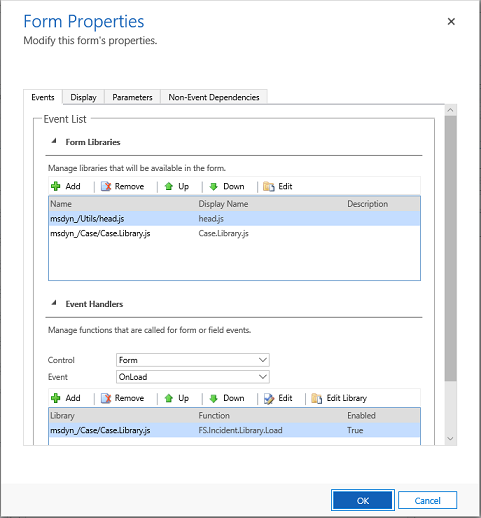
    • On Form Scripting:
      • You can register java script functions on following events:
        • On Load of Form
        • On Save of Form
        • On Change of a field
        • On Load of Subgrid

    Please note, form scripts are executed only when you use D365 UI, because it is Java Script it is considered as front-end scripting (code is not executed on the Server). The code for these can be find in one of the form libraries.
    pastedimage1595413926609v1.png

    • Server Side Business Logic:
      • You can implement business logic on server side (which is triggered on an event or on demand). There are 2 common approaches:
        • Workflow or Microsoft Flow: these can be executed on a record created, change, delete, assignment and on-demand. These can be viewed/modified easily by using Workflow or Flow editor.

    To view/edit a workflow: go to Advanced Settings -> Process Center -> Processes. You can find an active process (workflow) for target entity.  

    To view/edit a Flow: go to Advanced Settings -> Process Center -> Microsoft Flows.

        • Plugin: these are assemblies registered on SDK Messages provided by D365 (create, update, delete, assign. share, etc.). Plugins are written in C# .Net and are registered using plugin registration tool.

    You cannot see a plugin code using Plugin Regeneration Tool. This tool allows you to register a plugin assembly and register steps (triggers). You can add/disable steps using this tool, but for the code you need to open .Net Solution and see Class Library Code.

    I would suggest, you provide more details on the scenario to sort it out.

    Hope this clarifies.

    Best,

    Wahaj

    (if it helps, mark it verified)

  • Community Member Profile Picture
    on at

    Hi Wahaj,

    Thank you for your response.  To give you more information, on one of our forms we have a subgrid to another form and currently when one of the fields is changed in the subgrid a custom script is triggered, however when looking in the form properties of the form and the sub-grid (inside said form) there is no reference to an OnChange event so I am unsure where this logic is kept?

    Also apologies, I should have been more clearer when I was mentioning the plug-in registration. I have gone over the c# plug-in files and was unable to find a reference to the custom script inside the classes or in the steps created when registering the plug-in.

    Thank you

  • Wahaj Rashid Profile Picture
    11,321 on at

    Hi,

    Lets assume you have a sub-grid on Entity A having records of Entity B.

    Now, to trigger a Business Logic on sub-grid, you must register a function on the form of Entity A. Because sub-gird lies on Entity A, onLoad of sub-grid happens on this form, so the script should be on Entity A's form (you can look on Entity A's form library).

    But, there might be nothing registered on Entity A's form, reason being, there are several ways to trigger a Business Logic on update of Entity B. How you are sure, this is happening through sub-grid? On-change script on the Entity B, does not execute when you are on Entity A (even if it has sub-grid of Entity B). Subgrid is a just web component on Entity A's form listing records of Entity B. 

    So where is the logic then? As i mentioned earlier, it could be a workflow, Microsoft Flow or plugin.

    That is why, if you share exact scenario, it will help me to narrow down what's happening and more importantly where it is hapenning.

    Thanks,

    Wahaj

  • Community Member Profile Picture
    on at

    Hi Wahaj,

    I ended up realising yesterday that the code was being exectued in another app within my Dynamics365 instance.  

    Thank you for your help!

  • Wahaj Rashid Profile Picture
    11,321 on at

    Hi,

    Glad it worked.

    Best,

    Wahaj

Under review

Thank you for your reply! To ensure a great experience for everyone, your content is awaiting approval by our Community Managers. Please check back later.

Helpful resources

Quick Links

Responsible AI policies

As AI tools become more common, we’re introducing a Responsible AI Use…

Neeraj Kumar – Community Spotlight

We are honored to recognize Neeraj Kumar as our Community Spotlight honoree for…

Leaderboard > Customer experience | Sales, Customer Insights, CRM

#1
Tom_Gioielli Profile Picture

Tom_Gioielli 70 Super User 2025 Season 2

#2
Gerardo Rentería García Profile Picture

Gerardo Rentería Ga... 33 Most Valuable Professional

#3
Daniyal Khaleel Profile Picture

Daniyal Khaleel 32 Most Valuable Professional

Last 30 days Overall leaderboard

Product updates

Dynamics 365 release plans
