web
You’re offline. This is a read only version of the page.
close
Skip to main content

Notifications

Announcements

No record found.

Community site session details

Community site session details

Session Id :
Finance | Project Operations, Human Resources, ...
Suggested Answer

Issue with composite entity

(0) ShareShare
ReportReport
Posted on by 55

Hi

We have an issue with Composite entity that fails when we import the XML file.

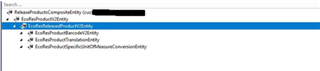
As per the business requirement, there is a need to create Composite entity with following Data entities: Products V2, Released products V2, Item - bar codes V2, Product translations and Product specific Unit conversions. And these are in the below order in the Composite entity.
pastedimage1607679830977v1.png

This composite entity successfully executed for export and import so that Released products with relevant fields (from all the above entities) were updated/created. But this was failed in one scenario where Inventory unit is different from Sales/Purchase units. This was failed due to the sequence of entities in the composite entity. As per this sequence, Unit conversions entity will execute after the Released products V2 entity is being executed so there was an error message saying that Unit conversion does not exist between Inventory unit and Purchase/Sales unit.

Hence, we have decided to change the order as below so that Unit conversions will be executed first and then Released products.

Products V2, Product specific Unit conversions, Released products V2, Item - bar codes V2, Product translations

We have created the composite entity with the above order, and we are getting the error when we try to export the XML file with this entity. Hence, we have limited the number of entities to 3 in another new composite entity.

pastedimage1607679830980v2.png

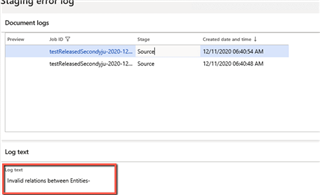
With this entity also we are getting the same error message as shown the 3rd image.


Error log when we have exported entity
pastedimage1607679830981v3.png

Let me know what I am missing here in creating a Composite entity.

I have the same question (0)
  • nmaenpaa Profile Picture
    101,162 Moderator on at

    HI Sathish,

    the screenshots are so small that it's not possible to read the error message.

  • Sathish Kumar Polisetti Profile Picture
    55 on at

    Hi Nikolaos,

    The error message says - "Invalid relations between Entities-".

    Am also attaching the screen shots here again.

    Entity 1

    Entity-1.png

    Entity 2

    Entity-2.png

    Error when exported the job (XML element file)

    Job-error.png

  • Suggested answer
    nmaenpaa Profile Picture
    101,162 Moderator on at

    Thanks.

    Please verify the relations between the entities, staging tables etc. Since you have now changed the entity hierarchy, you must adjust all the relations between them.

    Also, please remember to use your own prefix in the object names when developing new objects such as composite entities. Otherwise, if MS adds an entity called ReleasedProductCompositeEntity you can't install MS updates anymore in your system and are in trouble.

Under review

Thank you for your reply! To ensure a great experience for everyone, your content is awaiting approval by our Community Managers. Please check back later.

Helpful resources

Quick Links

Responsible AI policies

As AI tools become more common, we’re introducing a Responsible AI Use…

Neeraj Kumar – Community Spotlight

We are honored to recognize Neeraj Kumar as our Community Spotlight honoree for…

Leaderboard > Finance | Project Operations, Human Resources, AX, GP, SL

#1
André Arnaud de Calavon Profile Picture

André Arnaud de Cal... 456 Super User 2025 Season 2

#2
Martin Dráb Profile Picture

Martin Dráb 429 Most Valuable Professional

#3
BillurSamdancioglu Profile Picture

BillurSamdancioglu 239 Most Valuable Professional

Last 30 days Overall leaderboard

Product updates

Dynamics 365 release plans



