web
You’re offline. This is a read only version of the page.
close
Skip to main content

Notifications

Announcements

No record found.

Community site session details

Community site session details

Session Id :
Microsoft Dynamics NAV (Archived)

WebService - Update SalesOrderLine - Field Total Amount Excl. VAT i s readonly!

(0) ShareShare
ReportReport
Posted on by

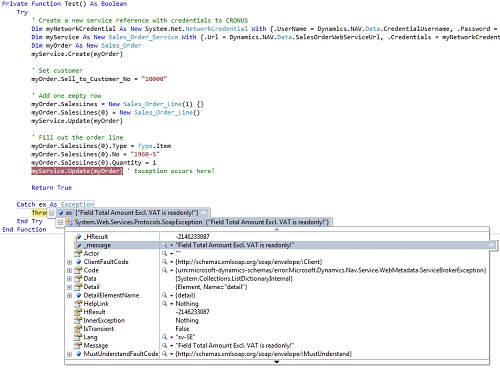
I get the exception "Amount Excl. VAT i s readonly!" when updating the order lines for NAV 2015. We do have the same software for NAV 2013 that works fine. The NAV 2015 is development installed at a virtual Windows 8 machine wich we access through the network. As I understand the summarize fields below the order lines are new in NAV 2015.

I took two steps back and made a simple order test code from the sample at https://community.dynamics.com/nav/b/arounddynamicsnavworld/archive/2014/08/01/nav-web-services-connectivity-samples.aspx but gets the same result.

Has anyone an idea why?

Rgds Cyril
*This post is locked for comments

I have the same question (0)
  • keoma Profile Picture
    32,729 on at

    hi,

    what did you publish as web service?

    if you used a page (sales order and/or sales order subform) try better to use a new codeunit with your own functions, which only deliver the needed functionality. when using pages as web services there might be side effects, which could end in errors.

  • Community Member Profile Picture
    on at

    Hi Jonathan,

    I do use page (id=42) and have done so for years. I also understand your point with side effects but it can´t be MS goal that everyone writes their own codeunits.

  • Suggested answer
    keoma Profile Picture
    32,729 on at

    then it's a bug, because same functionality works in nav 2013.

    please contact the microsoft support.

  • Community Member Profile Picture
    on at

    I already contacted microsoft support but want to see here if more developers has this issue.

  • Suggested answer
    keoma Profile Picture
    32,729 on at

    which NAV build version do you use? did you update with the newest cumulative updates?

    follow blogs.msdn.com/.../cumulative-update-2-for-microsoft-dynamics-nav-2015-has-been-released.aspx

    i have tried your sample successfully with build vs. 37874.

    but i added some fields for creating a sales order line:

    * Document_No = salesOrder.No

    * TypeSpecified = true

    * QuantitySpecified = true

    without these fields i got errors.

  • Community Member Profile Picture
    on at

    hmm, I do use 8.0.37847.0 and have the hotfix and its the standard CRONUS demo sample with same customer and items.

    I tested your suggestion with your fields/values but still has the same exception about the total amount thats readonly.

                With myOrder.SalesLines(0)
                    .Document_No = myOrder.No
                    .TypeSpecified = True
                    .QuantitySpecified = True
                    .Type = navSales_Order.Type.Item
                    .No = "1960-S"
                    .Quantity = 1
                End With

    What errors/exception you get whitout this values?

  • Suggested answer
    keoma Profile Picture
    32,729 on at

    i did not get the error you mentioned, i got following error: "Field 'No.' of table 'Sales Line' contains a value (1960-S), which was not found in associated table (Standard Text)."

    That means the Type value was not set correctly, because the TypeSpecified field was not set to true. After setting this field to true all worked fine.

    I should mention, that i used the german cronus database. this can be a reason for the difference. table "sales line" has value "NAVW18.00.00.38457" in version list. so the database seems newer than the used clients (both vs. 37874), but can be opened.

    best install CU 2 from the mentioned link above.

    did you check, if there is an inner exception? if there is one, what's the message?

  • Suggested answer
    Suresh Kulla Profile Picture
    50,243 Super User 2025 Season 2 on at

    Did you try assigning the total amount including vat field zero.

  • Community Member Profile Picture
    on at

    I will try with KB3020885 and reply you

  • Community Member Profile Picture
    on at

    Oh no, I just set .Type, .No and .Quantity as I always done against NAV 2013R2

                ' Create a new service reference with credentials to CRONUS
    Dim myService As New navSales_Order.Sales_Order_Service With {.UseDefaultCredentials = True} Dim myOrder As New navSales_Order.Sales_Order myService.Create(myOrder) ' Works fine ' Set customer myOrder.Sell_to_Customer_No = "10000" ' Add one empty row myOrder.SalesLines = New navSales_Order.Sales_Order_Line(1) {} myOrder.SalesLines(0) = New navSales_Order.Sales_Order_Line() myService.Update(myOrder) ' Works fine ' Fill out the order line With myOrder.SalesLines(0) .Type = navSales_Order.Type.Item .No = "1960-S" .Quantity = 1 End With myService.Update(myOrder) ' Exception occurs here!

Under review

Thank you for your reply! To ensure a great experience for everyone, your content is awaiting approval by our Community Managers. Please check back later.

Helpful resources

Quick Links

Responsible AI policies

As AI tools become more common, we’re introducing a Responsible AI Use…

Neeraj Kumar – Community Spotlight

We are honored to recognize Neeraj Kumar as our Community Spotlight honoree for…

Leaderboard > 🔒一 Microsoft Dynamics NAV (Archived)

Last 30 days Overall leaderboard

Featured topics

Product updates

Dynamics 365 release plans
