I want to get the approved hours that have not yet been invoiced so I used a rollup field. The issue is that the rollup field does not allow for blank values. As a work around I created a new field (which will be hidden from the user), and created 3 business rules:
1. When billing status is bank:
IF
Billing status does not contain data AND Transaction Type equals "Unbilled Sales"
THEN
Set ActualIndicator to "Yes"
2. When billing status = ready to invoice:
IF
Billing status equals "Ready to Invoice" AND Transaction Type equals "Unbilled Sales"
THEN
Set ActualIndicator to "Yes"
3. When billing status is not ready to invoice and transaction type is not unbilled sales:
IF
Billing status equals "Unbilled Sales Created,Customer Invoice Created,Customer Invoice Posted,Canceled" OR Transaction Type equals "Cost,Project Contract,Billed Sales,Resourcing Unit Cost,Inter-Organizational Sales"
THEN
Set ActualIndicator to "No"
Then the rollup field will sum the quantity I need when the ActulIndicator is set to yes.
However, the only problem that I am having is that on the form, the ActualIndictor values changes according to the business rule, however, on the view, it's staying as if the business rules are not working. When I open the record, the value is as expected to work with the business rules, however in order for the rollup field to show me the value that I want, I would have to save (even though the value is set to yes already) and then, the rollup field works as expected.
This is what is happening:
Once I approve the time entry, it goes to the time and material billing backlog. From the screenshot, the field is unassigned:
 ,
,
however, when I open the record, the field is set to yes:
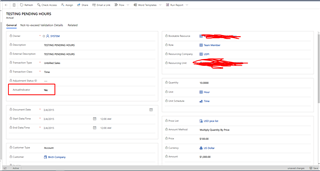
When I click on the back button on the environment, it shows that the record is saving (even though I did not make any changes).
And now I have the correct value.
This is happening even when the record is posted (same steps).
Is this normal behaviour for business rules? Do you have any suggestions? Is there another way to achieve the result?
(related to Project Operations)







