web
You’re offline. This is a read only version of the page.
close
Skip to main content

Notifications

Announcements

No record found.

Community site session details

Community site session details

Session Id :
Customer experience | Sales, Customer Insights,...
Answered

Is there any way to pre-fill my one form data to another form present on different landing pages?

(0) ShareShare
ReportReport
Posted on by 216

Hi 

Is there and way to pre-fill form 2 data on the basis of data submitted on form 1 . 

iam using dynamics 365 marketing forms and landing pages . I have to forms and 2 landing pages.  I want form 2 prefill on the basis of data submitted on form 1 . 

Thanks

Fariha Asmat

I have the same question (0)
  • Verified answer
    cloflyMao Profile Picture
    25,210 on at

    Hi Fariha,

    You can save data of form 1 to localStorage property at formSubmit event.

    Because each input field has a specifc id attribute, hence we can get its value with document.getElementById("123").value method.
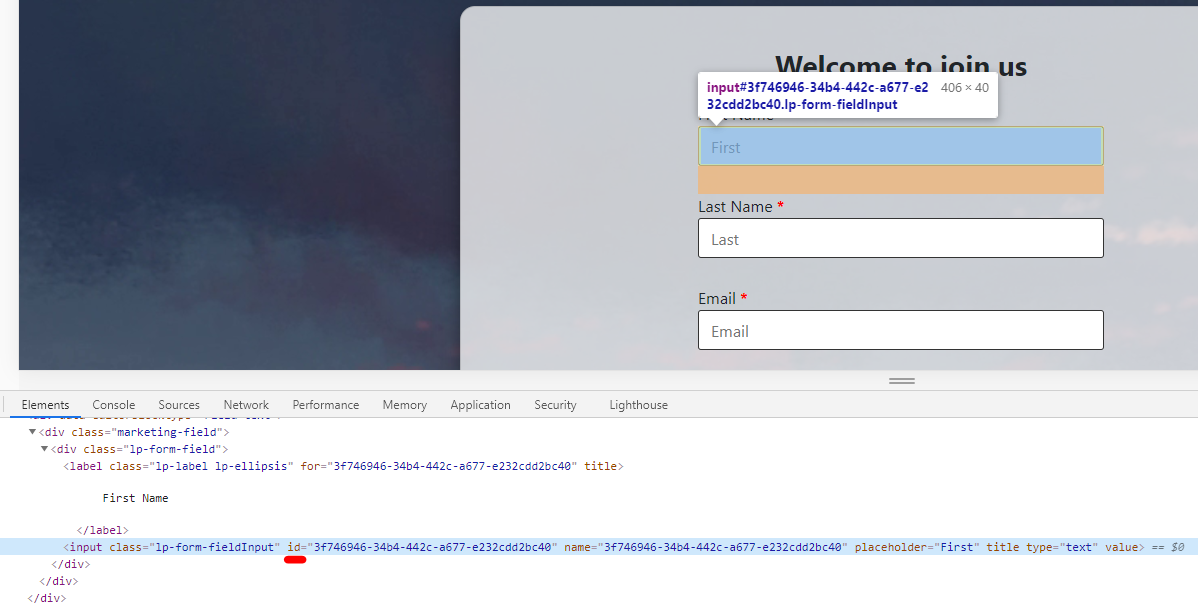
    pastedimage1599620608797v1.png

    Script 1:

    MsCrmMkt.MsCrmFormLoader.on('formSubmit', function (event) {
      var firstName = document.getElementById("3f746946-34b4-442c-a677-e232cdd2bc40").value;
      var lastName = document.getElementById("xxxx").value;
      var emailAddress = document.getElementById("yyyy").value;
      localStorage.setItem("firstname", firstName);
      localStorage.setItem("lastname", lastName);
      localStorage.setItem("emailaddress", emailAddress);
    });

    Then on the second landing page, get items from localStorage to fill fields of form 2.

    Script 2: 

    MsCrmMkt.MsCrmFormLoader.on('afterFormRender', function (event) {
      var firstName = document.getElementById("c98e6449-2f57-4058-aeee-546b0af11b5a");
      var lastName = document.getElementById("aaa");
      var emailAddress = document.getElementById("bbb");
      firstName.value = localStorage.getItem("firstname");
      lastName.value = localStorage.getItem("lastname");
      emailAddress.value = localStorage.getItem("emailaddress");
    });

    Please refer to following articles for how to use marketing form API and localStorage property:

    https://docs.microsoft.com/en-us/dynamics365/marketing/developer/marketing-form-client-side-extensibility

    https://developer.mozilla.org/en-US/docs/Web/API/Window/localStorage

    Regards,

    Clofly

Under review

Thank you for your reply! To ensure a great experience for everyone, your content is awaiting approval by our Community Managers. Please check back later.

Helpful resources

Quick Links

Responsible AI policies

As AI tools become more common, we’re introducing a Responsible AI Use…

Neeraj Kumar – Community Spotlight

We are honored to recognize Neeraj Kumar as our Community Spotlight honoree for…

Leaderboard > Customer experience | Sales, Customer Insights, CRM

#1
Tom_Gioielli Profile Picture

Tom_Gioielli 170 Super User 2025 Season 2

#2
#ManoVerse Profile Picture

#ManoVerse 70

#3
Jimmy Passeti Profile Picture

Jimmy Passeti 50 Most Valuable Professional

Last 30 days Overall leaderboard

Product updates

Dynamics 365 release plans






