web
You’re offline. This is a read only version of the page.
close
Skip to main content

Announcements

No record found.

News and Announcements icon
Community site session details

Community site session details

Session Id :
Service | Customer Service, Contact Center, Fie...
Suggested Answer

Custom domain name for Dynamics 354 Portal

(0) ShareShare
ReportReport
Posted on by 130

Hi Folks

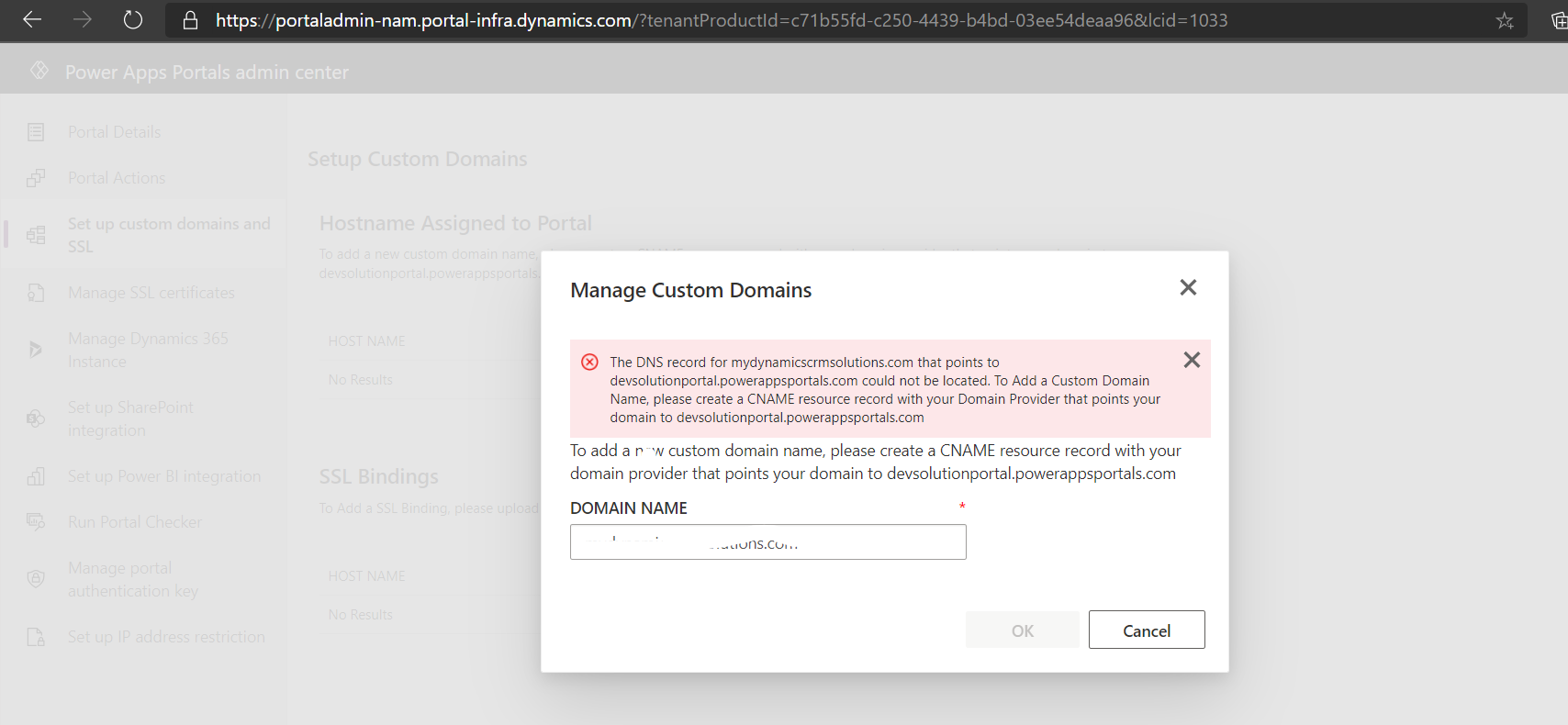
I am having an issue configuring custom domain name for Dynamics 365 portal. I have generated the certificate, bought the custom domain from Godady. Now I am trying to configure the custom domain Power Apps Portal Admin Center. I am getting the following error:

" The DNS record for mydynamicscrmsolutions.com that points to devsolutionportal.powerappsportals.com could not be located. To Add a Custom Domain Name, please create a CNAME resource record with your Domain Provider that points your domain to devsolutionportal.powerappsportals.com"

I don't understand how to get the DNS details of site so that I can add the CNAME record in Godady.
pastedimage1604540368699v1.png

Would really appreciate help.

Thanks

Noor

  • Suggested answer
    Adrian Begovich Profile Picture
    1,032 Moderator on at

    Hi Noor Ahmad,

    This article explains how to add a CNAME (alias) record to your DNS zone file in your GoDaddy account.

  • Noorahmad001 Profile Picture
    130 on at

    I already tried that and added the CNAME record but I am getting same error message.

  • JMAtoms Profile Picture
    125 on at

    Noor,

    The hostname and the CNAME are still in the screenshot above.  It looks as though you tried to white out the entry in text box, but didnt do so for the error message itself which contains the names in question.

    Whatever the case running a DNS lookup on mydynamicscrmsolutions.com whos that its an A record pointing to an IP address and not a CNAME pointing to devsolutionportal.powerappsportals.com

    mxtoolbox.com/SuperTool.aspx

    You have to fix your DNS.

  • Noorahmad001 Profile Picture
    130 on at

    Hi @JMAtoms

    I added the entry in DNS as below:

    Type: A

    Host/Name: mydynamicscrmsolutions.com

    Points to:34.102.136.180

    pastedimage1604628114011v1.png

    but I am still receiving the same error.

  • Suggested answer
    JMAtoms Profile Picture
    125 on at

    Noor,  the message from the Dynamics interfaces says a CNAME and the value it needs.  I also mentioned a CNAME in my reply in this thread.  Your DNS needs to be setup as:

    Delete that A record.

    Type needs to be CNAME

    Name needs to be: mydynamicscrmsolutions.com

    Value needs to be: devsolutionportal.powerappsportals.com

    Wait a half hour and try again.

  • Suggested answer
    yanoh Profile Picture
    155 on at

    As JMAtoms saied,  it will take some time to propagate to all DNS servers. Did the error is resolved?

  • Noorahmad001 Profile Picture
    130 on at

    Hi JAMAtoms

    Apologies I was busy in some other tasks. I added the entries exactly like you mentioned but and I did it last week but I am still having the same error on portals.

    pastedimage1604930197310v1.png

  • JMAtoms Profile Picture
    125 on at

    Hi Noor,

    Your DNS still isnt update for whatever reason.  See here:

    pastedimage1604932573248v2.png

    You're going to have to get with godaddy.  This isnt a dynamics problem.  As soon as your CNAME resolves correctly you can come back here if you need additional help.

Under review

Thank you for your reply! To ensure a great experience for everyone, your content is awaiting approval by our Community Managers. Please check back later.

Helpful resources

Quick Links

Season of Sharing Community Challenge Winners!

Congratulations to our community stars!

Women in Power Builds Momentum

Expanding mentorship, skilling, and AI innovation

Congratulations to the August Top 10 Community Leaders

These are the community rock stars!

Leaderboard > Service | Customer Service, Contact Center, Field Service, Guides

#1
Travis South Profile Picture

Travis South 54

#2
11manish Profile Picture

11manish 37 Super User 2026 Season 2

#3
ParthPatel249 Profile Picture

ParthPatel249 33

Last 30 days Overall leaderboard

Featured topics

Product updates

Dynamics 365 release plans



