web
You’re offline. This is a read only version of the page.
close
Skip to main content

Announcements

News and Announcements icon
Community site session details

Community site session details

Session Id :
Finance | Project Operations, Human Resources, ...
Unanswered

D365 Fixed Asset Posting Profile – Best Practice for Disposal (Scrap) Configuration

(0) ShareShare
ReportReport
Posted on by

Hi all,

I’m looking for best practice guidance on configuring Fixed Asset Posting Profiles for Disposal – Scrap in D365.


Current Issue
When reviewing disposal transactions, we’re not seeing a clear separation of:
  • Asset cost removal
  • Accumulated depreciation clearing
  • Gain/Loss recognition

Instead, the entries appear to be netting into a single account.

What We Noticed
  • Ledger accounts (Disposal – Scrap/Sale)
    • Main and Offset accounts are currently the same (P&L)
  • Disposal setup
    • Sales value type = All (gain/loss combined)
    • Post value types (Net book value) are not defined

Questions
 
  1. For Disposal – Scrap, should:
    • Main and Offset accounts be different (or offset left blank)?
  2. Is it best practice to:
    • Separate Gain vs Loss instead of using “All”?
  3. Should all Post value types (especially Net book value) be defined to ensure proper posting?
  4. Should D365 disposal entries fully break out:
    • Cost
    • Accumulated depreciation
    • Gain/Loss

Goal

Configure D365 to produce clear, standard disposal entries and provide full visibility into the asset lifecycle.
 

Any examples or recommended setups would be appreciated!

Categories:
I have the same question (0)
  • André Arnaud de Calavon Profile Picture
    305,424 Super User 2026 Season 1 on at
    Hi Ashleyyri,
     
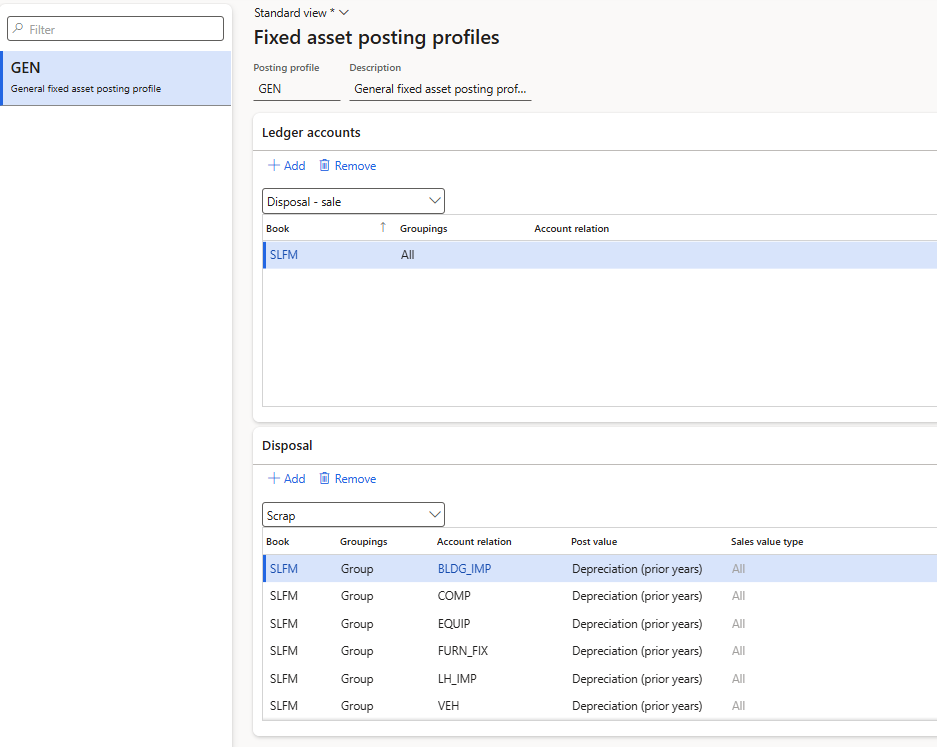
    For disposal (sales or scrap) you need to configure additional disposal parameters. The upper grid usually has indeed the same Main and offset account. Using the bottom grid, you can manage which posting types will be reversed and what accounts will be used. The net book value usually has the same accounts, but other types like depreciation prior years and this year do have differences between the main account and the offset account. 
    The total posted amount per post value will be deducted from the main account (balance accounts) and posted towards the offset account. In case there was a net book value when scrapping the asset, the result will be visible on the offset account. See as example the screenshot below. 
     
    The exact implementation depends on the details of main accounts in the chart of accounts. I had a quite tricky scenario in the past where investments for the current year were posted on one account where that balance was moved to another account for investments in prior years. Such scenario requires some additional thinking.
     
     
  • Ashleyyri Profile Picture
    on at

    Thank you so much André, for the quick response/support!!

    This is really helpful and clarified the distinction between the top and bottom sections of the posting profile.

    Based on your explanation, I took another look at our setup.

    I noticed that within the Disposal (bottom) section, all of our post value types (depreciation, acquisition, adjustments, etc.) are currently mapped using the same main and offset accounts. It sounds like this may be the root cause of why we’re not seeing a clear breakout of asset cost, accumulated depreciation, and gain/loss in the voucher.

    We also do not currently have a specific mapping defined for Net book value, which I’m now thinking is a key piece in driving the gain/loss behavior.

    Does that sound consistent with what you would expect?

    As a next step, I’m planning to update the disposal configuration so that:

    • Depreciation-related post values reverse between accumulated depreciation and asset accounts
    • Net book value is mapped to flow from the asset account to the gain/loss account

    Before making those changes, I just wanted to confirm that this approach aligns with best practice.


Under review

Thank you for your reply! To ensure a great experience for everyone, your content is awaiting approval by our Community Managers. Please check back later.

Helpful resources

Quick Links

Season of Sharing Community Challenge Launch!

Jump in, show your community spirit, and win prizes!

Women in Power Builds Momentum

Expanding mentorship, skilling, and AI innovation

Congratulations to the April Top 10 Community Leaders

These are the community rock stars!

Leaderboard > Finance | Project Operations, Human Resources, AX, GP, SL

#1
Giorgio Bonacorsi Profile Picture

Giorgio Bonacorsi 612

#2
André Arnaud de Calavon Profile Picture

André Arnaud de Cal... 592 Super User 2026 Season 1

#3
Abhilash Warrier Profile Picture

Abhilash Warrier 586 Super User 2026 Season 1

Last 30 days Overall leaderboard

Product updates

Dynamics 365 release plans