web
You’re offline. This is a read only version of the page.
close
Skip to main content

Notifications

Announcements

No record found.

Community site session details

Community site session details

Session Id :
Finance | Project Operations, Human Resources, ...
Suggested Answer

Update personnel number for employee

(1) ShareShare
ReportReport
Posted on by

Hi team,

I would seek your help related to personnel number as below:

How can we update/ modify personnel number after it’s created on employee record on the form?
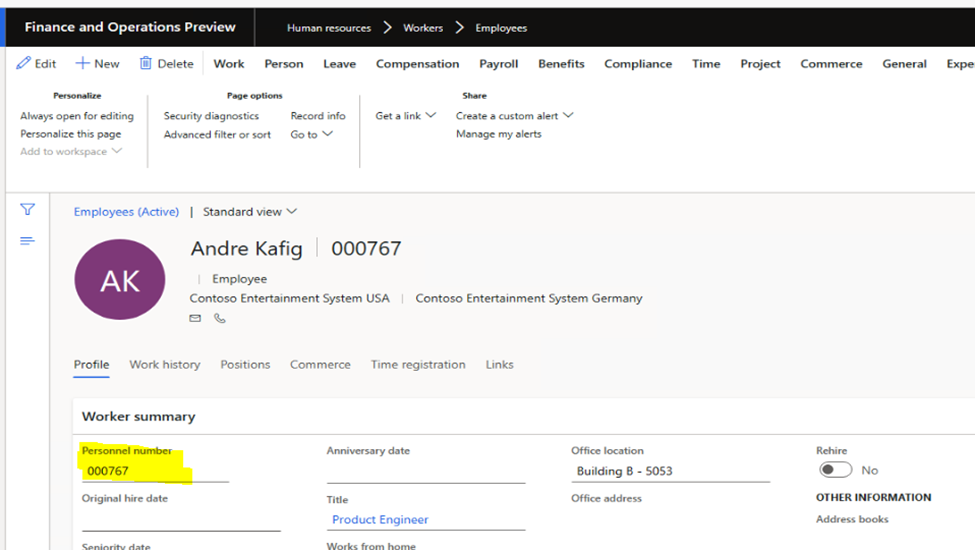
pastedimage1676950709164v1.png

I tested with changing set up at number sequence, but it didn’t work. Please find my test as below:

Go to Human Resources > Setup > Human Resources Parameters > Number Sequences. Identify the number sequence tagged to Personnel number

Navigate to Payroll -> Setup -> Parameters-> Human resources shared parameters, find the number sequence and uncheck the "Continuous" checkbox and mark the "Manual" checkbox in the general fast tab.
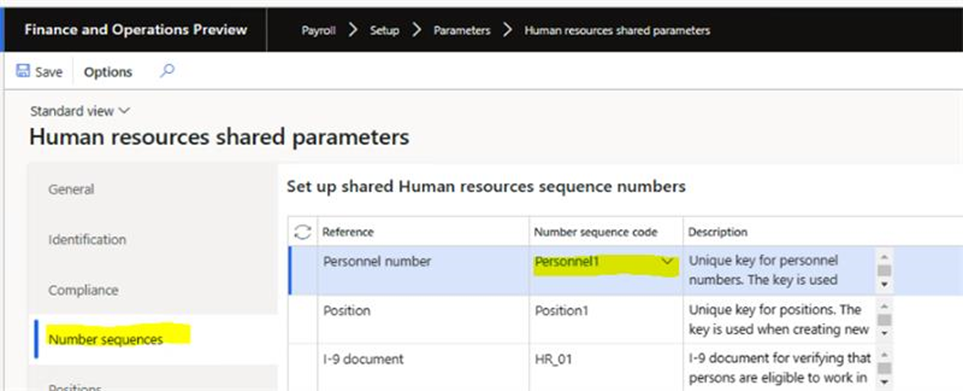
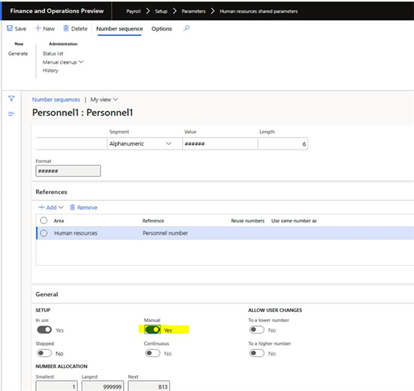
pastedimage1676950726105v2.png

pastedimage1676950745345v3.png

Could you please share your idea if there is any workaround for changing personnel number?

Thank you so much!

I have the same question (0)
  • Suggested answer
    GirishS Profile Picture
    27,827 Moderator on at

    Hi Julia,

    Why are you trying to change the personnel number?

    Personnel number is unique field in HcmWorker table, so it's not possible to change that. This personnel number field value is used in multiple forms as a reference field.

    One workaround will be renaming the primary key but that is not suitable for Personnel number also.

    Thanks,

    Girish S.

  • Suggested answer
    Charlotte X Profile Picture
    on at

    Hi Julia,

    As far as I know, it's not possible to change the personnel number in HR. The only option to change it would be creating new worker records.

  • Suggested answer
    Ramesh Babu P Profile Picture
    35 on at

    Hi Julia Nguyen,

    Changing the personnel number sequence to manual in Human resources shared parameters it allows the user to create an employee with desired personnel number not to update/ modify the personnel number.

    Please refer to the link below, which was discussed previously in the forum.

    community.dynamics.com/.../changing-a-worker-s-personnel-number

    Regards

    Ramesh Babu Paladugu

    If applicable, please mark the answer as verified - This post is my own opinion and does not necessarily reflect the opinion or view of my company.

Under review

Thank you for your reply! To ensure a great experience for everyone, your content is awaiting approval by our Community Managers. Please check back later.

Helpful resources

Quick Links

Responsible AI policies

As AI tools become more common, we’re introducing a Responsible AI Use…

Neeraj Kumar – Community Spotlight

We are honored to recognize Neeraj Kumar as our Community Spotlight honoree for…

Leaderboard > Finance | Project Operations, Human Resources, AX, GP, SL

#1
Martin Dráb Profile Picture

Martin Dráb 592 Most Valuable Professional

#2
André Arnaud de Calavon Profile Picture

André Arnaud de Cal... 478 Super User 2025 Season 2

#3
BillurSamdancioglu Profile Picture

BillurSamdancioglu 305 Most Valuable Professional

Last 30 days Overall leaderboard

Product updates

Dynamics 365 release plans
