web
You’re offline. This is a read only version of the page.
close
Skip to main content

Announcements

No record found.

News and Announcements icon
Community site session details

Community site session details

Session Id :
Microsoft Dynamics AX (Archived)

how to display the legal entity of user's role?

(0) ShareShare
ReportReport
Posted on by 932

I create first a grid that displays the list of user.

I create second grid thats displays the list of roles of the selected user.
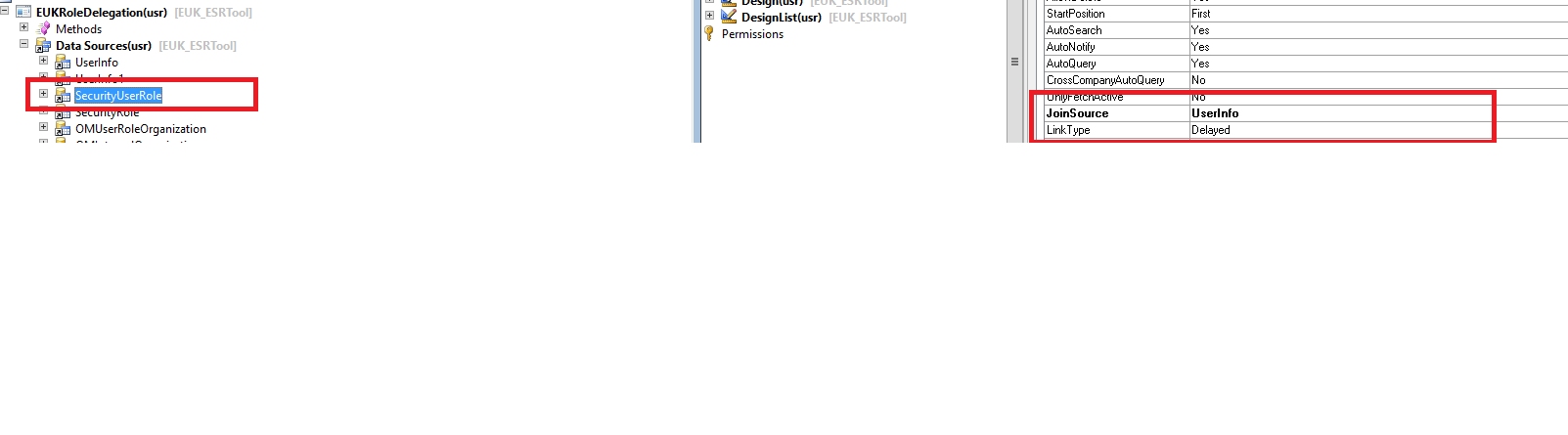
secUserRole.png

secRole.png

Now, in other tab I displayed if the role is active for all the organizations or have access to specific organizations:
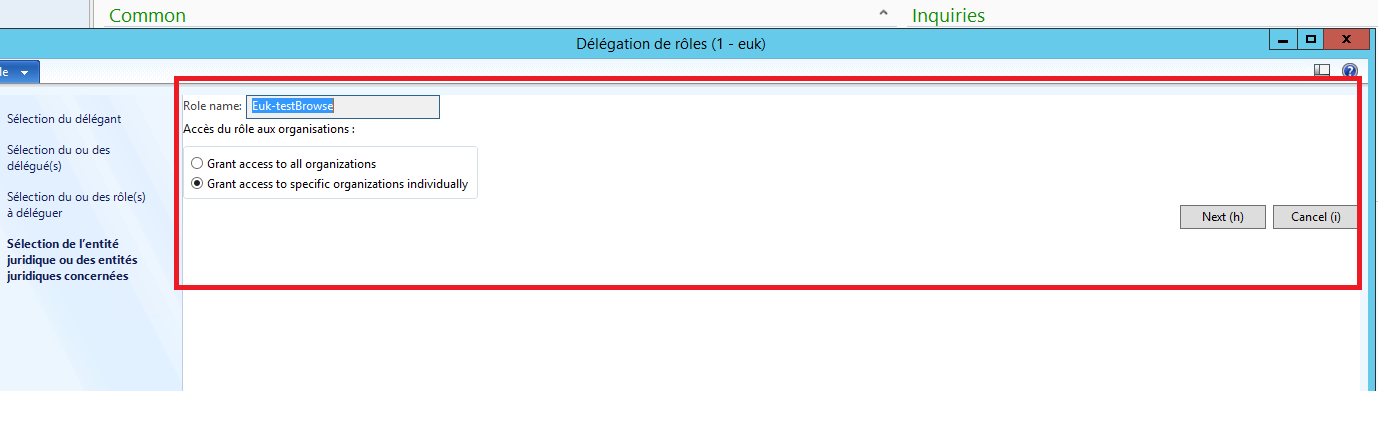
0458.access.png

If the radioButton "Grant access to specific organizations individually" is selected , I want when I clicked on "next" I get the  names of organizations where the selected role is active.

I added the OMUserRoleOrganization as dataSource , in the method executeQuery() I set this code:

public void executeQuery()
{
SysQuery::findOrCreateRange(this.query().dataSourceTable(tablenum(OMUserRoleOrganization)), fieldnum(OMUserRoleOrganization, User)).value(queryValue(UserInfo.id));
SysQuery::findOrCreateRange(this.query().dataSourceTable(tablenum(OMUserRoleOrganization)), fieldnum(OMUserRoleOrganization, SecurityRole)).value(queryValue(SecurityRole.RecId));

super();
}

 Then I added OMInternalOrganization as datasource,  in the method executeQuery() I set this code:

public void executeQuery()
{
SysQuery::findOrCreateRange(this.query().dataSourceTable(tablenum(OMInternalOrganization)), fieldnum(OMInternalOrganization, RecId)).value(queryValue(OMUserRoleOrganization.OMInternalOrganization));
super();
}

I called these methods in clicked Button, but I didn't get values.

I want to know how to link the userInfo, SecurityRole, OMUserRoleOrganization and OMInternalOrganization  to get the names of organizations??

*This post is locked for comments

I have the same question (0)
  • André Arnaud de Calavon Profile Picture
    304,293 Super User 2026 Season 1 on at

    Hi Basma,

    Not sure what you are exactly trying to achieve/asking here, but the organization assignment can be based on a hierarchy. In that case, you can use the table OMExplodedOrganizationSecurityGraph to get the individual organizations.

  • BASMA Profile Picture
    932 on at

    I add OMUserRoleOrganization as datasource:

    omUser.png

    then I add OMINternalOrganization : i link it with OMUserRoleOrganization :

    omIntern.png

    Now I get the correct organizations but when I open form I get this dialogBox:

    6761.entity.png

    I didn't understand it ?

  • Ludwig Reinhard Profile Picture
    Microsoft Employee on at

    Hi Basma,

    What is the purpose of this adjustment? What do you want to achieve at the end of the day?

    Would be great if you could explain.

    Many thanks

    Ludwig 

  • BASMA Profile Picture
    932 on at

    The purpose of this task is :

    1. choice of user from grid

    2.display the list of roles assigned to this user.

    3.When I selected role and clicked next , I get the names of organizations where the role is active.

  • Suggested answer
    André Arnaud de Calavon Profile Picture
    304,293 Super User 2026 Season 1 on at

    Hi Basma,

    This is already standard available. You can go to the users list page. Then open the details for one user. You can click a role. At the right side, there is a space for factboxes. Out of the box, one fact box will then show the list of organizations. If you need to present it a bit different, then use the example for the exact queries and coding.

  • BASMA Profile Picture
    932 on at

    I need it in a new form, beacause there are some other tasks related to it.

    in the list of user in form, I didn't know  the source of dialogBox

  • André Arnaud de Calavon Profile Picture
    304,293 Super User 2026 Season 1 on at

    The fact-box on the user details form is also a form. You can find it based on menu items used in the fact-box section of the form design. Please let us know if you are able to reverse engineer it now.

  • BASMA Profile Picture
    932 on at

    Hi André,

    it works now,

    juste I changed the property of omUserRoleOrganization.

  • André Arnaud de Calavon Profile Picture
    304,293 Super User 2026 Season 1 on at

    Hi Basma,

    Thanks. Glad you solved it, but what exact property are you referring to?

  • Verified answer
    BASMA Profile Picture
    932 on at

    Hi, André,

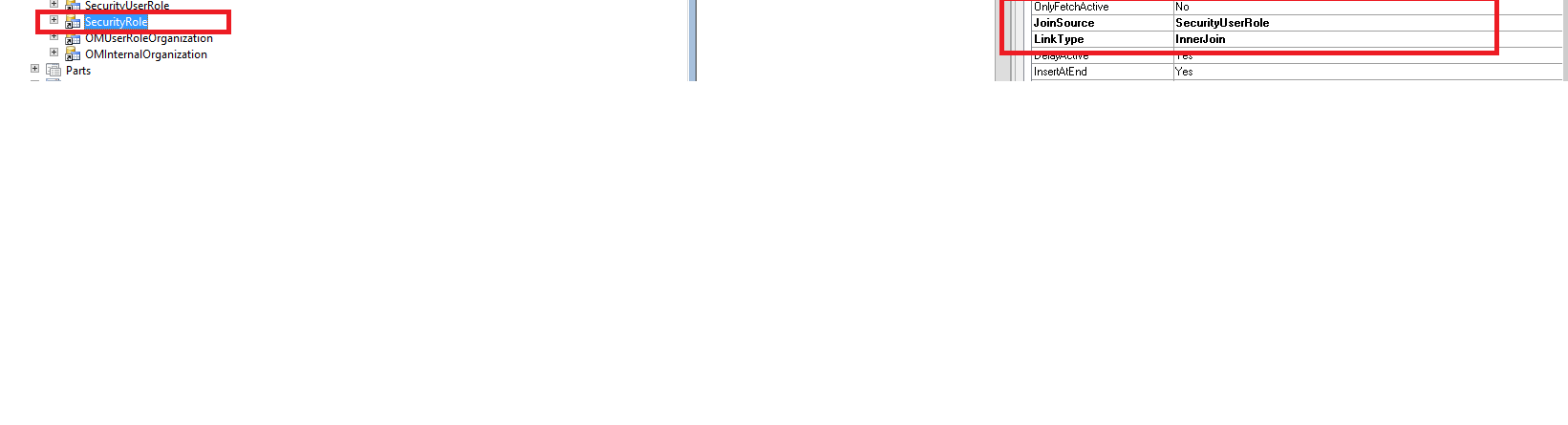
    4505.secUserRole.png

Under review

Thank you for your reply! To ensure a great experience for everyone, your content is awaiting approval by our Community Managers. Please check back later.

Helpful resources

Quick Links

Introducing the 2026 Season 1 community Super Users

Congratulations to our 2026 Super Stars!

Meet the Microsoft Dynamics 365 Contact Center Champions

We are thrilled to have these Champions in our Community!

Congratulations to the March Top 10 Community Leaders

These are the community rock stars!

Leaderboard > 🔒一 Microsoft Dynamics AX (Archived)

#1
CP04-islander Profile Picture

CP04-islander 26

#2
imran ul haq Profile Picture

imran ul haq 8

#3
André Arnaud de Calavon Profile Picture

André Arnaud de Cal... 4 Super User 2026 Season 1

Last 30 days Overall leaderboard

Featured topics

Product updates

Dynamics 365 release plans