web
You’re offline. This is a read only version of the page.
close
Skip to main content

Notifications

Announcements

No record found.

Community site session details

Community site session details

Session Id :
Finance | Project Operations, Human Resources, ...
Unanswered

SSRS report : can we have a table with grouped data and transpose it ?

(0) ShareShare
ReportReport
Posted on by 596

Hi,

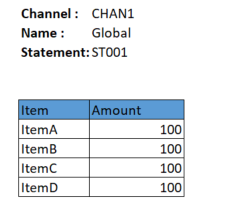
In SSRS development, if my data (TempTable) for the report has some fields that actually has same value for all the rows, can I use table to display it in report, but group it so I will only have 1 value, then transpose it so the header will be on the left side ?

I have data something like this : 

Channel Channel name StatementNum Item Amount
CHAN1 Global ST001 ItemA 100
CHAN1 Global ST001 ItemB 100
CHAN1 Global ST001 ItemD 100

So in my report, I would create something like this : 
pastedimage1670318579190v1.png

I am thinking the one above it (channel, etc), is one table that is grouped like my question, and there is another table below it for the items (this part already created).

Thanks,

I have the same question (0)
  • GirishS Profile Picture
    27,827 Moderator on at

    Hi Lars volt,

    I guess you are asking something which is given in the below url.

    Means creating child group from the parent group. Show the header values in one line - Against that header showing multiple lines.

    https://www.tutorialgateway.org/ssrs-grouping-in-table-reports/

    Thanks,

    Girish S.

  • Deepak Agarwal Profile Picture
    8,602 on at

    Hi Lars, If I understand your query, you want to to use one table for both header info and line details. One question here, if there are same values for each line why you want to use a table on header. You can try to put the same as field.

  • Voltes Profile Picture
    596 on at

    Hi Girish,

    Not exactly, forgive the wording "grouping" seems misleading. So I do not want to be like the "Excel" whereby the grouped on the left then its detail on the rights (sometime by expanding).

    I guess the picture is self explanatory, the "Channel" and Channel Name, is put at the top section of the report, something like when we put report's parameters.

    Hi Deepak,

    I'm sorry, I missed the point of "try to put the same as field", is it same like what I just commented about the Excel like ?

  • GirishS Profile Picture
    27,827 Moderator on at

    Yes, I understood. You need to create parent and child groups. Refer to the link I have sent in my previous reply for creating parent and child group. Also, you can refer to standard "customer payment journal" report for this. In this report, journal number will be on one line and grouped to left side for all the lines and below that we will have detail lines.

    Thanks,

    Girish S.

  • Voltes Profile Picture
    596 on at

    Hi Girish,

    Noted on the sample. I've created "quite similar" like it, like this : 

    1. While my table (as described in my 1st thread) all rows with same channel and channel name. I have put one tablix, special for this "header" part only

    2. In Row group, added Parent group and specify grouping on Channel and Channel name ->

    pastedimage1670382127341v1.png

    3. And after that, in my tablix, I just add new column on left (inside group) for the header name, basically to be like this : 

    pastedimage1670383548453v2.png

    The <<Expr>> value is just a label id

    3. But apparently this doesn't work since the channel name will still repeated, which I guess it is the detail. But if I put the Detail section -> visibility to Hide, all table will not shown.

    pastedimage1670389958962v3.png

    Currently the channel name that got repeated is like this : 

    pastedimage1670390790188v4.png

    So, how to make this table only show Channel & Channel name ? (without the details repetition)

    Thanks,

  • Voltes Profile Picture
    596 on at

    Hi all,

    Anyone know what is wrong with the settings ?

    Thanks

Under review

Thank you for your reply! To ensure a great experience for everyone, your content is awaiting approval by our Community Managers. Please check back later.

Helpful resources

Quick Links

Responsible AI policies

As AI tools become more common, we’re introducing a Responsible AI Use…

Neeraj Kumar – Community Spotlight

We are honored to recognize Neeraj Kumar as our Community Spotlight honoree for…

Leaderboard > Finance | Project Operations, Human Resources, AX, GP, SL

#1
André Arnaud de Calavon Profile Picture

André Arnaud de Cal... 456 Super User 2025 Season 2

#2
Martin Dráb Profile Picture

Martin Dráb 429 Most Valuable Professional

#3
BillurSamdancioglu Profile Picture

BillurSamdancioglu 239 Most Valuable Professional

Last 30 days Overall leaderboard

Product updates

Dynamics 365 release plans



