web
You’re offline. This is a read only version of the page.
close
Skip to main content

Notifications

Announcements

No record found.

Community site session details

Community site session details

Session Id :
Microsoft Dynamics AX (Archived)

Refreshing InventDim Dimensions upon Table Filtering

(0) ShareShare
ReportReport
Posted on by 209

Hello everyone,

i have this problem that i can't solve,  so i hope you can help me.

Warehouse management > Load planning workbench

Line Details Table
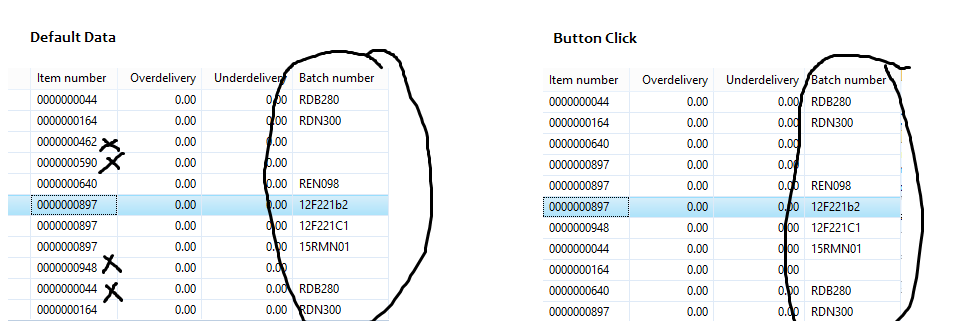
ques.png

I have this code ( in a button) that filters the data from the Picture in the Left, that removes the data with (filters InventTrans.StatusIssue == 4)

everything is working and is filtered, but there's one problem that i noticed,

the Dimensions from InventDim (BatchNumber, Size, Color, Style, Configuration)

is not refreshing based on the filtered data, (see the 2 pictures, the Batch number did not move, but the item number moved.

I tried ds.refresh, executequery, but i can't seem to make it work,

this is my button click (WORKING)

while select * from WHSLoadLine
join inventTransOrigin
where WHSLoadLine.InventTransID == inventTransOrigin.InventTransId
join inventTrans
where inventTransOrigin.RecId == inventTrans.InventTransOrigin
&& inventTrans.StatusIssue == 4
&& inventTrans.inventDimId == WHSLoadLine.InventDimId
&& WHSLoadLine.LoadId == WHSLoadTable.LoadId


*This post is locked for comments

I have the same question (0)
  • jasman Profile Picture
    1,413 on at

    What tables are you using in your form - I am specifically interested in what table the batch number field is bound to ?

  • XSpy Profile Picture
    209 on at

    The ItemNumber and every other data are from WHSLoadLine

    the BatchNumber(also Size, Color, Style, Configuration) are from InventDim

  • XSpy Profile Picture
    209 on at

    The InventDim is Inner Joined in WHSLoadLine, but after I used clicked() which has the code:

    while select * from WHSLoadLine

    join inventTransOrigin

    where WHSLoadLine.InventTransID == inventTransOrigin.InventTransId

    join inventTrans

    where inventTransOrigin.RecId == inventTrans.InventTransOrigin

    && inventTrans.StatusIssue == 4

    && inventTrans.inventDimId == WHSLoadLine.InventDimId

    && WHSLoadLine.LoadId == WHSLoadTable.LoadId

    the InventDim (BatchNumber, Size, Color, Style, Configuration), doesnt seem to be moving and matching their respective ItemNumber.

  • jasman Profile Picture
    1,413 on at

    How is the shown code:

    while select * from WHSLoadLine

    join inventTransOrigin

    where WHSLoadLine.InventTransID == inventTransOrigin.InventTransId

    join inventTrans

    where inventTransOrigin.RecId == inventTrans.InventTransOrigin

    && inventTrans.StatusIssue == 4

    && inventTrans.inventDimId == WHSLoadLine.InventDimId

    && WHSLoadLine.LoadId == WHSLoadTable.LoadId

    use for filtering exactly ?

    Or is the code something you pulled from the debugger from the form datasource ?

  • XSpy Profile Picture
    209 on at

    see from the Picture I posted in the Post,

    The Left picture, which has in some Item Numbers, must be removed upon button click.

    that's what the code do (and it works, see Right Picture).

    -------

    but the BatchNumber( which is from InventDim) does not move because it is from another DataSource (InventDim).

    that's where i need help, to be able to Refresh the BatchNumber, and match it's Item Number.

  • Verified answer
    jasman Profile Picture
    1,413 on at

    Isn't the correct way of filtering making changes to the range values of the datasources of the forms query ?

    I am afraid I have never seen a construct like this before, that a clicked-method on a button, makes filtering by a dreict while-select on the datasources of the form.

    What I would do in the clicked method of the button, is to change the range values of the datasources of the form and run <table>_ds.research(true); thus invoking a executequery()on any linked datasources resulting in a refresh of all datasources.

  • XSpy Profile Picture
    209 on at

    yep, that's the standard filtering, but the Data that I have to filter is from another Table, which is not in the DataSource, the InventTrans.StatusIssue, which is why I used why select code.

    I only have the WHSLoadLine and InventDim in my DataSource, i dont know other way to connect filter InventTrans.StatusIssue without using while select,

    if you have alternative way, please help. thanks.

  • jasman Profile Picture
    1,413 on at

    I would simply introduce new datasources for the tables (InventTrans) that will be used for filtering and make sure that they are joined and filtered correctly to get the required result.

    I have actually seen forms, where datasources were introduced ONLY to be able to do not existsjoin filtering on other datasources in the form which presented data on the screen.

    The filtering datasources were no where to be found in the UI.

  • 5400 Profile Picture
    7,162 on at

    May i know which table you want to filter.  are those tables under data source .. It looks me your UI with ItemID.. So it could be salesline or purchline may i know which "Tab" data you want to filter.

    While select is not good practice to filter the data. You can use QueryBuilddatasource with range.

    as per your while statement it is not cleared which inventdim get filter in UI. if you see in form there are multiple InventDim data source with different name and different join data source.

    If i know exact path where you want to display your filter data i can suggest some code.  

  • XSpy Profile Picture
    209 on at

    thanks Bhaskar Roy for the reply.

    but I already fixed the issue with Jacob's suggestion, thanks anyway :D

Under review

Thank you for your reply! To ensure a great experience for everyone, your content is awaiting approval by our Community Managers. Please check back later.

Helpful resources

Quick Links

Responsible AI policies

As AI tools become more common, we’re introducing a Responsible AI Use…

Neeraj Kumar – Community Spotlight

We are honored to recognize Neeraj Kumar as our Community Spotlight honoree for…

Leaderboard > 🔒一 Microsoft Dynamics AX (Archived)

#1
Martin Dráb Profile Picture

Martin Dráb 4 Most Valuable Professional

#1
Priya_K Profile Picture

Priya_K 4

#3
MyDynamicsNAV Profile Picture

MyDynamicsNAV 2

Last 30 days Overall leaderboard

Featured topics

Product updates

Dynamics 365 release plans


