web
You’re offline. This is a read only version of the page.
close
Skip to main content

Announcements

News and Announcements icon
Community site session details

Community site session details

Session Id :
Small and medium business | Business Central, N...
Suggested Answer

Cannot create sales quote by Business Central Contact Insight in Outlook Desktop App

(0) ShareShare
ReportReport
Posted on by

Hi all,

I've set up Business Central add-in in Outlook. Everything worked fines with the Outlook Web App.

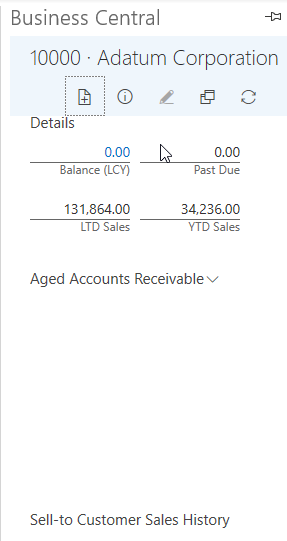
However, for the Outlook Desktop App, I cannot create sales quote (click sales quote and some other fields did not display anything), and also cannot see the chart in the Desktop version, as you can see in the pictures below.

Outlook Web App
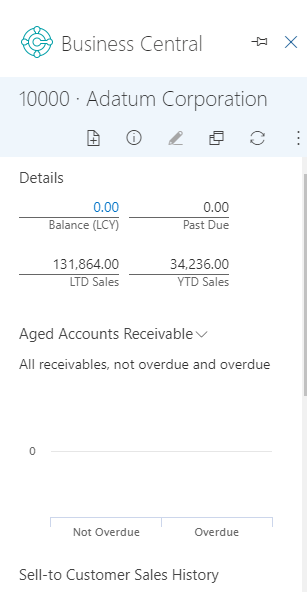
pastedimage1584060728135v1.png

Outlook Desktop App

pastedimage1584060753687v2.png

Please help me figure out this issue. Thank you so much.

I have the same question (0)
  • Community Member Profile Picture
    on at

    Hi all, please help me with this issue.

  • Community Member Profile Picture
    on at

    Can you go to "Office Add-in Management" page in BC. Let me know what you record you have

  • Community Member Profile Picture
    on at

    Yes, here it is.

    pastedimage1584070842950v2.png

  • Suggested answer
    Marco Mels Profile Picture
    Microsoft Employee on at

    Hello,

    Best is to raise this to Microsoft Support via your CSP / Dynamics partner. We may need to have a look at the manifest files in details and may request to obtain a Fiddler trace.

    Thanks.

  • SonnyThSpoon Profile Picture
    5 on at

    Hi Harry,

    Did you ever get a response/resolution to this?  I am having the same experience the outlook web-client works as expected. Though from the Outlook application, you can only view the client information. None of the drilldowns are working, or new Sales transactions can be created.

    I am thinking there is a pop-up prevention happening, but I can't see any security settings or options to work with to resolve the issue.

Under review

Thank you for your reply! To ensure a great experience for everyone, your content is awaiting approval by our Community Managers. Please check back later.

Helpful resources

Quick Links

Season of Sharing Community Challenge Launch!

Jump in, show your community spirit, and win prizes!

Women in Power Builds Momentum

Expanding mentorship, skilling, and AI innovation

Congratulations to the April Top 10 Community Leaders

These are the community rock stars!

Leaderboard > Small and medium business | Business Central, NAV, RMS

#1
OussamaSabbouh Profile Picture

OussamaSabbouh 2,497 Super User 2026 Season 1

#2
YUN ZHU Profile Picture

YUN ZHU 1,778 Super User 2026 Season 1

#3
AndrewThomas81 Profile Picture

AndrewThomas81 1,507

Last 30 days Overall leaderboard

Featured topics

Microsoft Training Manuals

Product updates

Dynamics 365 release plans