web
You’re offline. This is a read only version of the page.
close
Skip to main content

Notifications

Announcements

No record found.

Community site session details

Community site session details

Session Id :
Microsoft Dynamics AX (Archived)

Displaying Dynamic set of Amount Totals in Groups based on Account number on my Report

(0) ShareShare
ReportReport
Posted on by 25

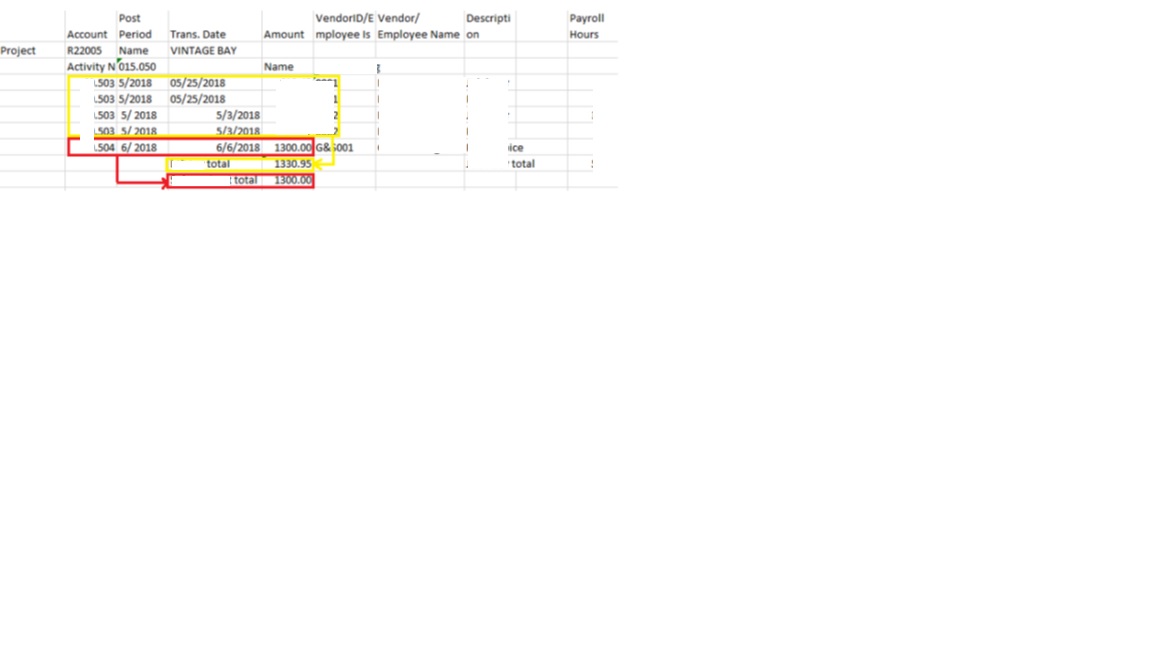
I would like to make a grouping total on my report. In the attached screenshot I have records grouped based on Account Number.  I would like to see a total of every account group separately. In the below case an Amount total of group 503 and 504.
Can this be achieved on SSRS report design level or controlled in DP class level?
7870.1.jpg

*This post is locked for comments

I have the same question (0)
  • Verified answer
    Ludwig Reinhard Profile Picture
    Microsoft Employee on at

    Hello Sabarishkk,

    If it is 'just' an account based report - that is a report based on ledger accounts - then you do not need to develop anything but can rather use the Management Reporter and configure that report.

    Yet, from your screenprint, I can see a vendor column with no data.

    Is it a vendor based report that you want to create?

    Would be great if you could provide more details here.

    Many thanks,

    Ludwig

  • Sabarishkk Profile Picture
    25 on at

    Hi Ludwig,

    Thanks for your thoughts on this. The report is a collection of data from vendor , Expense and Payment journals, account number is a field which displays only Account number based on which record grouping is done. In My case I have 4 records grouped with Account 503 with amounts 1000+200+100+30.95 and 1 record with 504 having Amount 1300. I am looking to get a Subtotal of Account 503 - 1330.95 and Account 504 - 1300.  If 505 record exists, sum 505 Amount and to display in Account 505 likewise.

    I hope this is helpful Let me know if there is something I can clarify on.

    Best Regards

    Sabarish

  • Verified answer
    Ludwig Reinhard Profile Picture
    Microsoft Employee on at

    Hi Sabarish,

    In this case you cannot go along with the Management Reporter as it does not include all the subledger information you need but only focuses on findims and accounts.

    What you can do possibly is having a look at the standard perspectives (cubes) that you can find in the AOT.

    I would expect that the ledger or vendor cube contain the information you are looking for but I do not know by heart.

    Probably have a look at those perspectives and if they don't fit you can still create your own SSRS report.

    Best regards,

    Ludwig

Under review

Thank you for your reply! To ensure a great experience for everyone, your content is awaiting approval by our Community Managers. Please check back later.

Helpful resources

Quick Links

Responsible AI policies

As AI tools become more common, we’re introducing a Responsible AI Use…

Neeraj Kumar – Community Spotlight

We are honored to recognize Neeraj Kumar as our Community Spotlight honoree for…

Leaderboard > 🔒一 Microsoft Dynamics AX (Archived)

#1
Martin Dráb Profile Picture

Martin Dráb 4 Most Valuable Professional

#1
Priya_K Profile Picture

Priya_K 4

#3
MyDynamicsNAV Profile Picture

MyDynamicsNAV 2

Last 30 days Overall leaderboard

Featured topics

Product updates

Dynamics 365 release plans



