web
You’re offline. This is a read only version of the page.
close
Skip to main content

Notifications

Announcements

Community site session details

Community site session details

Session Id :
Customer Service forum

When creating a new case, automatically check if customer has contract for relevant product

(0) ShareShare
ReportReport
Posted on by

Dear members,

I recently started to work with Dynamics 365. This week I started to read and learn about creating business process flows and workflows in the application.

Quickly I recognized a challenge in our organization of which I suspect that it can be solved by creating a workflow, unfortunately I'm a bit stuck in the execution of the idea.

Goal: 

Our helpdesk department is obliged to check if a customer has a service contract on the product they are reporting to have an issue with before helping the customer. This currently means navigating between the contract page and the new case entry. 

I have the feeling that it should be possible to create a logical workflow which checks whether the customer (account) has a service contract for a certain product and if this contract is still valid.

Account -> Contract -> Contract Lines -> Product (service contract) -> Contract Lines End Date.

The workflow should be triggered as soon as the account field is entered during a new case entry.

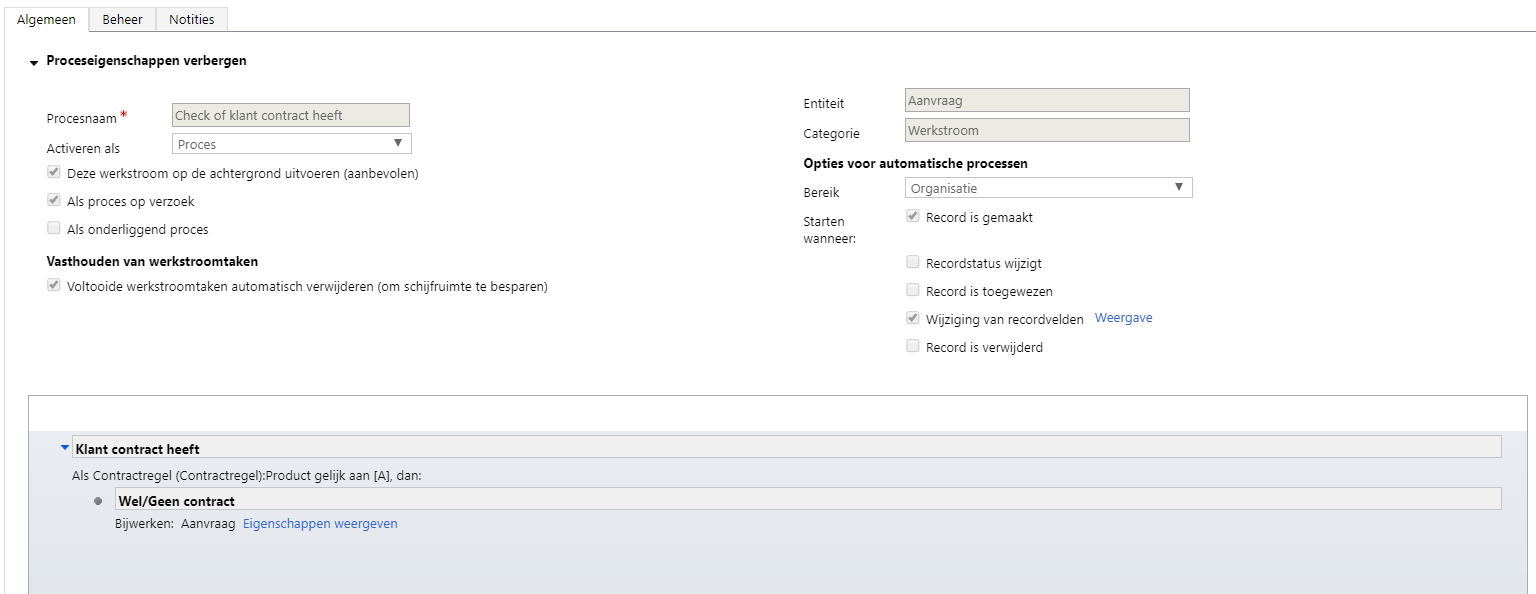
Below a snapshot (in Dutch, but it should be pretty simular to the other languages location wise) of the direction I was heading...
Knipsel.PNG

The condition says: If Contract Line / Product equals 'product A' (service product) then: Update Case -> in the case entry change the product to 'product A'

Eventually I want to create an entity which says yes or no referring to contract or not.

However, for now I want to start with getting the workflow principles fixed.

I'm struggling a bit with finding the correct reference and relations between entity, record and field.

Hoping that somebody can help me get on the right track.

If more information is needed, please let me know.

Best regards,

Maurice

Categories:
I have the same question (0)
  • Suggested answer
    diegompc Profile Picture
    798 on at

    Hi Maurice Wierckx,

    Maybe you could set Product (case) and Entitlements/Contract (case) as mandatory and you can filter by Product (case) field regarding the Entitlement or Contract added to the Case.

    In the next image the filter is deactivated.

    Captura6.PNG

    This option is only modifying field's properties, without WFs.

    Regards!!

  • Community Member Profile Picture
    on at

    Dear Diego,

    Thank you for your reply.

    Sorry to say, but I don't understand the solution that you are describing.

    Would it be possible for you to elaborate a bit more?

    The goal is to automatically let the employee at the Helpdesk see whether the customer is having a service contract or not. And the only information used to find the contract and contract lines, is the customer entity (account).

    Appreciating the help!

    Maurice

  • diegompc Profile Picture
    798 on at

    Hi Maurice Wierckx,

    You wrote: "Our helpdesk department is obliged to check if a customer has a service contract on the product they are reporting to have an issue with before helping the customer" so I understood that helpdesk employee, just before creating a case, have to check if the customer has a contract associated with the product, right?

    In that case, I assumed that the "helpdesk employee" has the case form open and making some changes in the case form you can prevent to open a case if the customer does not have a contract associated with that product.

    Case form has Account (lookup field), Contract (lookup field), Product (lookup field) and so on...

    Sorry if I did not understand you correctly. Would you mind to tell me exactly when would you like to check if the customer has a contract associated with the product?

    Regards!!

  • Community Member Profile Picture
    on at

    Dear Diego,

    Please don't apoligize, I appreciate the help and it might well be that it's my beginners experience with the program which is making this more difficult than it might be.

    I'll try to explain it in steps:

    1. Customers calls the helpdesk

    2. Helpdesk employee answers call and opens new case entry in Dynamics 365

    3. Helpdesk employee enters the Account field in the new case form and additional information as contactperson, etc.

    4. As soon as the Account field has been entered I want to start an automatic workflow in which the system (Dynamics 365) checks if the chosen Account has a contract -> which contains a contract line -> which contains product 'Y'. If it does, the sysem should also check if the End date of that product line is past today's date (to ensure that it's a valid contract line).

    5. If the workflow is positive, then I want the system to fill in product 'Y' in the product field of the new case entry opened by the Helpdesk employee (this can also be a new entry field which states Service Contract 'Yes' or 'No'.

    6. This way the employee knows within a split second (assuming that the system is that quick) whether to help or direct the customer to the sales department for a service contract.

    I understand that we also have the opportunity to check first and then start the new case entry, however we are registering every call and the information whether the caller has a contract yes or no. This is an interesting performance indicator for our sales department to know if there are opportunities.

    And the second argument is that as soon as we have the customer on the phone, we want to help him/her as quick as possible without waiting for our employee to check if the contract is ok in a different part of the program.

    Again, it might well be that I'm missing the knowledge of the ins and outs of the program.

    But by reading about the business process flows and workflows, I had the feeling that the above mentioned automation is possible.

    Hoping that this clarifies my question a bit more.

    Again many thanks for the support!

    Maurice

  • Suggested answer
    diegompc Profile Picture
    798 on at

    Hi Maurice!!

    Between steps 3 and 4 you have to enter Product Y, is it right? Otherwise you can not look for the product in Contract Line, right?

    My approach at this time, because I have to spend more time researching the approach using WF or maybe Actions (you have two variables Account and Product or Account and Contract and WF only have one trigger field option). And for the moment I think using LookupFields and Views is easier:

    1. Customers calls the helpdesk.

    2. Helpdesk employee answers call and opens new case entry in Dynamics 365.

    3. Helpdesk employee enters the Account and Contact field in the new case form.

    4. Helpdesk employee enters the Contract lookup field (regarding the Account value) in the new case form.

    4.1 If the Customer doesnt have Active Contract, Helpdesk employee will not open the case.

    5. Helpdesk employee tries to enter the Product lookup field (regarding the Contract value and Account value) in the new case form.

    5.1 If the product doesnt exist in Contract line, Helpdesk employee will not open the case and will notify the customer.

    5.2 If the product exists the case will be open.

    Probably it will even  faster than with a WF... :)

    Sorry if for now I can not give you the solution you're looking for.

    Regards!!

  • Community Member Profile Picture
    on at

    Dear Diego,

    As mentioned, it's probably my beginners experience, because I'm (not yet) familiar with the loopup fields.

    I'll make sure to dive into this topic and experiment with your suggestion.

    Fortunate and unfortunately my holiday started today, so I'll not be able to report anything back before the beginning of next month.

    Nevertheless it's on the top of my to-do list and I'll make sure to let you know the outcome!

    Again many thanks for the patience and support.

    Take care!

    Maurice

Under review

Thank you for your reply! To ensure a great experience for everyone, your content is awaiting approval by our Community Managers. Please check back later.

Helpful resources

Quick Links

November Spotlight Star - Khushbu Rajvi

Congratulations to a top community star!

Forum Structure Changes Coming on 11/8!

In our never-ending quest to help the Dynamics 365 Community members get answers faster …

Dynamics 365 Community Platform update – Oct 28

Welcome to the next edition of the Community Platform Update. This is a status …

Leaderboard > Customer Service

Last 30 days Overall leaderboard

Featured topics

Product updates

Dynamics 365 release plans
