web
You’re offline. This is a read only version of the page.
close
Skip to main content

Notifications

Announcements

No record found.

Community site session details

Community site session details

Session Id :
Microsoft Dynamics AX (Archived)

How can I adjust Financial Cost Amounts on Inventory

(0) ShareShare
ReportReport
Posted on by 120

Hi everyone,

I have an issue with our inventory that is causing all sorts of problems. I have attached a screen shot.

What I believe is happening is a timing issue, but I do not know how to adjust it. This is what happened with this particular item....

1) A new item configuration was created

2) A Sales Order was created referencing this item.

3) A Production Order was created referencing the Sales Order.

4) After production as you can see from screen shot, it cost us $772.48 to produce

5) The item got Invoiced BEFORE the production order got "Ended". (When the Production Orders get ended, that is the Financial Transaction) As it got invoiced, because this item was new with no historic cost to pull from, it pulled the moving average of the main item category (2,171.30).

6) The Production Order was then reviewed and ended a few days later after the item was already invoiced

7) This is the result, we have 0 of these items in inventory and it is showing a negative value of -1,398.82
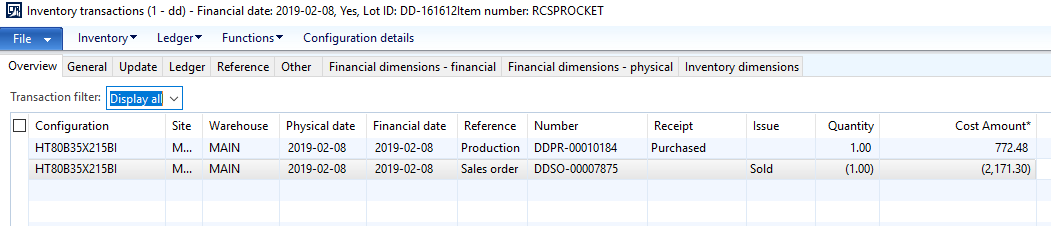
6327.Inventory.png

How can I adjust this? I need to be able to change the Financial cost of the Sales Order but do not know where in the system I can do this. This has happened hundreds of times over the year, to the point where our inventory is now showing that we have 450+ items and a negative cost. On our books our inventory is a negative when it should be a positive.

Thanks in advanced.

JordanH

*This post is locked for comments

I have the same question (0)
  • Suggested answer
    André Arnaud de Calavon Profile Picture
    301,119 Super User 2025 Season 2 on at

    Hi JordanH,

    If you have LIFO, FIFO or weighted average inventory costing model, you have to use periodically the inventory closing and recalculation jobs. This will settle these transactions based on the model and assign the correct cost price and will post the adjustment then. See also: docs.microsoft.com/.../run-inventory-close

  • JordanH Profile Picture
    120 on at

    Thank you for response Andre.

    We use Moving Average, does this change the process needed to adjust these types of errors?

    JordanH

  • André Arnaud de Calavon Profile Picture
    301,119 Super User 2025 Season 2 on at

    Hi JordanH,

    This is indeed a different story. The moving average does not require closing. I wonder what caused the system to take the cost into account. You can try to run the revaluation for moving average. I have not used this myself for products not on-hand.

  • JordanH Profile Picture
    120 on at

    From my research and using the system, that cost the system took is the moving average of the main product. As an example, if you look at the screenshot I posted you see in the very top bar the item number is RCSPROCKET, but the Configuration is HT80B35X215BI. Under the Item number of RCSPROCKET we have several hundred different configurations for different types of items we produce. It was set up this way before I started. When you view the Item Number cost for RCSPROCKET it appears as $2171.30.

    Which is how I came to the conclusion that this is a timing issue. Because the Sales Order got invoiced before the Production Order ended, that specific configuration had no cost to pull from so it pulled from the main item type (RCSPROCKET). But as you can see this item was significantly less than the average, so now if you imagine this was our only inventory our Inventory account would be in a negative position with 0 items in it.

    As you mentioned the Revaluation for Moving Average, I will look into this to see what I can find, I have only used AX for a few months and am still learning. I will update this thread on what I find.

    If anyone has any useful information for Moving Average, I would appreciate any input on this.

    Thanks,

    JordanH

Under review

Thank you for your reply! To ensure a great experience for everyone, your content is awaiting approval by our Community Managers. Please check back later.

Helpful resources

Quick Links

Responsible AI policies

As AI tools become more common, we’re introducing a Responsible AI Use…

Neeraj Kumar – Community Spotlight

We are honored to recognize Neeraj Kumar as our Community Spotlight honoree for…

Leaderboard > 🔒一 Microsoft Dynamics AX (Archived)

#1
Martin Dráb Profile Picture

Martin Dráb 4 Most Valuable Professional

#1
Priya_K Profile Picture

Priya_K 4

#3
MyDynamicsNAV Profile Picture

MyDynamicsNAV 2

Last 30 days Overall leaderboard

Featured topics

Product updates

Dynamics 365 release plans



