web
You’re offline. This is a read only version of the page.
close
Skip to main content

Notifications

Announcements

No record found.

Community site session details

Community site session details

Session Id :
Microsoft Dynamics AX (Archived)

Create a Field specific level access security privilege

(0) ShareShare
ReportReport
Posted on by

Hello everyone,

I am working on D365O and i need to set up a security privilege granting access to a whole form(InventJournalCount) the user should be able to see all data within the form but only be able to edit/update one field in the hole form ("Counted" field  in the journal lines  "InventJournalTrans" Table)

I found this article in MSDN  How to: Design Permissions for Fields in a Table [AX 2012]  and i also read some other similar subjects on this Forum and some others

I created the following security privilege :
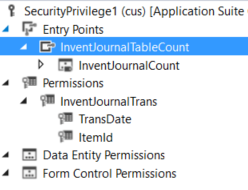
5342.Capture.PNG

The entry point on the form is set to update, the permission on the table "InventJournalTrans" is set to update and for the two fields "TransDate" and "ItemId" are on read.

This does not work when i test it and isolate this privililege within a single role assigned to a test user and i still can edit those two fields.

Thanks for reading.

*This post is locked for comments

I have the same question (0)
  • Sohaib Cheema Profile Picture
    49,438 User Group Leader on at

    Have yo given a try to Overriding permission for these two tables, that may allow you to set Read-Only permissions for those fields and Edit permission for remaining whole table?? You may give this a try for your single role that you are using for testing.

  • Community Member Profile Picture
    on at

    Hi Souhaib,

    I am not sure i got your suggestion , my aim is to set the whole date on the form(Which contains 5 datasources) to read only and allow edit on only signe field ("Counted" field  in the journal lines  "InventJournalTrans" Table) i made the example with only twi fields to test it cause the solution will mean to add all fields from all datasources(Tables)to the permission and set them to read only, if i got it right.

    Thanks

  • Community Member Profile Picture
    on at

    Data not date* =) sorry

Under review

Thank you for your reply! To ensure a great experience for everyone, your content is awaiting approval by our Community Managers. Please check back later.

Helpful resources

Quick Links

Responsible AI policies

As AI tools become more common, we’re introducing a Responsible AI Use…

Neeraj Kumar – Community Spotlight

We are honored to recognize Neeraj Kumar as our Community Spotlight honoree for…

Leaderboard > 🔒一 Microsoft Dynamics AX (Archived)

#1
Martin Dráb Profile Picture

Martin Dráb 4 Most Valuable Professional

#1
Priya_K Profile Picture

Priya_K 4

#3
MyDynamicsNAV Profile Picture

MyDynamicsNAV 2

Last 30 days Overall leaderboard

Featured topics

Product updates

Dynamics 365 release plans



