web
You’re offline. This is a read only version of the page.
close
Skip to main content

Notifications

Announcements

No record found.

Community site session details

Community site session details

Session Id :
Microsoft Dynamics AX (Archived)

Error when opening SSRS report designer in Visual Studio (Invalid Enum Value)

(0) ShareShare
ReportReport
Posted on by

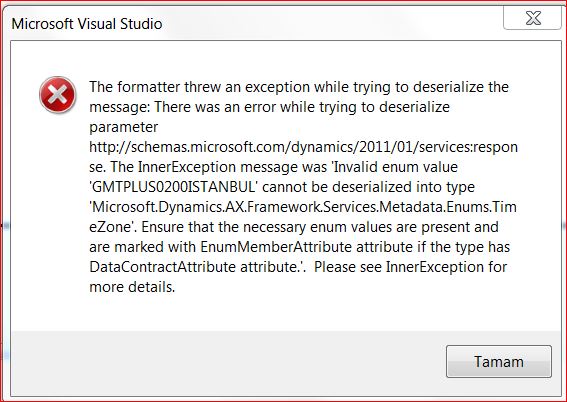
Hello,we are getting the following error while trying to open a ssrs report designer in visual studio.Looks like it is caused by the datetime fields in the report however we coulnt find the exact cause of  the problem,as a result we can not edit a design of any report that has a datetime field in it.Has anybody come across with this kind of problem before?

Regards

*This post is locked for comments

I have the same question (0)
  • Suggested answer
    keoma Profile Picture
    32,729 on at

    there is a similiar error regarding workflows. maybe following links help you.

    follow https://mbs2.microsoft.com/Knowledgebase/kbdisplay.aspx?WTNTZSMNWUKNTMMYZWLSWZQTLLRPPXLZWSZPQPMLQTRSNSNR

    and https://mbs2.microsoft.com/Knowledgebase/kbdisplay.aspx?WTNTZSMNWUKNTMMYZWLSWZQTLLRPPXLZPXURMWLQUYXQLXKN


    it seems that the enum value GMTPLUS0200ISTANBUL is not recognized (maybe should be  GMTPLUS0200ATHENS_BUCHAREST_ISTANBUL).

    for that follow msdn.microsoft.com/.../microsoft.dynamics.ax.framework.services.metadata.enums.timezone.aspx

    although it's listed in this timezone list (combobox): http://msdn.microsoft.com/en-us/library/gg848856.aspx

  • Community Member Profile Picture
    on at

    I see thanks,well I have check the timezones table on the db and that enum is there,however it is not in AX settings where user can select the timezone.And also, I dont have the slightest clue where that data (GMTPLUS0200ISTANBUL) comes from to the reports,a different time zone selected in AX.Also the default ssrs reports are not working as well...

  • Community Member Profile Picture
    on at

    what error message you are getting for default SSRS report

  • Community Member Profile Picture
    on at

    Consider reviewing the SSRS report setup in Dynamics AX

    Review if inbound AIF port in Dynamics AX is activated or not.

    Please verify and update us with your findings

  • Community Member Profile Picture
    on at

    AifServices port in "setup>services and app.integration framework>inbound  ports " is active.

    Anywhere else should i look for?

  • Verified answer
    Community Member Profile Picture
    on at

    Installing Cumulative Update for AX2012R2 (KB2850972) fixes this problem.

  • Suggested answer
    Mohammad Raziq Ali Profile Picture
    2,486 on at

    Hi,

    Things you must remember while working SSRS reports whether it is customized or New reports from scratch.

    -->Try to put static debugger (write breakpoint; in your code)in DP Class processReport() method.

    --> Run the report from visual studio (go to Microsoft dynamics AX Configuration Utility, select developer tab, and select check boxes provided) and debug it.

    --> Stress (While Debugging) on query in processReport() methods because that could also be one of the reason for your problem.

    --> Put static debugger in insertIntoTempTable() as well to check whether data is populating in temp table or not, change TableType as regular.

    --> Refresh Report Report Server in Tools-> Caches ->Refresh report server

    --> Delete the Report from report Server and redeploy it.

    --> Generate Incremental Cil and Full Cil generation (Recommended)

    Note: This is as per AX 2012 and higher versions.

Under review

Thank you for your reply! To ensure a great experience for everyone, your content is awaiting approval by our Community Managers. Please check back later.

Helpful resources

Quick Links

Responsible AI policies

As AI tools become more common, we’re introducing a Responsible AI Use…

Neeraj Kumar – Community Spotlight

We are honored to recognize Neeraj Kumar as our Community Spotlight honoree for…

Leaderboard > 🔒一 Microsoft Dynamics AX (Archived)

#1
Martin Dráb Profile Picture

Martin Dráb 4 Most Valuable Professional

#1
Priya_K Profile Picture

Priya_K 4

#3
MyDynamicsNAV Profile Picture

MyDynamicsNAV 2

Last 30 days Overall leaderboard

Featured topics

Product updates

Dynamics 365 release plans



