web
You’re offline. This is a read only version of the page.
close
Skip to main content

Notifications

Announcements

No record found.

Community site session details

Community site session details

Session Id :
Microsoft Dynamics AX (Archived)

Purchase requisition disable recall

(0) ShareShare
ReportReport
Posted on by

Hi,

I need to make a customization. When there is a purchase requisition created and submitted, I need to make it impossible to recall. I have almost done it, I only need to disable Recall button on Workflow history form:
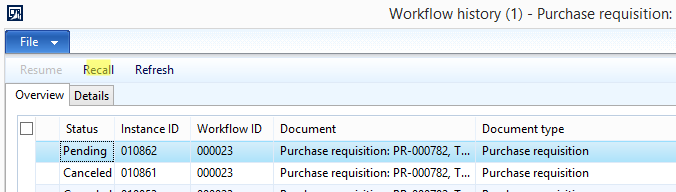
7571.Untitled.png

Any help would be appreciated, thanks.

*This post is locked for comments

I have the same question (0)
  • Suggested answer
    Sohaib Cheema Profile Picture
    49,438 User Group Leader on at

    do you want to have a look at one of blog post and an old thread? given next url(s)

    community.dynamics.com/.../how-to-deactivate-a-specific-action-of-a-workflow

    community.dynamics.com/.../554500

  • Community Member Profile Picture
    on at

    Yeah, I did according to this. Its the last part I am lost at.

  • Sohaib Cheema Profile Picture
    49,438 User Group Leader on at

    and I am not sure what 'last part' refers to  :)

    please provide some details

  • Community Member Profile Picture
    on at

    I am confused about disabling button in Workflow history form:

    0458.Untitled.png

  • Sohaib Cheema Profile Picture
    49,438 User Group Leader on at

    it is asking you to customize WorkflowStatusForm(class)

    further what customization you need to do can be found in a reply given by me, in next url

    community.dynamics.com/.../554500

  • Community Member Profile Picture
    on at

    Yeah I saw that. It would be easy just to disable that button, but I have a need to disable it only for purchase requisitions.

  • Sohaib Cheema Profile Picture
    49,438 User Group Leader on at

    well in that case you can add an if condition to behave it for purchase requisitions only. you can catch and read workflow type in WorkflowStatusForm(class)

  • Community Member Profile Picture
    on at

    Do you happen to know as what argument is it passed to the class, because I couldn't find anything like that :/

  • Verified answer
    Sohaib Cheema Profile Picture
    49,438 User Group Leader on at

    let me help you bit more by telling that you can find all occurrences of resumeButton.visible inside WorkflowStatusForm(class) and you can control those as per your condition.

    I am not sure which args you are looking for. if you can help me by explaining those, I may be able to reply you accurately/closely for your question

Under review

Thank you for your reply! To ensure a great experience for everyone, your content is awaiting approval by our Community Managers. Please check back later.

Helpful resources

Quick Links

Responsible AI policies

As AI tools become more common, we’re introducing a Responsible AI Use…

Neeraj Kumar – Community Spotlight

We are honored to recognize Neeraj Kumar as our Community Spotlight honoree for…

Leaderboard > 🔒一 Microsoft Dynamics AX (Archived)

#1
Martin Dráb Profile Picture

Martin Dráb 4 Most Valuable Professional

#1
Priya_K Profile Picture

Priya_K 4

#3
MyDynamicsNAV Profile Picture

MyDynamicsNAV 2

Last 30 days Overall leaderboard

Featured topics

Product updates

Dynamics 365 release plans



