web
You’re offline. This is a read only version of the page.
close
Skip to main content

Notifications

Announcements

No record found.

Community site session details

Community site session details

Session Id :
Finance | Project Operations, Human Resources, ...
Answered

Get URL for document attachment of Released Product

(0) ShareShare
ReportReport
Posted on by 758

Hi Everyone,

On Released Products, we can upload multiple product images. And can keep any one as default one.

This image gets attached in attachment section as shown below,
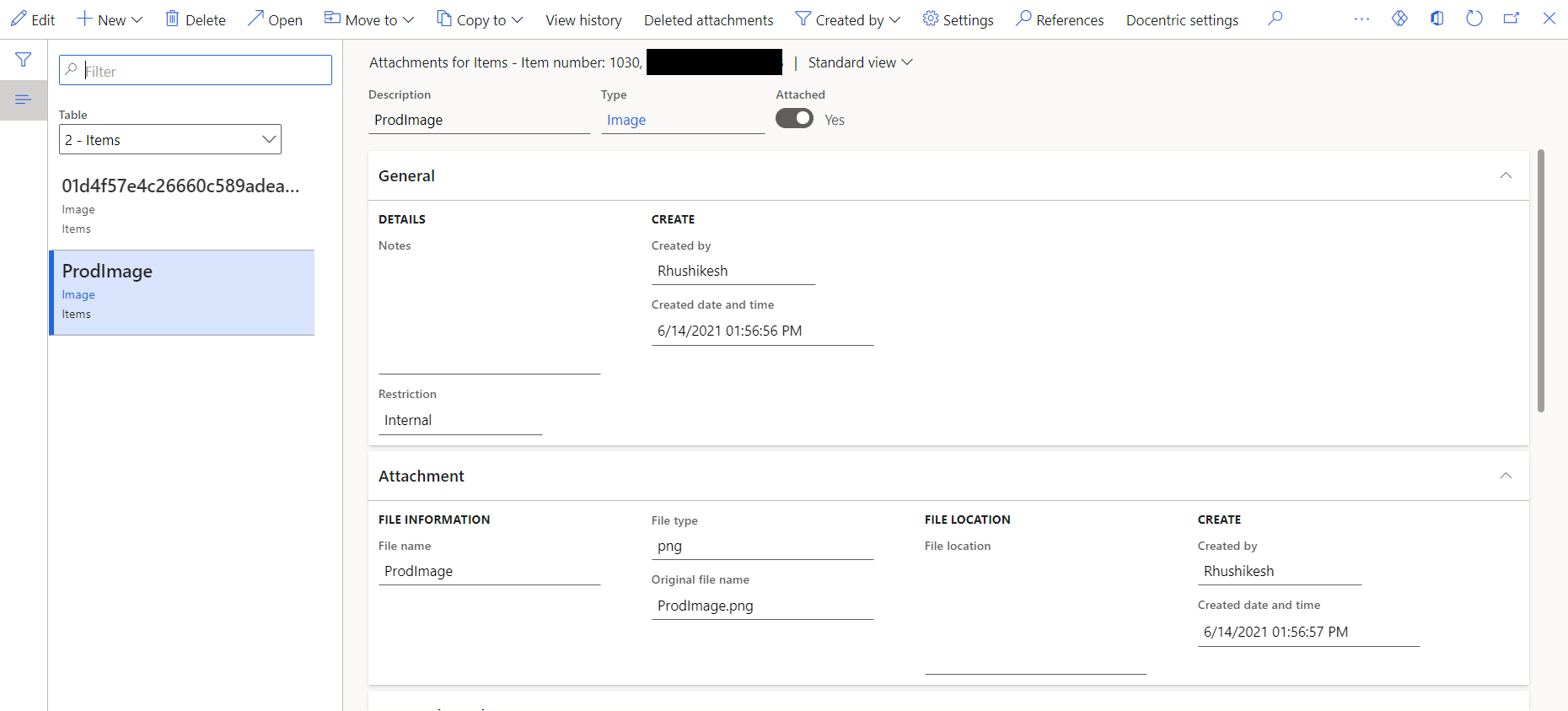
pastedimage1623840220914v1.png

Now when we click on "Open", the image gets downloaded. When I debugged code, and copied the logic in Runnable class as below, I am able to download the image when that Runnable class excutes.

public static void main(Args _args)
    {
        InventTable inventTable = InventTable::find("1030");
        EcoResProductImage  ecoResProductImage;
        DocuRef defaultDocuRef;

        defaultDocuRef = EcoResProductImage::findDefaultImageDocuRef(inventTable);
        str displayUrl = DocumentManagement::getAttachmentPublicUrl(defaultDocuRef);
        Info(strFmt("%1",displayUrl));
        new Browser().navigate(displayUrl, false, false);

    }

When I am printing "displayURL" variable mentioned in above code, I am getting URL in below format,

filemanagement/7319160f-ecc4-435a-bf09-1d9823860f40?access_token=eyJDb21wYW55IjoiU01TQSIsIkhhc2hlZFRva2VuIjoiUGpZV1dkQVZ2UkNtK1lqVDhQTmF0TUxlb3RxZVh4REVleWtxdXhPNUVGSEFHcG14UThHQ1FoRnZtbWk1Z1VwYzRoUTV1THBQK1FLeVRSYjJ3WGtZQkE9PSIsIlBhcnRpdGlvbiI6NTYzNzE0NDU3NiwiVXNlcklkIjo1NjM3MjExMzI3LCJWYWxpZFVudGlsIjoiXC9EYXRlKDE2MjM4NDIyNjA2NjcpXC8iLCJGaWxlSWQiOiI3MzE5MTYwZi1lY2M0LTQzNWEtYmYwOS0xZDk4MjM4NjBmNDAifQ==&ms-dyn-caid=6218636d-9551-4xx8-b1e3-971451fxxxx

Also in DocuValue table, AccessInformation field has value as,

csaXXXX2dfo45f76547a947d.blob.core.windows.net/.../7319160F-ECC4-435A-BF09-1D9823860F40

My requirement is, I need to share the URL to 3rd party so that they can download the same product image. Can anyone suggest how this can be achieved?

Browser class of D365F&O easily process this URL and I can download the file by using below code, and I could not figure out how it's processing in Browser class.

new Browser().navigate(displayUrl, false, false);

But, how any other software can make use of above URL to download the same image? Is it possible to test the URL using POSTMAN?

I have the same question (0)
  • Verified answer
    nmaenpaa Profile Picture
    101,160 Moderator on at

    I think these links expire in max 15 minutes (someone was just asking about similar topic this week). Theoretically you can define longer lifespan but then you can't use the standard classes that create those links.

    You might consider uploading the attachment somewhere else such as Azure Files, Sharepoint and Onedrive and share URL for that location to the external app. Or even send the image to the third party directly.

    In other words - I don't think that the document management records/links are intended for direct sharing with external parties.

  • Rhushikesh R Profile Picture
    758 on at

    Hi Nikolaos, thank you for prompt response. Actually we are sending the data to Azure data lake using data entities and 3rd party wants the Product image as well.

    So it seems like, the only option is to use different storage location, correct?

  • Verified answer
    nmaenpaa Profile Picture
    101,160 Moderator on at

    Another option could be to base64 encode the file and send it as part of the entity (in a Memo field). However there's a maximum size of ~30 000 characters when exporting Memo fields via data entities, so please check whether this is sufficient for you.

  • vicky1234 Profile Picture
    66 on at

    Hi Nikolas,

    I have a similar requirement to send the image via logic app and save it to a file share .

    However while doing so its shows me the value of the container i.e. bitmap and what i require is to save a image to a folder.

    How do you change a bitmap/container to image in logic app OR I will need to run a logic to generate the url and save it to the folder in D365

  • Suggested answer
    CU23062149-0 Profile Picture
    2 on at

Under review

Thank you for your reply! To ensure a great experience for everyone, your content is awaiting approval by our Community Managers. Please check back later.

Helpful resources

Quick Links

Responsible AI policies

As AI tools become more common, we’re introducing a Responsible AI Use…

Neeraj Kumar – Community Spotlight

We are honored to recognize Neeraj Kumar as our Community Spotlight honoree for…

Leaderboard > Finance | Project Operations, Human Resources, AX, GP, SL

#1
Martin Dráb Profile Picture

Martin Dráb 503 Most Valuable Professional

#2
André Arnaud de Calavon Profile Picture

André Arnaud de Cal... 434 Super User 2025 Season 2

#3
BillurSamdancioglu Profile Picture

BillurSamdancioglu 278 Most Valuable Professional

Last 30 days Overall leaderboard

Product updates

Dynamics 365 release plans
