web
You’re offline. This is a read only version of the page.
close
Skip to main content

Notifications

Announcements

No record found.

Community site session details

Community site session details

Session Id :
Finance | Project Operations, Human Resources, ...
Suggested Answer

Dual-write : personalize time zone

(0) ShareShare
ReportReport
Posted on by

Hi guys,

For a Dual-write processes, I setup PowerApps personalization setting and F&O User options - preferences to GMT + 1 (Amsterdam), as well as in F&O legal entity's timezone to the same. I'm not sure whether the last setup (legal entity) even related but I just set all the same.

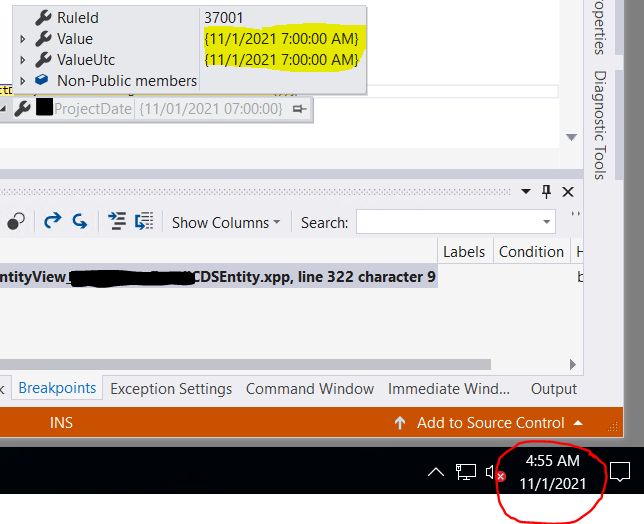
But anyway, what is the logic as when I debug the date, when "touch" the data entity mapped to Dual-write, when it is on 11/1 4:55 AM became 11/1 7:00 AM ?
pastedimage1635743632230v1.png

Is there any other Time zone setting interfere with this process ? I wonder also what is the function DateTimeUtil::GetUserPreferredTimezone() return, since it looks doesn't give my preference in User Options ?

Thanks,

I have the same question (0)
  • Suggested answer
    nmaenpaa Profile Picture
    101,162 Moderator on at

    What you see in the debugger is UTC timestamp, so you shouldn't expect to see your local time here.

    Second, the field that you're looking at seems to be a date field, so even though it's stored as dateTime under the hood, it will not necessarily have a meaningful time. 

    If the user picks date such as 01.11., then the system might translate it to "01.11. 00:00 in user's time zone (in the system where the value was entered" and then stores the UTC version of that. So if an user who sits in UTC +1 inputs date 01.11. in such field, I would expect to see even "31.10. 23:00" stored in the database. Sometimes this leads to funny results as you can already see.

    But if we think how it SHOULD work, I don't think that user's timezones should have any impact on how the data is stored. It should always be stored in UTC, and shown to the user according to their timezone settings.

    This is my understanding of some of the things that you asked about. Now the question is: is there a bug in the way how the information is handled in your scenario? Could very well be, but I think it's good if you can provide the end to end scenario with all details. And most likely the next step is that you should create a support request to MS, providing that info and reporting it as a bug.

  • WillWU Profile Picture
    22,363 on at

    Hi VoltesDev,

    D365FO stores GMT time in the database using the UTC data type. This date/time stamp is independent of the time zone. So when you don't set a time zone for the timestamp field and get it in the code, it will show the GMT time.

    DateTimeUtil::GetUserPreferredTimezone() is used to get the preferred time zone of the current user, the preferred time zone is first set according to the Windows locale of your computer, and the preferred time zone is used only when displaying combined dates and times.

  • VoltesDev Profile Picture
    on at

    Hi,

    No, my field is UTCDateTime, that is why I expected the UTCValue in debug will be the same, because all setting is same GMT +1, and in addition the PC which is VM (and all this run in VM), the TImzone is UTC.

    pastedimage1635760000380v2.png

    Like current capture is 9:45AM, if ( check time in Amsterdam which is GMT + 1 is exactly 10:45 AM. This is I guess same as you've been describe. Problem is why no matter when the time is in my PC. F&O date which is a UTCDatetime type showing 1:00 AM (always).

    Thanks

  • Suggested answer
    nmaenpaa Profile Picture
    101,162 Moderator on at

    I have to admit that I had to guess your data type, and since you shared part of the field name ("...ProjectDate") I guessed that it was a date. So the guess was wrong. 

    Anyway, to me it seems that there could be a bug. And the next step is to report it to Microsoft via the support.

Under review

Thank you for your reply! To ensure a great experience for everyone, your content is awaiting approval by our Community Managers. Please check back later.

Helpful resources

Quick Links

Responsible AI policies

As AI tools become more common, we’re introducing a Responsible AI Use…

Neeraj Kumar – Community Spotlight

We are honored to recognize Neeraj Kumar as our Community Spotlight honoree for…

Leaderboard > Finance | Project Operations, Human Resources, AX, GP, SL

#1
André Arnaud de Calavon Profile Picture

André Arnaud de Cal... 467 Super User 2025 Season 2

#2
Martin Dráb Profile Picture

Martin Dráb 420 Most Valuable Professional

#3
BillurSamdancioglu Profile Picture

BillurSamdancioglu 241 Most Valuable Professional

Last 30 days Overall leaderboard

Product updates

Dynamics 365 release plans
