Hi,
We are running Dynamics AX 4.0.
I was wondering if anyone has ever come across the below error message before when closing AX down
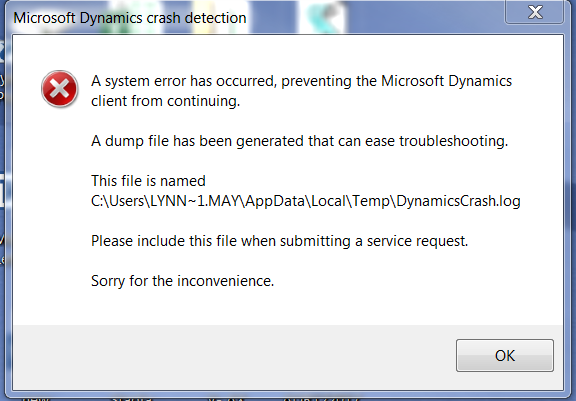
I have tried reinstalling AX, rebuilding windows profile and even replaced the PC and still getting the error its only this particular user.
This is from the dynamicscrash.log file
Axapta Crash Dump File for Axapta build 2163 (Nov 18 2006 04:06:04)
Dumped : Wed Jan 24 16:35:28 2018
Crash : Exception 0xc0000005 caught (unspecified) in thread 0x13b4 of process 0x1388.
-------------------------------------------------------------
--# FV EIP----- RetAddr- FramePtr StackPtr Symbol
0 .V 012225c3 011ca46c 0028f808 00288c10 Mod: Ax32[C:\DynamicsAX\Client\Bin\Ax32.exe], base: 01000000h
1 .V 011ca46c 011ca481 0028f824 0028f810 Mod: Ax32[C:\DynamicsAX\Client\Bin\Ax32.exe], base: 01000000h
2 .V 011ca481 01241288 0028f83c 0028f82c Mod: Ax32[C:\DynamicsAX\Client\Bin\Ax32.exe], base: 01000000h
3 .V 01241288 01241c73 0028f880 0028f844 Mod: Ax32[C:\DynamicsAX\Client\Bin\Ax32.exe], base: 01000000h
4 .V 01241c73 011f62d9 0028f88c 0028f888 Mod: Ax32[C:\DynamicsAX\Client\Bin\Ax32.exe], base: 01000000h
5 .V 011f62d9 011f662f 0028f8bc 0028f894 Mod: Ax32[C:\DynamicsAX\Client\Bin\Ax32.exe], base: 01000000h
6 .V 011f662f 011bf4fe 0028f8c8 0028f8c4 Mod: Ax32[C:\DynamicsAX\Client\Bin\Ax32.exe], base: 01000000h
7 .V 011bf4fe 01249b7d 0028f8fc 0028f8d0 Mod: Ax32[C:\DynamicsAX\Client\Bin\Ax32.exe], base: 01000000h
8 .V 01249b7d 01249eb9 0028f94c 0028f904 Mod: Ax32[C:\DynamicsAX\Client\Bin\Ax32.exe], base: 01000000h
9 .V 01249eb9 0118be2c 0028f9a4 0028f954 Mod: Ax32[C:\DynamicsAX\Client\Bin\Ax32.exe], base: 01000000h
10 .V 0118be2c 0115396f 0028fb54 0028f9ac Mod: Ax32[C:\DynamicsAX\Client\Bin\Ax32.exe], base: 01000000h
11 .V 0115396f 0148e5a1 0028fb5c 0028fb5c Mod: Ax32[C:\DynamicsAX\Client\Bin\Ax32.exe], base: 01000000h
12 .V 0148e5a1 011705af 0028fb8c 0028fb64 Mod: Ax32[C:\DynamicsAX\Client\Bin\Ax32.exe], base: 01000000h
13 .V 011705af 0116bbf6 0028fbb0 0028fb94 Mod: Ax32[C:\DynamicsAX\Client\Bin\Ax32.exe], base: 01000000h
14 .V 0116bbf6 76e262fa 0028fbfc 0028fbb8 Mod: Ax32[C:\DynamicsAX\Client\Bin\Ax32.exe], base: 01000000h
15 .V 76e262fa 76e26d3a 0028fc28 0028fc04 gapfnScSendMessage +818 bytes
Decl: gapfnScSendMessage
Mod: USER32[C:\Windows\syswow64\USER32.dll], base: 76e10000h
16 .V 76e26d3a 76e30d3f 0028fca0 0028fc30 GetThreadDesktop +215 bytes
Decl: GetThreadDesktop
Mod: USER32[C:\Windows\syswow64\USER32.dll], base: 76e10000h
17 .V 76e30d3f 76e30d65 0028fcd8 0028fca8 GetClientRect +197 bytes
Decl: GetClientRect
Mod: USER32[C:\Windows\syswow64\USER32.dll], base: 76e10000h
18 .V 76e30d65 0116a23d 0028fcf8 0028fce0 CallWindowProcW +27 bytes
Decl: CallWindowProcW
Mod: USER32[C:\Windows\syswow64\USER32.dll], base: 76e10000h
19 .V 0116a23d 0116a307 0028fd14 0028fd00 Mod: Ax32[C:\DynamicsAX\Client\Bin\Ax32.exe], base: 01000000h
20 .V 0116a307 76e262fa 0028fd58 0028fd1c Mod: Ax32[C:\DynamicsAX\Client\Bin\Ax32.exe], base: 01000000h
21 .V 76e262fa 76e26d3a 0028fd84 0028fd60 gapfnScSendMessage +818 bytes
Decl: gapfnScSendMessage
Mod: USER32[C:\Windows\syswow64\USER32.dll], base: 76e10000h
22 .V 76e26d3a 76e277c4 0028fdfc 0028fd8c GetThreadDesktop +215 bytes
Decl: GetThreadDesktop
Mod: USER32[C:\Windows\syswow64\USER32.dll], base: 76e10000h
23 .V 76e277c4 76e2788a 0028fe5c 0028fe04 CharPrevW +312 bytes
Decl: CharPrevW
Mod: USER32[C:\Windows\syswow64\USER32.dll], base: 76e10000h
24 .V 76e2788a 011593cb 0028fe6c 0028fe64 DispatchMessageW +15 bytes
Decl: DispatchMessageW
Mod: USER32[C:\Windows\syswow64\USER32.dll], base: 76e10000h
25 .V 011593cb 0115ac5e 0028fea0 0028fe74 Mod: Ax32[C:\DynamicsAX\Client\Bin\Ax32.exe], base: 01000000h
26 .V 0115ac5e 01169edd 0028fed8 0028fea8 Mod: Ax32[C:\DynamicsAX\Client\Bin\Ax32.exe], base: 01000000h
27 .V 01169edd 0151c39c 0028fef0 0028fee0 Mod: Ax32[C:\DynamicsAX\Client\Bin\Ax32.exe], base: 01000000h
28 .V 0151c39c 75cc336a 0028ff88 0028fef8 Mod: Ax32[C:\DynamicsAX\Client\Bin\Ax32.exe], base: 01000000h
29 .V 75cc336a 774498f2 0028ff94 0028ff90 BaseThreadInitThunk +18 bytes
Decl: BaseThreadInitThunk
Mod: KERNEL32[C:\Windows\syswow64\KERNEL32.dll], base: 75cb0000h
30 .V 774498f2 774498c5 0028ffd4 0028ff9c RtlInitializeExceptionChain +99 bytes
Decl: RtlInitializeExceptionChain
Mod: ntdll[C:\Windows\SysWOW64\ntdll.dll], base: 77410000h
31 .V 774498c5 00000000 0028ffec 0028ffdc RtlInitializeExceptionChain +54 bytes
Decl: RtlInitializeExceptionChain
Mod: ntdll[C:\Windows\SysWOW64\ntdll.dll], base: 77410000h
Stackdump exit code 0 (The operation completed successfully)
If someone could please get back to me i would be very grateful.
Thanks
Darren







