web
You’re offline. This is a read only version of the page.
close
Skip to main content

Notifications

Announcements

No record found.

Community site session details

Community site session details

Session Id :
Microsoft Dynamics AX (Archived)

Creating new Journal with Excel Addins, standard functionality not work correctly

(0) ShareShare
ReportReport
Posted on by 380

Hi guys,

I have an error within standard functionality.

In the following scenario:

picture0.png

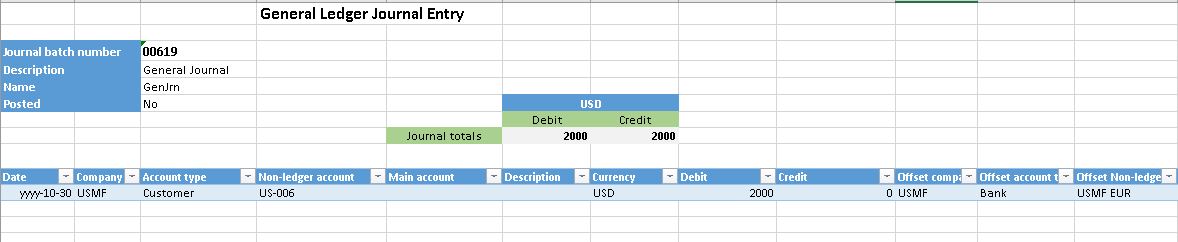
Selecting 00619 Journal, click on Open In excel and select the second option "General journal line entry"
8015.picture1.jpg

When excel is opened with the above contain.

Using this excel I want to create a new journal, for this requirement, I click on Journal Batch Number and click on new button.

When click on new button, header information is removed, but line not. This line continue linked to previous journal. In the following picture I show it.

picture3.jpg

If I try delete the line and create a new line, when I click on publish, a new journal is created with a empty line and in the previous journal, line is removed.

This logical is absolutely wrong.

*This post is locked for comments

I have the same question (0)
  • Suggested answer
    Ludwig Reinhard Profile Picture
    Microsoft Employee on at

    Hi David Rodríguez,

    To my knowledge the creation of new Journals is not supported through this functionality.

    Just check the fields that are included in the Excel add-in and you should see that the creation of new Journals is locked / not supported.

    8836.j.png

    Best regards,

    Ludwig

  • drodmarin Profile Picture
    380 on at

    Hi Ludwig,

    In the https://roadmap.dynamics.com/#application=049f7cf6-2992-e611-80dc-c4346bac0910#status=a5708e92-ae97-e611-80df-c4346baceb68 page Microsoft said the following:

    Excel add-in support for creating header records, including journal headers, in Excel

    (Released with Platform Update 4) The Excel add-in now allows users to create a header record in Excel. This is particularly useful if you are entering Journal lines. Previously, you could create a journal header in the client, open lines in Excel, enter the lines, publish, and then go back to the client to create the next journal header and open it in Excel. Now, after publishing the lines of a journal, you can click on the journal header fields, click the New button, and a new journal will be created. This feature allows users, such as accountants and data entry professionals, to stay in Excel, create journals and enter lines without requiring the potentially distracting action of returning to the client to create a new journal header.

    I think that this functionality is covered but doesn't work successfully.

  • Verified answer
    Ludwig Reinhard Profile Picture
    Microsoft Employee on at

    Hi David,

    I just played around a bit and it seems to work.

    Try to open the Excel workbook, locate the cursor in the header section and then select the + New button.

    Enter a the name of the journal and then select the publish button and a new journal is created.

    Seems to be a bit bumpy but it worked in my case.

    Best regards,

    Ludwig

  • drodmarin Profile Picture
    380 on at

    Hi Ludwig,

    I haven't contact with MS support yet.

    Before I wanted to share with the community.

    I'm going immediately contact with MS support.

    Thank you Ludwig for your answers.

    Regards.

  • Ludwig Reinhard Profile Picture
    Microsoft Employee on at

    Hi David,

    Please see my revised comment.

    I tested this in a different demo System and there it worked.

    If you Need screenprints, let me know.

    Cheers,

    Ludwig

  • drodmarin Profile Picture
    380 on at

    Hi Ludwig,

    Thank you for your test. But the issue is focused on lines. Header Journal is created successfully but lines not.

    Regards.

  • Suggested answer
    Ludwig Reinhard Profile Picture
    Microsoft Employee on at

    Hi,

    Here are some screenprints that might help

    Step 1: Create an Excel document

    step7.png

    Result:

    4314.step2.png

    Step 2:

    Navigate to the Header and hit +New

    Enter a Name and a journal

    7028.step3.png

    Step 3: Hit publish

    Result: THe new Journal is created

    step4.png

    Step 4:

    Now I tried entering the lines and published them => this did not work

    0184.step5.png

    For that reason, I added the Journal Batch number reference into the lines with the help of the designer

    3718.step6.png

    Then added some posting lines and published them

    step6a.png

    Result:

    It uploaded the lines

    step7.png

    Yet, if I click refresh in Excel, it does not show me the uploaded lines.

    There might be a filter or something that prevents this.

    Anyway, maybe those screenprints help.

    Best regards,

    Ludwig

  • drodmarin Profile Picture
    380 on at

    Hi Ludwig,

    Thank you for your time.

    Beginning with a empty excel works fine, except that Excel does not show the uploaded lines, However, whether you begin to work with excel from other journal, works wrongly. When you click on new header, lines of the previous journal are showed still. When you click on publish this line will be deleted from previous journal.

    Regards.

  • Ludwig Reinhard Profile Picture
    Microsoft Employee on at

    Hi David,

    Yep. Have you tried contacting the MS support and what they say to this?

    Best regards,

    Ludwig

Under review

Thank you for your reply! To ensure a great experience for everyone, your content is awaiting approval by our Community Managers. Please check back later.

Helpful resources

Quick Links

Responsible AI policies

As AI tools become more common, we’re introducing a Responsible AI Use…

Neeraj Kumar – Community Spotlight

We are honored to recognize Neeraj Kumar as our Community Spotlight honoree for…

Leaderboard > 🔒一 Microsoft Dynamics AX (Archived)

#1
Martin Dráb Profile Picture

Martin Dráb 4 Most Valuable Professional

#1
Priya_K Profile Picture

Priya_K 4

#3
MyDynamicsNAV Profile Picture

MyDynamicsNAV 2

Last 30 days Overall leaderboard

Featured topics

Product updates

Dynamics 365 release plans



