web
You’re offline. This is a read only version of the page.
close
Skip to main content

Notifications

Announcements

No record found.

Community site session details

Community site session details

Session Id :
Customer experience | Sales, Customer Insights,...
Suggested Answer

Where marketing Emails are stores in D365 Marketing? How to get access if we want to track it with Contact?

(0) ShareShare
ReportReport
Posted on by 20

I am exploring the D365 Marketing App.

I have created basic customer journey to send an emails to segment. I am stuck related to email records. Where does this emails are stores which is sent by Customer Journey?

Is there any API to access it?

It would be great if anyone can help me on this.

thanks,

I have the same question (0)
  • cloflyMao Profile Picture
    25,210 on at

    Hi Sanjay,

    1.Marketing email storage: 

    If you mean marketing email itself, then all of these records are saved as msdyncrm_marketingemail entity,
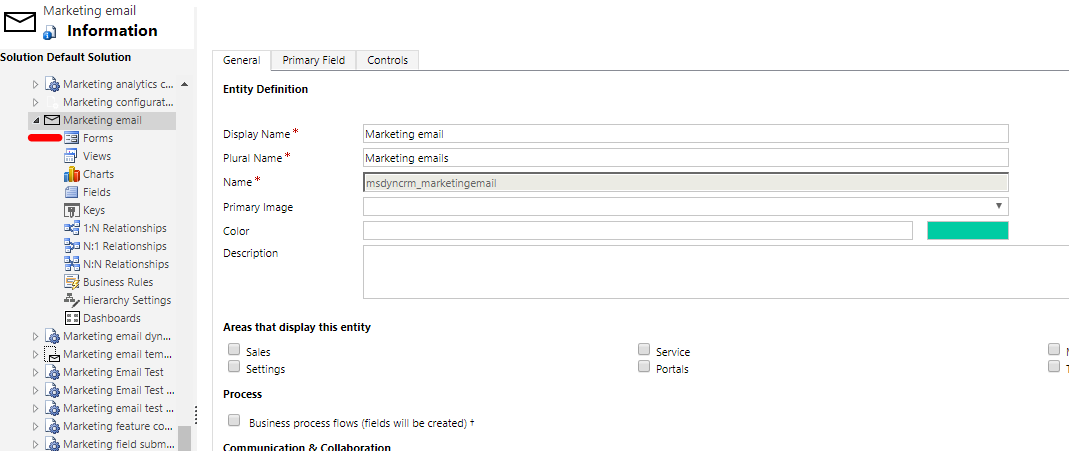
    pastedimage1571900557279v1.png

    you could make customization for it as well as other CRM entities,

    also Web API CRUD request or client API with formContext/Xrm.

    If you mean where the sent marketing email store, there is a link (View in browser/Open it in browser) at upper right corner on some marketing email templates, 

    then you will find there are stored in http://xxx.marketingusercontent.com

    2. You could find all supported API in link below:

    https://docs.microsoft.com/en-us/dynamics365/marketing/developer/marketing-developer-guide

    pastedimage1571899658396v1.png

    All involved entities in a customer journey are supported with API, 

    Customer journey has its own SDK and segment is similar to common Web API request;

    and you can retrieve contact interactions(*) during customer journey.

    It seems that marketing email entity doesn't have particular API compared with entities or data(*) above.

    There two type data in marketing application:

    Profile data (could be viewed as general Common Data Service entities)

    - (*)Interaction data: such as email opens, email clicks, event registrations, page submissions (data in Insights tab)

     The later one are not directly accessible compared with profile data,

    you need use the Power BI "Azure Blob Storage" connector for this type of data.

    https://docs.microsoft.com/en-us/dynamics365/marketing/custom-analytics#data-sources-for-custom-analytics

    Regards,

    Clofly

  • SanjayKanani Profile Picture
    20 on at

    Thanks Clofly Mao,

    I have already gone  through all link under developer guide but it's not useful for my requirement.

    I need to access email records which sent to individual contact like a email message activity associated to contact.

    Could you please gave me an example how to access Profile data as common data service ?

    is it API or need to access with MS Flow or anything else?

    it would be great if you could help me on this.

  • cloflyMao Profile Picture
    25,210 on at

    Hi Sanjay,

    If your email records mean data in Insight tab like below:

    pastedimage1571901612360v1.png

    unfortunately those data could be only exported by Azure Blob storage(in JSON format file, and you might need Azure subscription for this), which means there is no API for them to perform operation.

    https://docs.microsoft.com/en-us/dynamics365/marketing/custom-analytics#set-up-azure-blob-storage-and-connect-it-to-marketing

    That because marketing email has its separate back end engine compared with activity emails, so each sent won't be created as a entity record as activity email.

    Please feel free to ask me if you have any doubt while connection to Azure Blob storage with your marketing application.

    Regards,

    Clofly

  • SanjayKanani Profile Picture
    20 on at

    Thanks Clofly Mao

    I haven't tried with blob storage but if we can achieve this using following API then it might be more useful.

    POST : URL/.../msdyncrm_ListWidgetData

    {

      "WidgetRequest":"{\"WidgetId\":\"InteractionsTimelineLeadMarketingForm\",\"Top\":15,\"SkipToken\":\"\",\"LanguageId\":\"1033\",\"OffsetFromUtcInMinutes\":330,\"Filter\":{\"DateFrom\":\"2019-09-22T09:57:35.871Z\",\"DateTo\":\"2019-10-23T09:57:35.871Z\",\"Properties\":[{\"Name\":\"ContactId\",\"Value\":\"CONTACT GUID\"}]}}"

    }

  • cloflyMao Profile Picture
    25,210 on at

    Hi Sanjay,

    Thanks for sharing what you found.

    However, I never work with organizationRequest before so I couldn't confirm whether it's could be converted as request you posted.

    From all published and supported API by doc, we could only get interaction data based on contact.

    Regards,

    Clofly

  • Suggested answer
    cloflyMao Profile Picture
    25,210 on at

    Hi Sanjay,

    I have tried to convert it as a POST request, it seems that msdyncrm_ListWidgetData could be regarded as an action calling.

    While I was trapped in the format of WidgetRequest, finally I got result successfully assistance from the author, you can see my comment and his reply in that article.

    The key is we should concatenate request body in JSON format instead of in JSON format directly. 

    A full code:

    var data = {
      WidgetRequest: '{"WidgetId":"MessageEmailSentByContactList",'  
        '"Top":15,'  
        '"SkipToken":"",'  
        '"LanguageId":"1033",'  
        '"OffsetFromUtcInMinutes":120,'  
        '"Filter":'  
        '{"DateFrom":"2019-10-01T18:20:34.711Z",'  
        '"DateTo":"2019-10-24T18:20:34.711Z",'  
        '"Properties":['  
        '{"Name":"MessageId",'  
        '"Value":"9e026c38-6578-e711-a823-000d3a36f58f"'  
        '}'  
        ']}'  
        '}'
    };
    
    var req = new XMLHttpRequest();
    req.open("POST", Xrm.Page.context.getClientUrl()   "/api/data/v9.0/msdyncrm_ListWidgetData", true);
    req.setRequestHeader("OData-MaxVersion", "4.0");
    req.setRequestHeader("OData-Version", "4.0");
    req.setRequestHeader("Accept", "application/json");
    req.setRequestHeader("Content-Type", "application/json; charset=utf-8");
    req.onreadystatechange = function() {
      if (this.readyState === 4) {
        req.onreadystatechange = null;
        if (this.status === 204 || this.status === 200) {
          var result = JSON.parse(this.response)
          console.log(result.WidgetData);
        } else {
          var error = JSON.parse(this.response).error;
          Xrm.Utility.alertDialog("Error in Action: "   error.message);
        }
      }
    };
    req.send(JSON.stringify(data));

    MessageId is our marketing email id.

    Result for a marketing email:

    pastedimage1571967240835v3.png

    pastedimage1571967197720v2.png

    There is time difference for timestamp, I'm still researching it.

    Anyway, now we can retrieve these data via web api style request with not officially supported api,

    then you need some js library to visualize these data.

    Regards,

    Clofly 

Under review

Thank you for your reply! To ensure a great experience for everyone, your content is awaiting approval by our Community Managers. Please check back later.

Helpful resources

Quick Links

Responsible AI policies

As AI tools become more common, we’re introducing a Responsible AI Use…

Neeraj Kumar – Community Spotlight

We are honored to recognize Neeraj Kumar as our Community Spotlight honoree for…

Leaderboard > Customer experience | Sales, Customer Insights, CRM

#1
Tom_Gioielli Profile Picture

Tom_Gioielli 83 Super User 2025 Season 2

#2
Gerardo Rentería García Profile Picture

Gerardo Rentería Ga... 49 Most Valuable Professional

#3
#ManoVerse Profile Picture

#ManoVerse 40

Last 30 days Overall leaderboard

Product updates

Dynamics 365 release plans
