web
You’re offline. This is a read only version of the page.
close
Skip to main content

Notifications

Announcements

No record found.

Community site session details

Community site session details

Session Id :
Finance | Project Operations, Human Resources, ...
Answered

How can i use "Input User Parameter" in Electronic Reporting in D365?

(0) ShareShare
ReportReport
Posted on by 156

Hi All,

I want to add the user input parameter in my desired Report.

I created an Input user Parameter, but this parameter doesn't appear in my report.

How can I use "Input User Parameter" in Electronic Reporting in D365?

Anyone can help me and send me an example or guidance?

Best Regards,

Zahra

I have the same question (0)
  • Suggested answer
    Ludwig Reinhard Profile Picture
    Microsoft Employee on at

    Hello Zahra,

    Can you provide some additional information about this parameter?

    What are users supposed to enter?

    What kind of business process do you want to incorporate?

    Best regards,

    Ludwig

  • Zahra Mirzazadeh Profile Picture
    156 on at

    Hi Ludwig,

    Thanks for your replying,

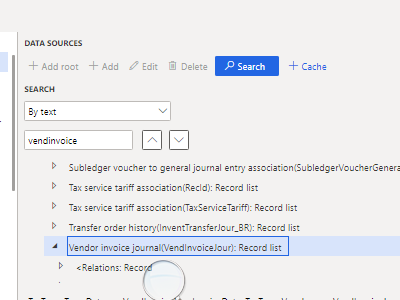
    I need a report Based on TaxTrans table, as I know Taxtrans table has relation with VendInvoiceJour:

    Taxtrans.Voucher=VendInvoiceJour.LedgerVoucher and  Taxtrans.transDate=VendInvoiceJour.InvoiceDate

    1-I created a TableRecord and I select "Ask for query":
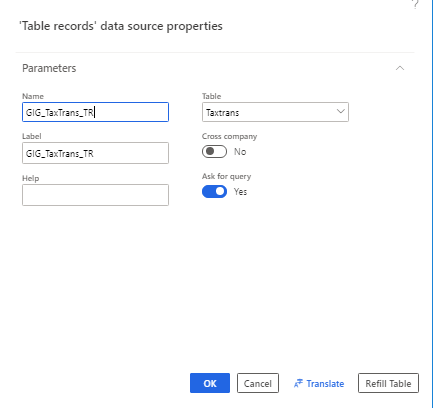
    pastedimage1585398353095v1.png

    2- in relationTab i got to my another field for my Report Result:
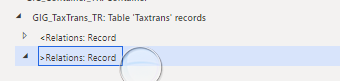
    pastedimage1585398598400v3.png

    pastedimage1585398500882v2.png

    3- I derived from my model and biding my fields.

    4- I selected "Run" it shows all of the fields in "TaxTrans" table that in step 1 I had done as my parameters("Ask for query").
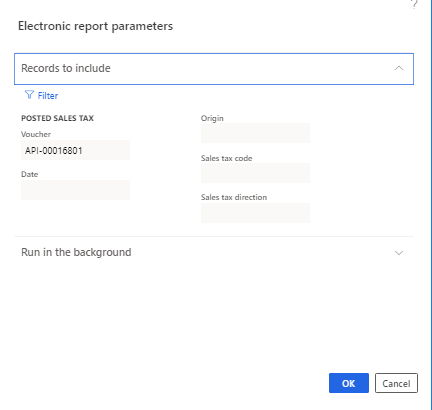
    pastedimage1585399359990v4.png

    5- now user wants another field that I should add to my parameters . It is "invoiceaccount" ,this field  does not exist in "TaxTransTable"  but it exists in "VendInvoiceJour" table.

    I stuck in this issue, I don't know what should I do for adding "invoiceaccount" as my input user parameter?

    I appreciate you for helping me.

    Best regards,

    Zahra

    Zahra  


  • Zahra Mirzazadeh Profile Picture
    156 on at

    Good afternoon,

    I Should add some additional information:

    1- In my Desired Data model I grouped by base on taxtrans table and bound this group by to "Payment".

    pastedimage1585490319871v2.png

    2- Before running the Report, all of the fields of taxtrans table appeared, I wanna add One Parameter to my previous parameter which exists in "vendorInvoiceJour" table.

    Would you give me guidance?

    Best Regards,

    Zahra

  • Verified answer
    Ludwig Reinhard Profile Picture
    Microsoft Employee on at

    Hi Zahra,

    About the additional filter criteria that you are look for:

    When you open the filter form you can add additional linkages to related tables.

    Simply click the joins tab and then select the related table and press the upper 'add table join' button, not the lower 'ok' button. 

    If you have done this navigate to the range tab, select the additional table and field and apply your filter. 

    Best regards, 

    Ludwig

  • Zahra Mirzazadeh Profile Picture
    156 on at

    Hello Ludwig,

    Thank you very much the way you mentioned about that, it works well :)

    I appreciate your guidance.

    Kind Regards

    Zahra


Under review

Thank you for your reply! To ensure a great experience for everyone, your content is awaiting approval by our Community Managers. Please check back later.

Helpful resources

Quick Links

Responsible AI policies

As AI tools become more common, we’re introducing a Responsible AI Use…

Neeraj Kumar – Community Spotlight

We are honored to recognize Neeraj Kumar as our Community Spotlight honoree for…

Leaderboard > Finance | Project Operations, Human Resources, AX, GP, SL

#1
André Arnaud de Calavon Profile Picture

André Arnaud de Cal... 467 Super User 2025 Season 2

#2
Martin Dráb Profile Picture

Martin Dráb 420 Most Valuable Professional

#3
BillurSamdancioglu Profile Picture

BillurSamdancioglu 241 Most Valuable Professional

Last 30 days Overall leaderboard

Product updates

Dynamics 365 release plans