web
You’re offline. This is a read only version of the page.
close
Skip to main content

Notifications

Announcements

No record found.

Community site session details

Community site session details

Session Id :
Finance | Project Operations, Human Resources, ...
Suggested Answer

RDP with AOT query in Ax 2012 r3

(0) ShareShare
ReportReport
Posted on by 30

HI al,

i have made SSRS report RDP based with Query

[
    SRSReportQueryAttribute (querystr(GDJ_JPN_VendQR)),
    SRSReportParameterAttribute(classStr(GDJ_JPN_VendorTransactionContract))
]
class GDJ_JPN_VendorTransactionDP extends SrsReportDataProviderPreProcessTempDB
{
}

i have mentioned Query here

ProcessReport method

[SysEntryPointAttribute(false)]
public void processReport()
{
    ;
    contract = this.parmDataContract() as GDJ_JPN_VendorTransactionContract;

    if(contract)
    {
        fromDate    = contract.parmfromDate();
        toDate      = contract.parmtoDate();

        this.insertDataTmpTable(fromDate,toDate);
    }
}

InsertDataTempTable method

public void insertDataTmpTable(transdate   _fromDate,
                        transdate   _toDate)
{
    VendTrans   vendTransOpng;

    boolean     flag;
    query = new query();

    qbds    = query.addDataSource(tableNum(VendTrans));
    qbds.relations(true);

    // date range mapping
    if(_fromDate && _toDate)
    {
        qbds.addRange(fieldNum(VendTrans,TransDate)).value(queryRange(_fromDate, _toDate));
    }

    qbds.addRange(fieldNum(VendTrans,AccountNum)).value();

    qr = new QueryRun(query);

    while(qr.next())
    {
        vendTrans = qr.get(tableNum(VendTrans));
    }
}

here in dialog i am given 
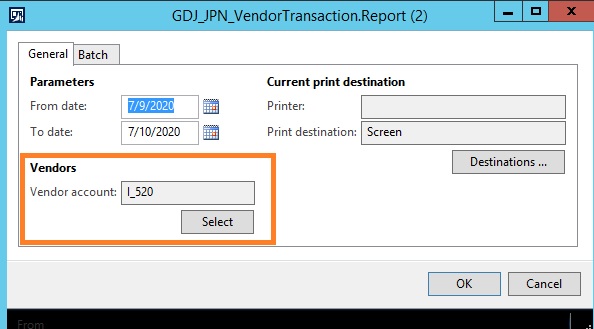
3113.vendor.jpg

Note - date filter is working fine BUT the Vendor account which i am given in query is  NOT  FILTERING data based on vendor.

Please let me know how to resolve ?

please give me more shed on this.

thanks!

I have the same question (0)
  • @rp@n Profile Picture
    30 on at

    I have modified the insertTempTable method

    public void insertDataTmpTable(transdate   _fromDate,
                            transdate   _toDate)
    {
        VendTrans   vendTransOpng;
    
        boolean     flag;
        
        query = this.parmQuery();
        
        qbds    = query.addDataSource(tableNum(VendTrans));
        qbds.relations(true);
    
        // date range mapping
        if(_fromDate && _toDate)
        {
            qbds.addRange(fieldNum(VendTrans,TransDate)).value(queryRange(_fromDate, _toDate));
        }
    
        qbds.addRange(fieldNum(VendTrans,AccountNum)).value();
    
        queryRun = new QueryRun(query);
    
        while(queryRun.next())
        {
            vendTrans = queryRun.get(tableNum(VendTrans));
        }
    
    }
    

    but still it's not FILTERING VEND ACCOUNT

  • @rp@n Profile Picture
    30 on at

    I debugged the query

    V2.jpg

    in the above query, i have required, the Vendor account which i am given in query that should match with VendTrans.AccountNum. So, that it will fetch the record based on ( date range + AccountNum ) from vendTrans.

    Please give me more shed on this.

    thanks!

  • Suggested answer
    udaY-ch Profile Picture
    5,133 on at

    Hi

    Is your query having vendtable as a single datasource?

    If not, then you need to use, query.datasourceno(1).adddatasource(your table) to make the right connection.

    Uday

  • @rp@n Profile Picture
    30 on at

    yes, single data source ( vend table )

  • Suggested answer
    udaY-ch Profile Picture
    5,133 on at

    Hi,

    Adding new data sources as a joining data source shouldn't be added directly to the query (query.adddataSource)

     public static void query(Args _args)
    {
        Query                   query;
        QueryRun                queryrRun;
        QueryBuildDataSource    qbdVendTrans, qbdsVendTable;
        QueryBuildRange         qbr;
        VendTrans               vendTrans;
    
        query = new Query(queryStr(Your Query));
    
        //Solution 1
        //qbdsVendTable = q.dataSourceTable(TableNum(vendTable));
        //qbdVendTrans = qbdsVendTable.addDataSource(TableNum(VendTrans));
        //or
        qbdVendTrans = query.dataSourceTable(TableNum(vendTable)).addDataSource(TableNum(VendTrans));
    
        //Solution2
        //qbdVendTrans = query.dataSourceNo(1).addDataSource(TableNum(VendTrans)); 
        
        qbdVendTrans.relations(true);
        qbdVendTrans.joinMode(JoinMode::InnerJoin);
    
        qbr = qbdVendTrans.addRange(FieldNum(VendTrans, AccountNum));
        qbr.value("1000000");  
    
        queryrRun = new QueryRun(query);
    
        while (queryrRun.next())
        {
            vendTrans = queryrRun.get(tableNum(VendTrans));
            info(strFmt("%1", vendTrans.AccountNum));
        }
    }

    Uday

Under review

Thank you for your reply! To ensure a great experience for everyone, your content is awaiting approval by our Community Managers. Please check back later.

Helpful resources

Quick Links

Responsible AI policies

As AI tools become more common, we’re introducing a Responsible AI Use…

Neeraj Kumar – Community Spotlight

We are honored to recognize Neeraj Kumar as our Community Spotlight honoree for…

Leaderboard > Finance | Project Operations, Human Resources, AX, GP, SL

#1
André Arnaud de Calavon Profile Picture

André Arnaud de Cal... 449 Super User 2025 Season 2

#2
Martin Dráb Profile Picture

Martin Dráb 422 Most Valuable Professional

#3
BillurSamdancioglu Profile Picture

BillurSamdancioglu 239 Most Valuable Professional

Last 30 days Overall leaderboard

Product updates

Dynamics 365 release plans
