web
You’re offline. This is a read only version of the page.
close
Skip to main content

Notifications

Announcements

No record found.

Community site session details

Community site session details

Session Id :
Customer experience | Sales, Customer Insights,...
Answered

How to get Output Parameter from Custom Action Using Web API

(0) ShareShare
ReportReport
Posted on by 145

I am unclear as to how to get output parameters using Web Api for custom actions.

I have created a custom action that creates an email with an attached report, and then returns EmailId as an output parameter.
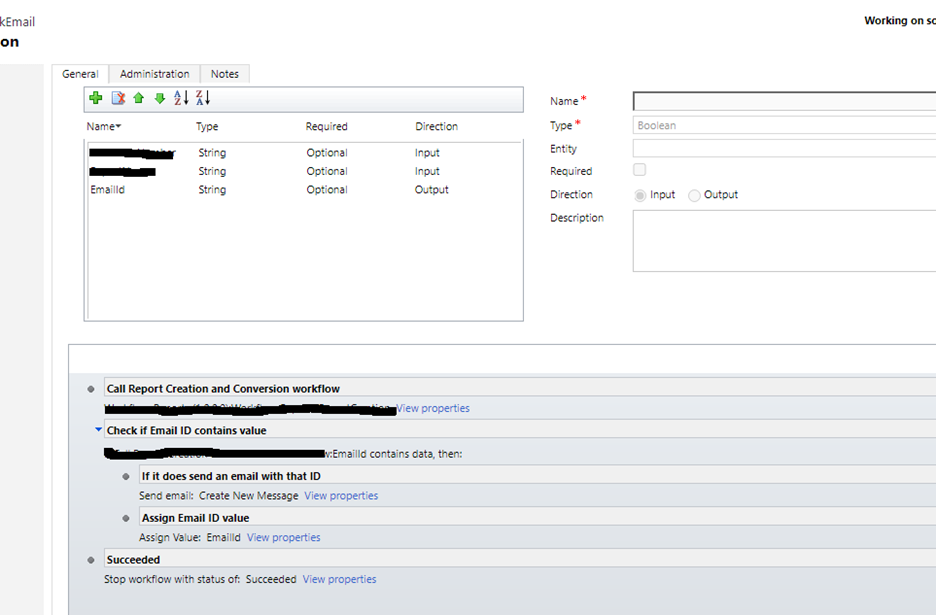
pastedimage1631569115500v1.png

I assign the returned email ID to the local output parameter.
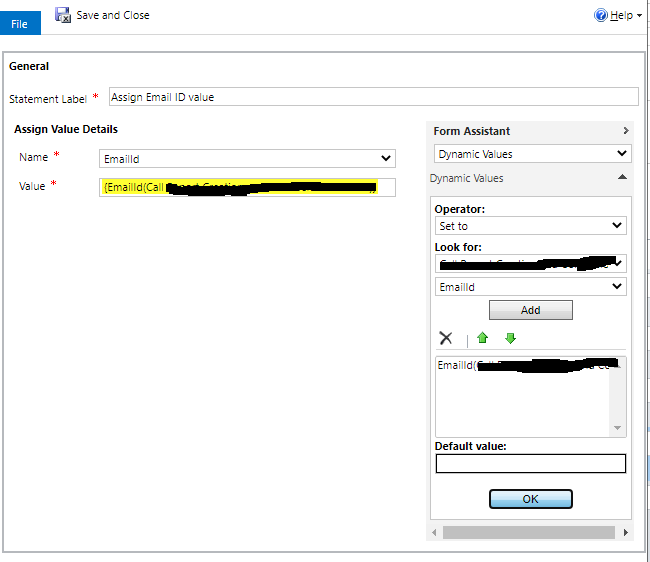
pastedimage1631569196602v2.png

I call the action using web api.


function CallAction() {
var regNumber = Xrm.Page.getAttribute("xxxxxxxxxxxxxxxxxxxr").getValue();
var Id = Xrm.Page.data.entity.getId().substring(1, 37);
var serverURL = Xrm.Page.context.getClientUrl();
var emailid="";
var parameters = {};
parameters.ReferenceNumber = regNumber;
parameters.ReportName = "Test";
console.log(Id);
var req = new XMLHttpRequest();
req.open("POST", serverURL + "/api/data/v8.2/xxxxxxxxxxxxxxxx(" + Id + ")/Microsoft.Dynamics.CRM.xxxxxxxxxxxxxxxxxxxxx", false);
req.setRequestHeader("OData-MaxVersion", "4.0");
req.setRequestHeader("OData-Version", "4.0");
req.setRequestHeader("Accept", "application/json");
req.setRequestHeader("Content-Type", "application/json; charset=utf-8");
req.onreadystatechange = function() {
if (this.readyState == 4 /* complete */ ) {
req.onreadystatechange = null;
if (this.status == 200) {
var results = JSON.parse(this.response);
if(results==null)
console.log("Results null");
else
{
console.log("Results NOT null");
console.log(this.response);
}

}
else
{
Xrm.Utility.alertDialog(this.statusText);
var error = JSON.parse(this.response).error;
alert(error.message);
}
}
else
{
Xrm.Utility.alertDialog(this.statusText);
}
};
req.send(JSON.stringify(parameters));

}

I get null for EmailID in the response body.
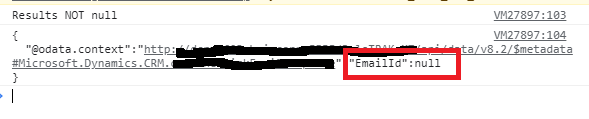
pastedimage1631569317595v4.png

Is this not the correct approach?

Thanks

ngetz

I have the same question (0)
  • Verified answer
    Pawar Pravin  Profile Picture
    5,237 on at

    It may help you, please refer this blog.

    pravinpawarweb.wordpress.com/.../

  • ngetz Profile Picture
    145 on at

    I will take a look, thanks.

  • ngetz Profile Picture
    145 on at

    Prawin,

    In your blog example you are using a plugin. I have a custom workflow with output parameters and then the action pulls the output parameters. Will it work with a custom workflow?

    Thanks

  • ngetz Profile Picture
    145 on at

    I got it to work as a plugin, thank you.

Under review

Thank you for your reply! To ensure a great experience for everyone, your content is awaiting approval by our Community Managers. Please check back later.

Helpful resources

Quick Links

Responsible AI policies

As AI tools become more common, we’re introducing a Responsible AI Use…

Neeraj Kumar – Community Spotlight

We are honored to recognize Neeraj Kumar as our Community Spotlight honoree for…

Leaderboard > Customer experience | Sales, Customer Insights, CRM

#1
Tom_Gioielli Profile Picture

Tom_Gioielli 73 Super User 2025 Season 2

#2
Gerardo Rentería García Profile Picture

Gerardo Rentería Ga... 43 Most Valuable Professional

#3
Daniyal Khaleel Profile Picture

Daniyal Khaleel 32 Most Valuable Professional

Last 30 days Overall leaderboard

Product updates

Dynamics 365 release plans



