web
You’re offline. This is a read only version of the page.
close
Skip to main content

Notifications

Announcements

No record found.

Community site session details

Community site session details

Session Id :
Microsoft Dynamics AX (Archived)

Error while importing data package

(0) ShareShare
ReportReport
Posted on by 90

Hi Folks,

I am getting an error while importing data package in D365FO:

"Could not find file 'C:\windows\TEMP\677157F6-18CA-49F6-A818-E4137CC6BA1F_27432AE2-126A-480D-B492-5337DF4C7A4F\PackageHeader.xml'".
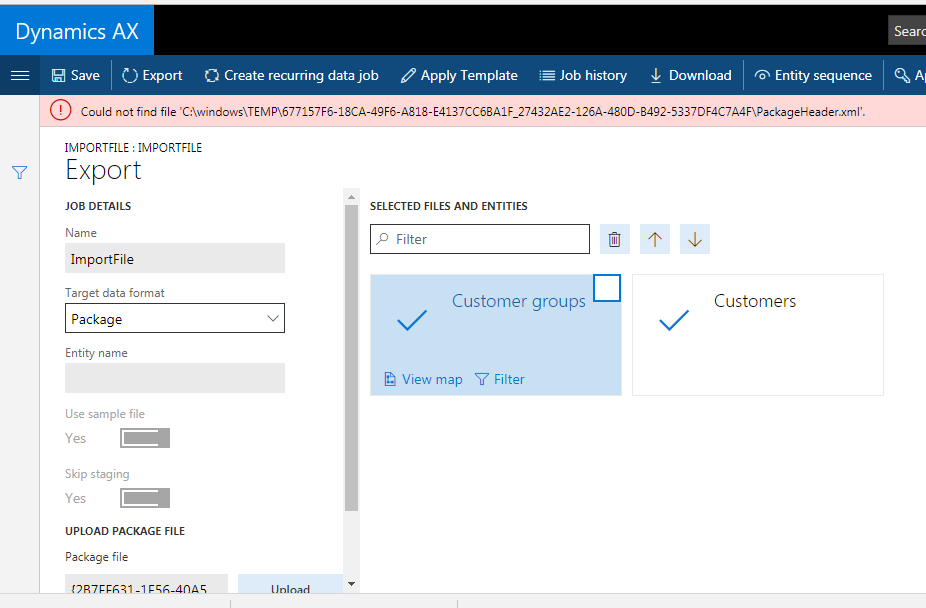
D54F9E12.PNG

Steps I performed are below:

1) Exported data package solution having 2 entities for Customers and Customer groups.

2) Unzipped the file generated in step 1.

3) Modified one of the entity files by adding one record.

4) Zipped the folder again. Tried with all Windows compressed folder, WinZip, WinRar.

5) Imported the package in D365

Please let me know if you have faced the similar issue.

*This post is locked for comments

I have the same question (0)
  • Sangram Shinde Profile Picture
    2,114 on at

    Hi,

    This seems like bug, you can open MS ticket for this.

  • Suggested answer
    TripleA Profile Picture
    110 on at

    Hi prkr,

    Please make sure that the zip file folder doesn't have a child folder in which your package files exist because the system will only check the zip file folder and if header or any other file is not present, it will fail.

    e.g. zippedfile.zip should contain the header.xml etc.

    It should not be like zippedfile.zip > zippedfile > header.xml etc

    Hope this solves the issue.

  • Suggested answer
    Sukrut Parab Profile Picture
    71,710 Moderator on at

    Your zip file  is not in proper format. Make sure you have done compression properly and it contains Metadata files.  

  • Sangram Shinde Profile Picture
    2,114 on at

    Is your issue resolved? What is the solution.

    Thanks,

    Sangram

  • Rajeshvari Solanki Profile Picture
    145 on at

    Is this issue resolved? what is the solution.

    I am getting same error.

  • Suggested answer
    TripleA Profile Picture
    110 on at

    Hi Rajeshvari,

    Please make sure that the zip file folder doesn't have a child folder in which your package files exist because the system will only check the zip file folder and if header or any other file is not present, it will fail.

    e.g. zippedfile.zip should contain the header.xml etc.

    It should not be like zippedfile.zip > zippedfile > header.xml etc

    Hope this solves the issue.

  • Suggested answer
    K_G Profile Picture
    142 on at

    I was experiencing the same issue.

    So I went back to the Export project I used and I checked the box labelled "Generate data package" before clicking the Export button.

    Then I downloaded the data package, updated the Excel files within it, and I was successfully able to import my package.

    7651.PIC.JPG

  • Suggested answer
    Diana Raileanu Profile Picture
    39 on at
    The solution lies in the way the package was zipped. Select all import files (including the Manifest and the PackageHeader) > WinZip > Add to {package name}
    Zipping the folder like this will result in the error on import. 

Under review

Thank you for your reply! To ensure a great experience for everyone, your content is awaiting approval by our Community Managers. Please check back later.

Helpful resources

Quick Links

Responsible AI policies

As AI tools become more common, we’re introducing a Responsible AI Use…

Neeraj Kumar – Community Spotlight

We are honored to recognize Neeraj Kumar as our Community Spotlight honoree for…

Leaderboard > 🔒一 Microsoft Dynamics AX (Archived)

#1
Martin Dráb Profile Picture

Martin Dráb 4 Most Valuable Professional

#1
Priya_K Profile Picture

Priya_K 4

#3
MyDynamicsNAV Profile Picture

MyDynamicsNAV 2

Last 30 days Overall leaderboard

Featured topics

Product updates

Dynamics 365 release plans



