web
You’re offline. This is a read only version of the page.
close
Skip to main content

Notifications

Announcements

No record found.

Community site session details

Community site session details

Session Id :
Customer experience | Sales, Customer Insights,...
Suggested Answer

Business Rules Entity scope to trigger on Rollup Fields update

(0) ShareShare
ReportReport
Posted on by 197

I have a custom entity which has a Rollup Field from its related entity. Whenever this Rollup Field is updated by system job or manually, I want to copy its value to another field by using Business Rules configured on Entity Scope. Since the Business Rule is Entity Scope, I thought the value will be copied without being opened the form but it is not.

Can anyone explain if the Business Rule on Entity Scope should work for Rollup Fields update?

I have the same question (0)
  • RaviKashyap Profile Picture
    55,410 Moderator on at

    Hi Based on the below documentation- "The business rules, workflows or calculated fields always use the last calculated value of the rollup field." This means it won't get the latest value.

    docs.microsoft.com/.../define-rollup-fields

    Hope this helps.

  • Sven Vervynckt Profile Picture
    115 on at

    I'm facing the same issue. Did you manged to find a workaround for this? I've tried different conditions for the Business Rule, but none of them are triggering on update of the rollup field value. 

  • Suggested answer
    Preetam Yengkokpam Profile Picture
    197 on at

    Hello Sven,

    I further worked on the issue with Microsoft and confirmed that a business rule cannot be triggered on roll-up field updates even if you set as entity scope. My goal was to copy the roll-up field value to another field without user interacting with the entity form, in order words, I want copying happens at the background.

    Since I don't want to write any single line of custom code to achieve this, I end up using Power Automate Cloud Flows. This is what I did:

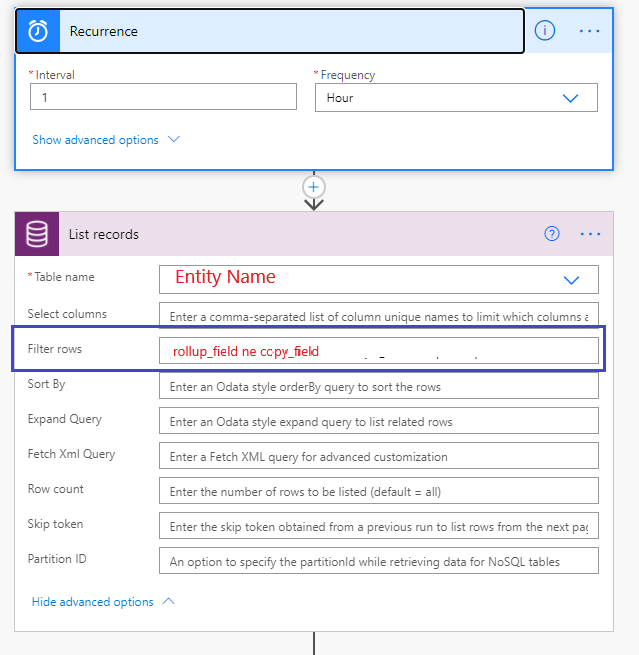
    1. Create a Cloud Flow. Use "Scheduler" to run the flow every one hour. Since Roll-Up field will update hourly at the minimum, I scheduled this flow to run every one hour.

    2. Use CDS connector to pull List Records on the entity. I include "Filter rows" to return only records where the "Roll-Up Field" value is not equals the other field value to minimize the performance issue.

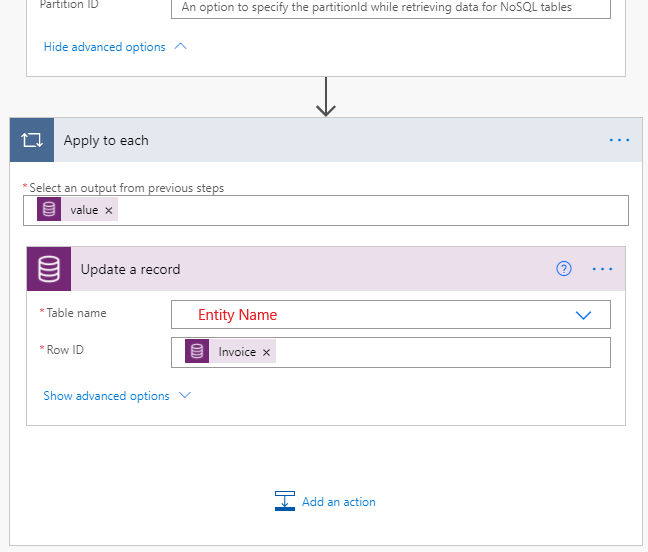
    3. Use CDS connector to update each records from step 2.

    Attached is the sample flow for your reference.Rollup1.pngRollup2.png
    This has been implemented and running without any issues for quite sometime. I check the timing settings for occurrences of the System Jobs which updates the roll up field and schedule this flow to run after 5 mins. So technically, the copy happens whenever an update at the roll up fields. Once the update happens on the other field, you can use for several other purposes such as triggering a workflow, trigger another flow or use for another roll up on its parent record.

    I hope this helps, let me know if you have any question I will be happy to help you.

    Thank you,

    Preetam

  • Preetam Yengkokpam Profile Picture
    197 on at

    Let me know if the suggested answer is working for you or have any questions

Under review

Thank you for your reply! To ensure a great experience for everyone, your content is awaiting approval by our Community Managers. Please check back later.

Helpful resources

Quick Links

Responsible AI policies

As AI tools become more common, we’re introducing a Responsible AI Use…

Neeraj Kumar – Community Spotlight

We are honored to recognize Neeraj Kumar as our Community Spotlight honoree for…

Leaderboard > Customer experience | Sales, Customer Insights, CRM

#1
Tom_Gioielli Profile Picture

Tom_Gioielli 170 Super User 2025 Season 2

#2
#ManoVerse Profile Picture

#ManoVerse 70

#3
Jimmy Passeti Profile Picture

Jimmy Passeti 50 Most Valuable Professional

Last 30 days Overall leaderboard

Product updates

Dynamics 365 release plans