web
You’re offline. This is a read only version of the page.
close
Skip to main content

Notifications

Announcements

No record found.

Community site session details

Community site session details

Session Id :
Finance | Project Operations, Human Resources, ...
Answered

Error while opening Extension object in Designer of Visual Studio

(0) ShareShare
ReportReport
Posted on by 758

Hi Everyone,

Need urgent help on below issue.

I have been working on migrating Ax2012 code to D365.

I have the overlayered objects in release branch of VSTS. I removed the overlayering of all objects and refactored them. 

But since last few days , if I try to open few extended forms out of those objects in VS designer, I am facing below error,
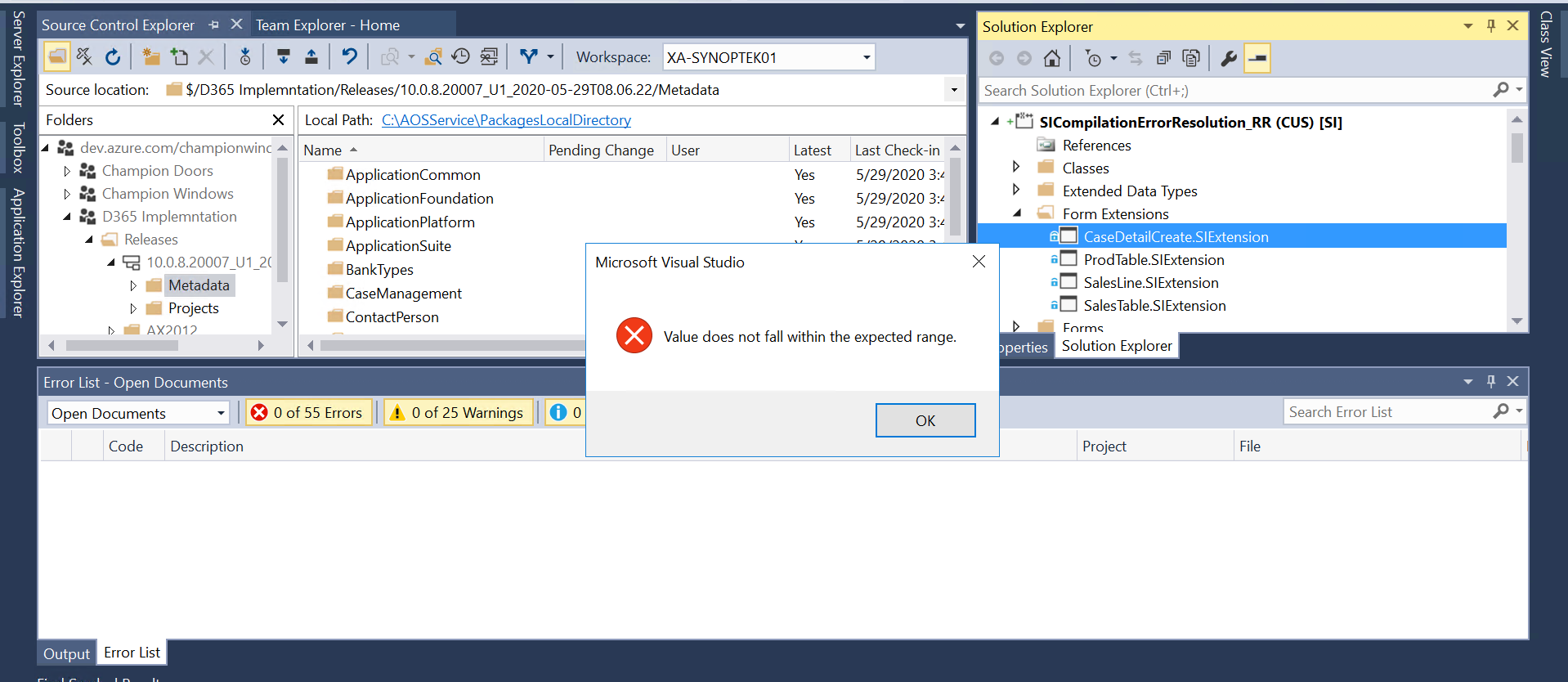
5415.VS-error2.png

Post Script: This not the case with all extensions that I have created but with few of them.  When I tried the model build in error window I got below error related to same objects,

"An unhandled exception was thrown while validating CaseDetailCreate.SIExtension with callstack System.ArgumentException: An item with the same key has already been added."

Please suggest solution on this.

I have the same question (0)
  • Suggested answer
    nmaenpaa Profile Picture
    101,160 Moderator on at

    Have you checked if you have an object called CaseDetailCreate.SIExtension also in some other package?

    Perhaps you copied it from ApplicationSuite package to your own package, but forgot to remove the old version?

  • Rhushikesh R Profile Picture
    758 on at

    Hi Nikoloas,

    Thanks for the reply. But I tried finding out the name of element in all packages but did not find any duplicate name object in other packages. Also I would like to go through one more error related to same, please confirm whether it is clarify anything to you or not.

    C:\AOSService\PackagesLocalDirectory\SI\BuildProjectResult.log(1119):Metadata Error: AxFormExtension/CaseDetailCreate.SIExtension/Controls/Copyqsjp02rw1/Controls/FSGeneralGroupBottomCol1/Controls/CategoryGroup/Controls/FSCaseIdGroup/Name: The duplicate name 'GeneralGroup_CaseId' was detected. The duplication is either in the base element that extension applies to or in other sibling extensions.

  • Suggested answer
    nmaenpaa Profile Picture
    101,160 Moderator on at

    GeneralGroup_CaseId is a control in CaseDetailCreate form. So your extension can't have any element with the same name.

    Please try to rename it (you should always use your own prefix with all your custom objects) and see if your problem is resolved.

  • Rhushikesh R Profile Picture
    758 on at

    Hi Nikolaos, that makes sense. But how could I rename the control now, as I am unable to open the object in Designer. Is there any alternative way to modify the same XML?

  • Verified answer
    nmaenpaa Profile Picture
    101,160 Moderator on at

    Yes, just locate the XML file of your form extension and rename it there.

  • Rhushikesh R Profile Picture
    758 on at

    Thank you so much Nikoloas. That worked for me. You are great. :)

Under review

Thank you for your reply! To ensure a great experience for everyone, your content is awaiting approval by our Community Managers. Please check back later.

Helpful resources

Quick Links

Responsible AI policies

As AI tools become more common, we’re introducing a Responsible AI Use…

Neeraj Kumar – Community Spotlight

We are honored to recognize Neeraj Kumar as our Community Spotlight honoree for…

Leaderboard > Finance | Project Operations, Human Resources, AX, GP, SL

#1
Martin Dráb Profile Picture

Martin Dráb 664 Most Valuable Professional

#2
André Arnaud de Calavon Profile Picture

André Arnaud de Cal... 522 Super User 2025 Season 2

#3
Sohaib Cheema Profile Picture

Sohaib Cheema 303 User Group Leader

Last 30 days Overall leaderboard

Product updates

Dynamics 365 release plans



