web
You’re offline. This is a read only version of the page.
close
Skip to main content

Notifications

Announcements

No record found.

Community site session details

Community site session details

Session Id :
Microsoft Dynamics AX (Archived)

AX 2009 function Export to Excel 2010 blank?

(0) ShareShare
ReportReport
Posted on by 215

I've experiencing some weird functionality in a new setup laptop- export to Excel 2010 in ax 2009.

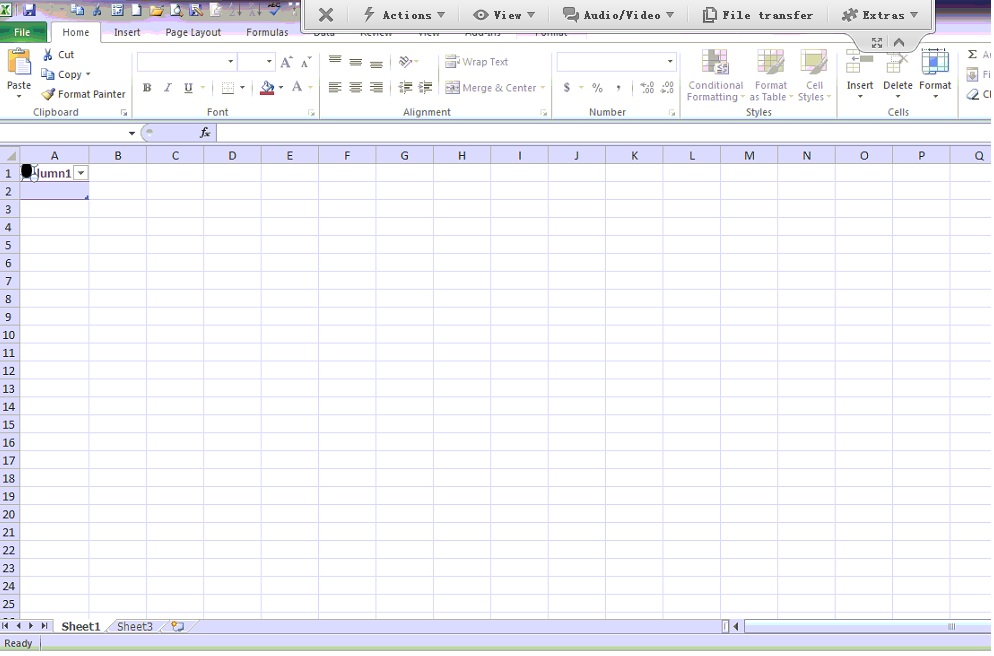
When I click export to excel menu icon, AX correctly counts the records which need to be exported, but when Excel opens nothing but a column "A1" and an image like screen shot below :-
 

Environment:

AX 2009, Office 2010, Windows 7 64bits.

Is this problem because of Excel add-in, or trust center issue?

*This post is locked for comments

I have the same question (0)
  • Asai Profile Picture
    10 on at

    Hey? Enyone are there? I have the some problem. AX2009 32bit, Office 2010 32bit, Win 7 64bit.

    Problem have all users in only this computer. AX client and Office reinstalled, but no effect.

  • TobyJ Profile Picture
    on at

    I have experienced this before and it was related to the fingerprint recognition software installed on the client machine. I uninstalled it and it fixed the problem.

  • Sean Lim Profile Picture
    5 on at

    I've the exact same problem. I tried uninstalling the fingerprint recognition software but the it doesn't solve the problem.

    I'm still unable to to export to excel.

    It's blank and a black dot that looks like a fingerprint is on it.

  • IREN ANG WEI REN Profile Picture
    215 on at

    Yes, i also facing with the same problem until now.

    Remove finger print s/w doesn't seem different.

    Previously I've had tried uninstall excel 2010 & AX2009 and reinstall back again, exporting still the same with the Dot and blank.

    Appreciate, if there is anyone can help me to solve this issue?

  • TobyJ Profile Picture
    on at

    It was a couple of years back when I had the issue and I can't remember exactly what I did to solve it, but it was definitely the fingerprint software that caused it.

    I do remember when I first got the laptop I did a clean install of the OS and only added what I needed as these consumer laptops usually come with a heap of unnecessary software. At first AX and excel was working fine, then I added the fingerprint software thinking it was pretty cool, and then got the issue. I thought I removed the software and it worked again, but maybe it didn't. The laptop I had at the time was a HP.

    If you are that desperate, you could try a clean install of the OS only and then add AX and MS Office, any other software from there, but not the fingerprint software.

  • ixman Profile Picture
    10 on at

    I had the same problem until I disabled the "Send to Bluetooth" COM Add-in in Excel and then everything worked fine.  I hope this helps.

  • Community Member Profile Picture
    on at

    Thanks Ixman, disabling Bluetooth worked for me. Note, it does not seem to work for other users because they don't have the add-in.

  • Suggested answer
    Asai Profile Picture
    10 on at

    Now I always disabling that. Less of the problems with the ax, printing, Office and etc.

  • Suggested answer
    Community Member Profile Picture
    on at

    Thanks ixman,

    disabled the 'Send to Bluetooth' COM Add-in in excel and it worked.

  • Suggested answer
    Community Member Profile Picture
    on at

    Tanks Ixman, worked for me to. very good!!!

Under review

Thank you for your reply! To ensure a great experience for everyone, your content is awaiting approval by our Community Managers. Please check back later.

Helpful resources

Quick Links

Responsible AI policies

As AI tools become more common, we’re introducing a Responsible AI Use…

Neeraj Kumar – Community Spotlight

We are honored to recognize Neeraj Kumar as our Community Spotlight honoree for…

Leaderboard > 🔒一 Microsoft Dynamics AX (Archived)

#1
Martin Dráb Profile Picture

Martin Dráb 4 Most Valuable Professional

#1
Priya_K Profile Picture

Priya_K 4

#3
MyDynamicsNAV Profile Picture

MyDynamicsNAV 2

Last 30 days Overall leaderboard

Featured topics

Product updates

Dynamics 365 release plans



