web
You’re offline. This is a read only version of the page.
close
Skip to main content

Notifications

Announcements

No record found.

Community site session details

Community site session details

Session Id :
Microsoft Dynamics AX (Archived)

Want to remove hyperlink from form control

(0) ShareShare
ReportReport
Posted on by 2,486

Hi All,

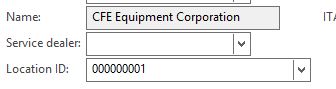
when the form is in edit mode the control has lookup behavior which is required but when it is in non-edit mode, it is hyperlinked which I don't want.

The following picture represents edit mode behavior.
0842.1.JPG

The following picture represents non-edit mode behavior and contain hyperlinked data.

1018.2.png

I just want to remove hyperlink from the text in non-edit mode.

Thanks,

Raziq

*This post is locked for comments

I have the same question (0)
  • André Arnaud de Calavon Profile Picture
    301,069 Super User 2025 Season 2 on at

    Hi Mohammad,

    This is standard behavior if there is a relation to another table and the menu-item is set on the table.

    Can you indicate why you have this requirement and if it is only related to this field or was this only one example of many links you want to get rid of?

  • Mohammad Raziq Ali Profile Picture
    2,486 on at

    This is related to only this field.

    When it is in edit mode, it's showing lookup behavior which is required but when it is

    hyperlinked in non-edit mode, if it is clicked, it is showing the following error

    6507.Untitled.png

    ERROR :"Could not process the lookupTable value on the Args instance. The table 'LogisticsLocation' does not exist as a root FormDataSource for the form 'DirPartyTable'."

    Thanks,

    Raziq

  • André Arnaud de Calavon Profile Picture
    301,069 Super User 2025 Season 2 on at

    Hi,

    I assume this is a customization? Then check if the correct menu item is used as FormRef on the table and also if the relation is setup correctly between this field and the reference table.

  • Mohammad Raziq Ali Profile Picture
    2,486 on at

    Hi André Arnaud de Calavon,

    I just don't want this field to be hyperlinked.

    Is it feasible?

    Thanks,

    Raziq

  • Sohaib Cheema Profile Picture
    49,438 User Group Leader on at

    The requirement is not making much sense, but can be achieved as following

    Go on DataSource, Reach to field where you want to stop "View Details"

    and write method as under

    public void jumpRef()

    {

       //super();

    }

    this should make hyperlink non-workable. you would not be able to "View Details". also nothing will happen if you will click hyperlink

  • 5400 Profile Picture
    7,162 on at

    Hi Raziq,

    I can say one workaround, If edit mode it is going to correct master table, you can set default property of control as "Edit" instead of "Auto".. it will be always edit mode.

    Thanks

    Bhaskar

  • Mohammad Raziq Ali Profile Picture
    2,486 on at

    Hi Sohaib bhai,

    I don't want blue color hyperlink itself.

    Thanks,

    Raziq

  • Sohaib Cheema Profile Picture
    49,438 User Group Leader on at

    in addition to what I suggested before do one thing more i.e you can add what Bhaskar has told i.e set ViewEditMode = Edit (on control properties)

  • Verified answer
    Douglas Noel Profile Picture
    3,905 on at

    Hi Mohammad,

    a dirty solution (for this one control could be the following:

    overwrite the mothods jumpref, mousenter, mouseleave, the hyperlinks isn't shown anymore

    public void mouseEnter(int _x, int _y, int _button, boolean _Ctrl, boolean _Shift)
    {
        if (!element.inViewMode())
        {
            super(_x, _y, _button, _Ctrl, _Shift);
        }
    }
    
    public void mouseLeave()
    {
        if (!element.inViewMode())
        {
            super();
        }        
    }
    
    public void jumpRef()
    {
        if (!element.inViewMode())
        {
            super();
        }
    }


    regrads

    Douglas

  • Mohammad Raziq Ali Profile Picture
    2,486 on at

    Hi Douglas Noel,

    That's what I want exactly which you have posted but the text should be in black color.

    Thanks,

    Raziq

Under review

Thank you for your reply! To ensure a great experience for everyone, your content is awaiting approval by our Community Managers. Please check back later.

Helpful resources

Quick Links

Responsible AI policies

As AI tools become more common, we’re introducing a Responsible AI Use…

Neeraj Kumar – Community Spotlight

We are honored to recognize Neeraj Kumar as our Community Spotlight honoree for…

Leaderboard > 🔒一 Microsoft Dynamics AX (Archived)

#1
Martin Dráb Profile Picture

Martin Dráb 4 Most Valuable Professional

#1
Priya_K Profile Picture

Priya_K 4

#3
MyDynamicsNAV Profile Picture

MyDynamicsNAV 2

Last 30 days Overall leaderboard

Featured topics

Product updates

Dynamics 365 release plans
