web
You’re offline. This is a read only version of the page.
close
Skip to main content

Notifications

Announcements

No record found.

Community site session details

Community site session details

Session Id :
Microsoft Dynamics AX (Archived)

Credit note request

(0) ShareShare
ReportReport
Posted on by 4

Hi guys, 

We have created a free text invoice to scrap the goods to a customer but the actual invoiced amount, price and quantity is wrong.

As you can see from the screenshot below the "Imported Wood" has a quantity of 3709.00 KG, with a price of 18.50 that equals to the amount of 68,616.50. The right invoiced quantity for Imported Wood should be 3162.00 KG, with a price of 16.50 that equals to 52,173.00. 

Further, the "Jungle Wood" has a invoiced quantity of 1641.00 KG, with a price of 6.90 that equals to the amount 11,322.90. The correct invoice should specify the following, Quantity 2188 KG, Price 5.75 and the amount should equal to 12,581.00. 
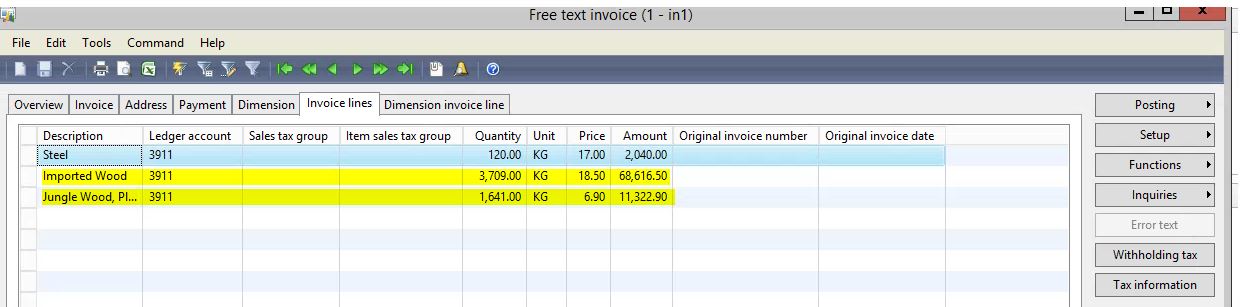
1665.Capture.JPG

The WRONG amount, price and quantity

Description          Ledger Account     Quantity    Unit      Price        Amount 

Imported Wood    3911                        3,709.00      KG         18.50        68,616.50

Jungle Wood         3911                       1641.00       KG           6.90        11,322.90

The CORRECT amount, price and quantity

Description          Ledger Account     Quantity    Unit      Price        Amount 

Imported Wood    3911                        3,162.00      KG         16.50        52,173.00

Jungle Wood         3911                       2,188.00       KG           5.75        12,581.00

As you can see from the tables above the difference between the wrong and correct quantity for Imported Wood and Jungle Wood is 547.00. We need to raise a credit  note for the price, amount and quantity difference. Could you please help me to specify what i should put in exactly to fix this difference. 

*This post is locked for comments

I have the same question (0)
  • Ludwig Reinhard Profile Picture
    Microsoft Employee on at

    Hi,

    What kind of modifications did you make to your free text invoices? Free text invoices can usually not be used for recording inventory transactions. I'm thus wondering about your process and modifications. Maybe you can elaborate.

    Many thanks and best regards

    Ludwig

  • Tony111 Profile Picture
    4 on at

    Hi Ludwig,

    There's no modifications made to our free text invoice. The items specified are not tracked in inventory. On the free text invoice, a main account for the sale is indicated on each invoice line (3911), which can be distributed to multiple ledger accounts. Also, the customer balance is posted to the summary account from the posting profile that is used for the free text invoice.

    I have posted a free text invoice with wrong quantity, price and amount (see first table above). I need help to fix this by creating a credit note for the customer (the correct value are seen in the second table above) . My question is which values I enter to fix this difference in price, quantity and amount. The final invoiced values after the correction should be as the second table.

    Many thanks

    Tony

  • Suggested answer
    Ludwig Reinhard Profile Picture
    Microsoft Employee on at

    Hi Tony,

    As free text invoices don't have a relationship to your inventory you can simply enter a negative quantity with the same positive price value that was used in the original invoice. This should ensure that your credit note is identical to your original invoice.

    Best regards

    Ludwig

Under review

Thank you for your reply! To ensure a great experience for everyone, your content is awaiting approval by our Community Managers. Please check back later.

Helpful resources

Quick Links

Responsible AI policies

As AI tools become more common, we’re introducing a Responsible AI Use…

Neeraj Kumar – Community Spotlight

We are honored to recognize Neeraj Kumar as our Community Spotlight honoree for…

Leaderboard > 🔒一 Microsoft Dynamics AX (Archived)

#1
Martin Dráb Profile Picture

Martin Dráb 4 Most Valuable Professional

#1
Priya_K Profile Picture

Priya_K 4

#3
MyDynamicsNAV Profile Picture

MyDynamicsNAV 2

Last 30 days Overall leaderboard

Featured topics

Product updates

Dynamics 365 release plans



