web
You’re offline. This is a read only version of the page.
close
Skip to main content

Notifications

Announcements

No record found.

Community site session details

Community site session details

Session Id :
Microsoft Dynamics AX (Archived)

Sale order Picking Slip Report issue

(0) ShareShare
ReportReport
Posted on by

Hi

i m facing a problem in Sale order picking slip report. actually when i run this report after each line, this report shows me extra line. i cannt understand why? i just want to remove this line. plz also have a look at image as well.
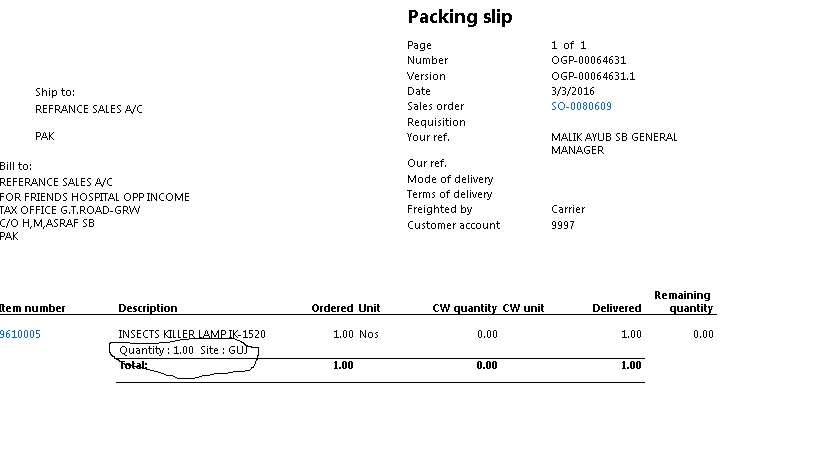
3823.Untitled.jpg

i want to delete mention area from my report. kindly help me. thanks

regards,

Hassan

*This post is locked for comments

I have the same question (0)
  • Martin Dráb Profile Picture
    237,965 Most Valuable Professional on at

    What do you mean by "running after each line"?

    It may be problem either in the report, in data or in your expectations.

  • Community Member Profile Picture
    on at

    i mean when i run this report, after each line it shows me Quantiy and line. i do't want to see this line after my item/line. as i also mentioned in image.

  • Martin Dráb Profile Picture
    237,965 Most Valuable Professional on at

    Aha. If you don't like the design, go and change it. I'm not sure what you expect from us.

  • Community Member Profile Picture
    on at

    yeah..thanks

  • Community Member Profile Picture
    on at

    dear if u look at report design, it show me a line (Qty and site),i do,t know why it is showing in report?

  • Martin Dráb Profile Picture
    237,965 Most Valuable Professional on at

    I'm sorry, but I still don't follow you. Could try to start explaining your problem in a few more sentences?

    You say that you see the controls in the design, so what's surprising on the fact that they're showing in the report? It's the expected behaviour, isn't it?

  • Community Member Profile Picture
    on at

    i m sending you image again...i just print sale order picking slip report..now it is showing me highlighted line automatically. i want to hide it.

    7128.Untitled.jpg

    kindly look it

  • Verified answer
    Martin Dráb Profile Picture
    237,965 Most Valuable Professional on at

    I thought we already discussed it. I told you to change the design if you don't like the current design.

    If you keep repeating the same things, I'm unable to help you. Maybe you'll have more luck with somebody else.

  • Sohaib Cheema Profile Picture
    49,438 User Group Leader on at

    ERP or software systems are made for Global Needs of clients who operate with numerous sort of businesses.

    The line of information which you are referring to, may be useless for your business. But that line of information can be very handy for many other business. How? This line of information represents inventory dimensions such as Site, Warehouse, Color, Size etc. Couple of businesses, highly utilize these inventory dimensions.

  • Community Member Profile Picture
    on at

    i know yar. but how can i hide this line? should i go to VS and change its design?

Under review

Thank you for your reply! To ensure a great experience for everyone, your content is awaiting approval by our Community Managers. Please check back later.

Helpful resources

Quick Links

Responsible AI policies

As AI tools become more common, we’re introducing a Responsible AI Use…

Neeraj Kumar – Community Spotlight

We are honored to recognize Neeraj Kumar as our Community Spotlight honoree for…

Leaderboard > 🔒一 Microsoft Dynamics AX (Archived)

#1
Martin Dráb Profile Picture

Martin Dráb 4 Most Valuable Professional

#1
Priya_K Profile Picture

Priya_K 4

#3
MyDynamicsNAV Profile Picture

MyDynamicsNAV 2

Last 30 days Overall leaderboard

Featured topics

Product updates

Dynamics 365 release plans



