web
You’re offline. This is a read only version of the page.
close
Skip to main content

Announcements

No record found.

News and Announcements icon
Community site session details

Community site session details

Session Id :
Finance | Project Operations, Human Resources, ...
Answered

How to Calculate 3-Month Average Wage Cost - Management Reporter

(0) ShareShare
ReportReport
Posted on by 297

I am trying to calculate the 3-month average wage cost for Jun-Aug.  I started with 2022; but, once I get htis to work, I will be applying to the previous 3 years, as well.

However, when I generate the report using this column definition, All the prints is the header information.  There is no data. 

What am I doing wrong? 

This is my Column Definition:
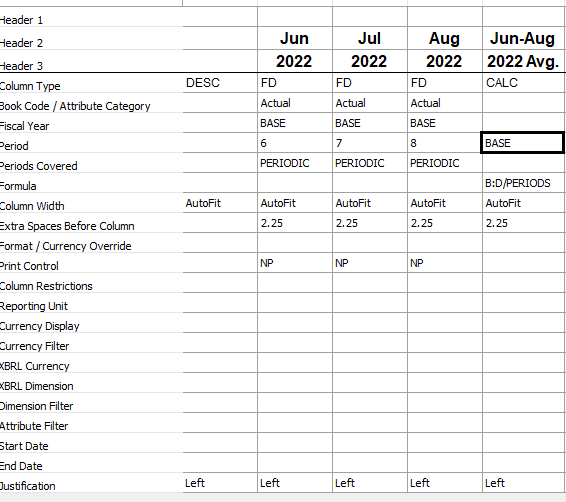
Average.png

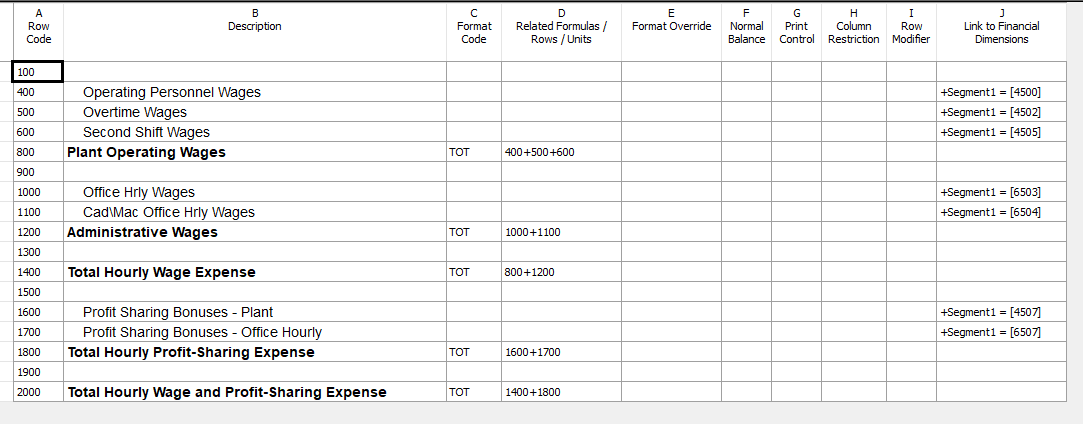
This is my Row Definition:

2313.Row.png

I have both the row and column definition specified in my Report Definition:
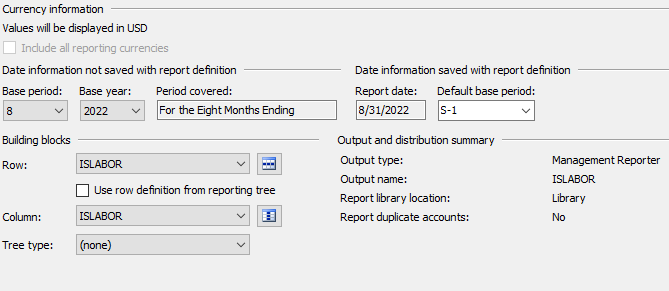
0211.Report.png

Thank you.

Categories:
I have the same question (0)
  • Suggested answer
    JakeF Profile Picture
    Microsoft Employee on at

    Summing columns with a range, B:D for example, will only sum printing columns by design. If you want to sum columns regardless of if they are printing, they must be specifically referenced, B+C+D for example. Also remember to add parentheses for order of operations if you want all three of those columns to be divided by the number of periods (B+C+D)/PERIODS.

    immage.png

  • PattiK323 Profile Picture
    297 on at

    Thank you.  Making the changes, I now get numbers to calculate and print; but, they are not correct.

    For example, Operating Personnel Wages (account 4500) are $100 for June, $200 for July, and $300 for August; but, the 3-month average is calculating as $75. It looks like it's dividing by 8 (the August period ?), instead of 3 months (June-July-August).

    Screenshot-2022_2D00_09_2D00_20-082145.png

  • Verified answer
    JakeF Profile Picture
    Microsoft Employee on at

    I edited the post to use generic numbers. The formula (B+C+D)/PERIODS will sum up those three columns and divide by the period number the report was generated for (8 in this case). If you want it to divide by 3 instead, change it to (B+C+D)/3.

  • PattiK323 Profile Picture
    297 on at

    I did that and it works, other than some weird and missing data for 2019 and 2020, which I need to figure out.  Thanks for your help!

Under review

Thank you for your reply! To ensure a great experience for everyone, your content is awaiting approval by our Community Managers. Please check back later.

Helpful resources

Quick Links

Introducing the 2026 Season 1 community Super Users

Congratulations to our 2026 Super Stars!

Meet the Microsoft Dynamics 365 Contact Center Champions

We are thrilled to have these Champions in our Community!

Congratulations to the April Top 10 Community Leaders

These are the community rock stars!

Leaderboard > Finance | Project Operations, Human Resources, AX, GP, SL

#1
Giorgio Bonacorsi Profile Picture

Giorgio Bonacorsi 804

#2
André Arnaud de Calavon Profile Picture

André Arnaud de Cal... 639 Super User 2026 Season 1

#3
Subra Profile Picture

Subra 528

Last 30 days Overall leaderboard

Product updates

Dynamics 365 release plans