web
You’re offline. This is a read only version of the page.
close
Skip to main content

Notifications

Announcements

No record found.

Community site session details

Community site session details

Session Id :
Microsoft Dynamics AX (Archived)

AxBuild.exe xppcompileall stuck on 3 asterisks

(0) ShareShare
ReportReport
Posted on by

Hi all,

I have a recurring issue when trying to start a compile all via AxBuild.exe on the server. Each time the compile starts, it just shows the AxBuild prompt with 3 asterisks. This window closes after about 15-20 minutes (without actually doing anything).

I stopped the aos service and issued the command as shown below. I have tried logging in with different accounts, changing the amount of workers in the command (/w=4).  I have this issue on other environments as well. Other users are able to start compiles on this machine.

Any tips would be appreciated.
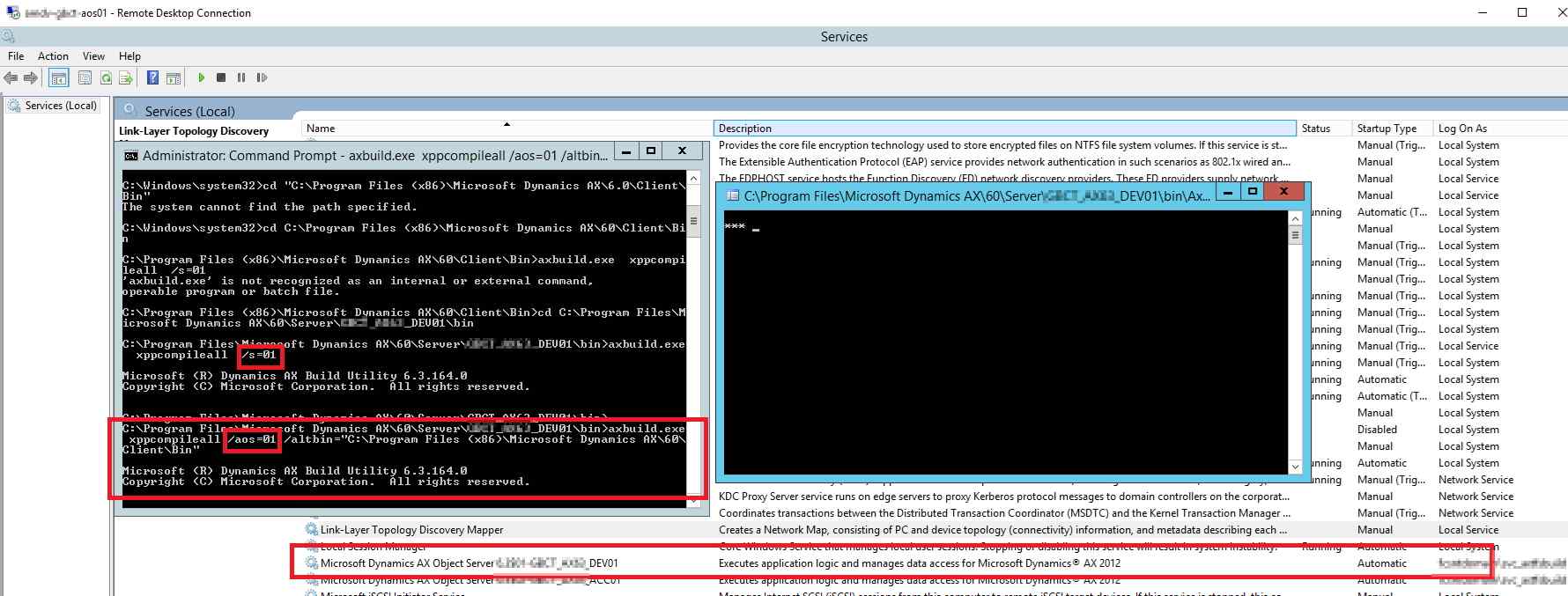
CompileAll-stuck.jpg

Thanks,

Gabriël

*This post is locked for comments

I have the same question (0)
  • Mea_ Profile Picture
    60,284 on at

    Hi Gabriel987,

    I had same issue once when I ran it under account that did not have all required permissions. I did no bother to find what exactly was missing but if you will do this under Adminstrator all should be ok.

  • Community Member Profile Picture
    on at

    Hi Ievgen,

    Thanks for your reply.

    My account is in the administrator group on that server and i open the command prompt with 'Run as administrator'.

  • Mea_ Profile Picture
    60,284 on at

    Did you try to run it under AOS account ?

  • XB Profile Picture
    1,875 on at

    Did you open the console as admin? do your user acces to DB?

    Did you check log from axbuild?

  • Suggested answer
    Luan Nguyen Profile Picture
    689 on at

    Hi,

    stop AOS, use AX admin user

    go to C:\Program Files\Microsoft Dynamics AX\60\Server\DAX\bin, and open cmd with admin right from here

    run this command

    axbuild.exe  xppcompileall  /s=01 /altbin="C:\Program Files (x86)\Microsoft Dynamics AX\60\Client\Bin"

  • Suggested answer
    startax Profile Picture
    1,845 on at

    Hi Gabriel ,

    Once i am faced the same issue and tried all option but cant succeed then last i am login with administrator and run the command.

    If you get any other solution please post here.

    Thanks

  • Community Member Profile Picture
    on at

    I have seen this in two scenarios. The first one is the permissions, ensure the user running axbuild.exe has the same permissions as the AOS Service account.

    AxBuild.exe must be run by an account that has no less security authority than the account that runs the permanent AOS has.

    Source: https://msdn.microsoft.com/en-us/library/dn528954.aspx


    The second time, it happened when my SQL Server had no more RAM resources available. I had to clear memory for my SQL service.

  • Bojan Jankovic Profile Picture
    on at

    The issue is on SQL side. Make sure that your account has enough permissions on AX databases.

    Regards,

    Bojan Jankovic

Under review

Thank you for your reply! To ensure a great experience for everyone, your content is awaiting approval by our Community Managers. Please check back later.

Helpful resources

Quick Links

Responsible AI policies

As AI tools become more common, we’re introducing a Responsible AI Use…

Neeraj Kumar – Community Spotlight

We are honored to recognize Neeraj Kumar as our Community Spotlight honoree for…

Leaderboard > 🔒一 Microsoft Dynamics AX (Archived)

#1
Priya_K Profile Picture

Priya_K 4

#1
Martin Dráb Profile Picture

Martin Dráb 4 Most Valuable Professional

#3
Ali Zaidi Profile Picture

Ali Zaidi 2

Last 30 days Overall leaderboard

Featured topics

Product updates

Dynamics 365 release plans



