web
You’re offline. This is a read only version of the page.
close
Skip to main content

Announcements

No record found.

News and Announcements icon
Community site session details

Community site session details

Session Id :
Finance | Project Operations, Human Resources, ...
Unanswered

Management Reporter Error : (this report contains one or more errors that prevent it from being rendered)

(0) ShareShare
ReportReport
Posted on by 5

Hello,

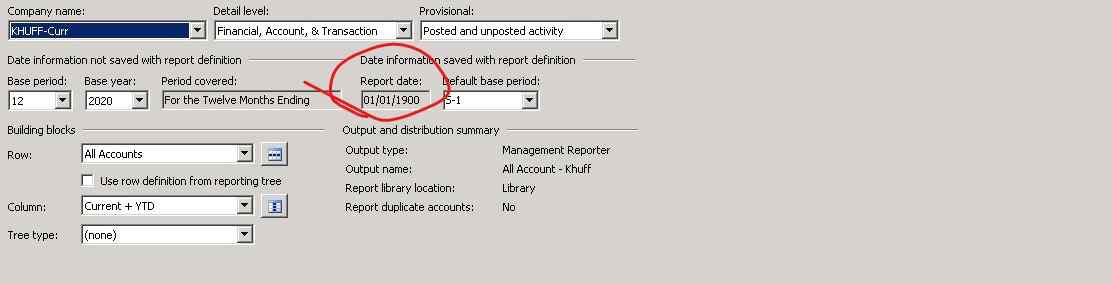
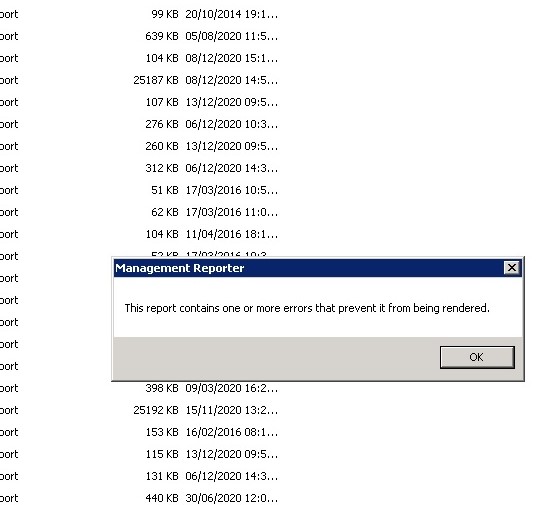
I have error ( this report contains one or more errors that prevent it from being rendered ) when generate reports for specific company & for specific year 2020 as attached.

I noticed that year has an invalid report date as shown 1/1/1900 as attached(Only 2020 Year ) 

i read post about rebuild data mart which i am not sure but i tried it also has issues the MR crash when i remove the integration link.

I will be thankful if any body has an idea ????
Untitled3.jpg

InkedUntitled1_5F00_LI.jpg

Categories:
I have the same question (0)
  • Bill Campbell Profile Picture
    12 on at

    First place I would look is at the Fiscal Period window in the Company that this report is generating for.  If not there then the data mart may be the best place to start.  But to the best of my knowledge this date is from the GP tables.

  • Greg Byer Profile Picture
    2,586 on at

    You'll want to check the fiscal period tables for this company and see if any of them have a date of 1/1/1900.  You can run these two queries against the company database:

    select PERNAME, PERIODDT, PERDENDT, PERIODID, YEAR1 from sy40100 where Series = 0 order by year1, PERIODID

    select * from SY40101

    If you find the 1/1/1900 date, you can fix it by re-creating the fiscal periods.  This KB will walk you through that process:

    support.microsoft.com/.../how-to-re-create-fiscal-periods-in-microsoft-dynamics-gp

    Once you've correct the fiscal periods, you can rebuild the data mart.  

Under review

Thank you for your reply! To ensure a great experience for everyone, your content is awaiting approval by our Community Managers. Please check back later.

Helpful resources

Quick Links

Introducing the 2026 Season 1 community Super Users

Congratulations to our 2026 Super Stars!

Congratulations to our 2025 Community Spotlights

Thanks to all of our 2025 Community Spotlight stars!

Leaderboard > Finance | Project Operations, Human Resources, AX, GP, SL

#1
Giorgio Bonacorsi Profile Picture

Giorgio Bonacorsi 531

#2
André Arnaud de Calavon Profile Picture

André Arnaud de Cal... 402 Super User 2026 Season 1

#3
Syed Haris Shah Profile Picture

Syed Haris Shah 257 Super User 2026 Season 1

Last 30 days Overall leaderboard

Product updates

Dynamics 365 release plans