web
You’re offline. This is a read only version of the page.
close
Skip to main content

Notifications

Announcements

No record found.

Community site session details

Community site session details

Session Id :
Finance | Project Operations, Human Resources, ...
Unanswered

Benefit Accrual Plans - Leave Caps

(0) ShareShare
ReportReport
Posted on by

Hello everyone,

My institution recently adopted Microsoft Dynamics 365, Finance HR and Payroll as our ERP. Our implementation company is new to rolling out this suite. I'm hoping someone can assist with a question that I have on Benefit Accrual Plans.

At our institution we have an annual carry forward balance of 320 hours of vacation time. 

We also want to enforce this cap each pay period, to remove the ability to earn over 320 hours at any given time.

If an employee currently has a balance at 315 hours and will accrue 6.15 hours from this pay period per our accrual schedule of 6.15 hours bi-weekly, the additional hour and change would be lost and they would end up having a total of 320 available hours.

Does anyone see any way of adjusting this to enforce it per pay period? I cannot change the Annual Plan Start Date, which was my first thought because when the annual date is hit it enforces the rule and calculation to put all employees to 320, but it's only performed once per year on the Annual Plan Start Date. I'm also a little confused on how the frequency calendar works, and wanted to see if we could come together as a community to answer this question. Our vendor so far believe they want to do a customization on one hand, but I had two more technical people state that the frequency and accrual rate basis might be items we could manipulate to get the maximum cap to calculate each pay period. 
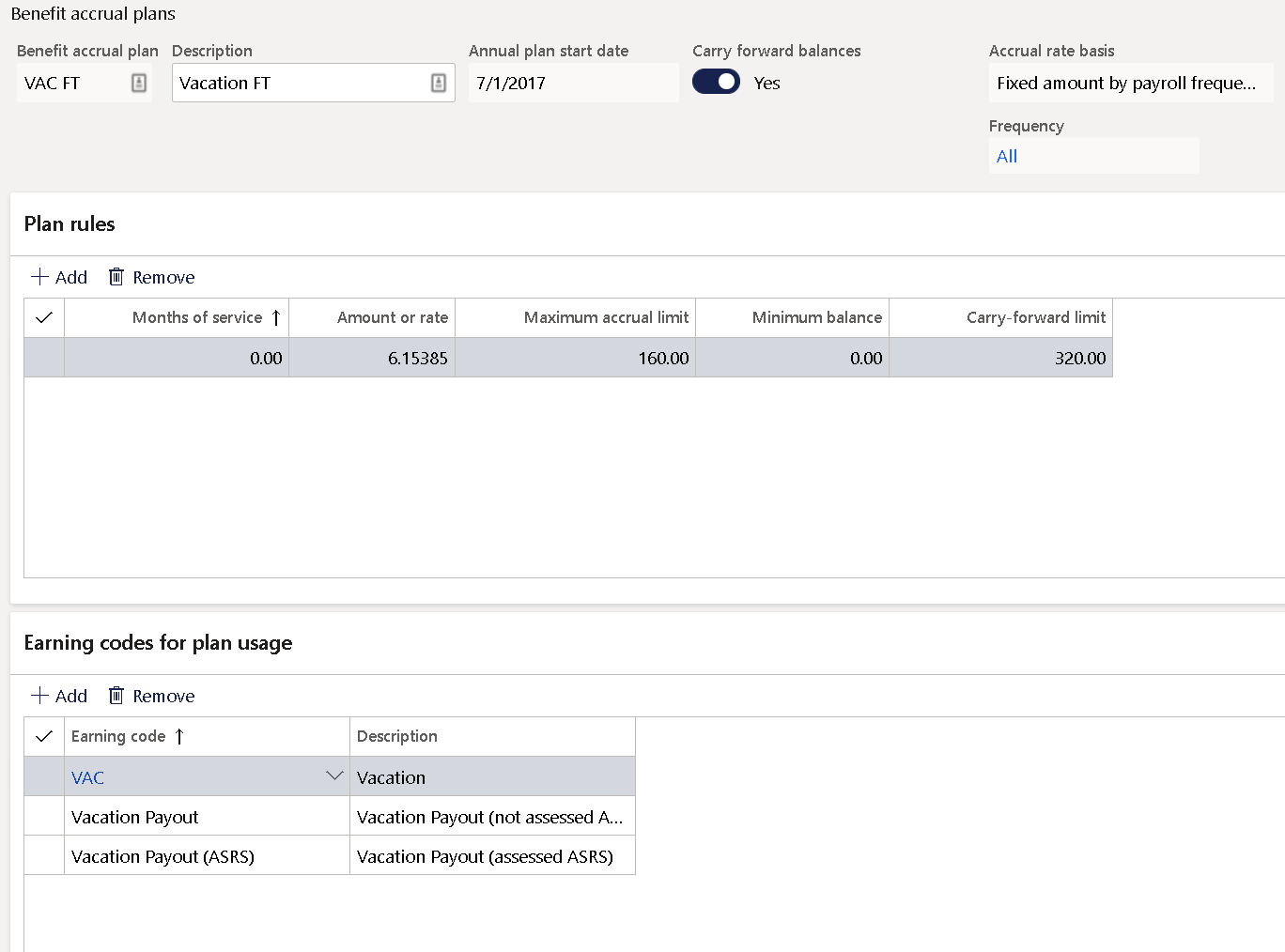
Benefit_5F00_Accrual_5F00_Plan.png

450343.png

Fig 2 - We want the available balance to max out at 320, and we would like the calculation for benefit accruals to run every pay period. No employee should have more than 320 available in any given pay period.

I have the same question (0)
  • Juanse Profile Picture
    660 on at

    Hello,

    The calendar frequency has to do with how often you want to accrue for vacation. It seems with your setting that it will accrue every time you run payroll, twice a month or three times a  month, depending on your payroll cadence.

    It seems your maximum accrual limit should be 320 as well. This will stop the accrual at 320. The only issue and one that needs customization is that if an employee carry overs  320 hours, then next plan year he would be allowed to accrue another 320. You will need to manually stop accrual once someone available limit reaches 320 hours.

    regards,

  • Community Member Profile Picture
    on at

    Hello,

    Our accruals are bi-weekly, which is working fine. The annual accrual for each employee is 160 hours per year, but the maximum to hold for all of time is 320. When accruals run each pay period, the 320 limit is being exceeded. I'm trying to find a way to cap that 320, each pay period.

  • qianwang Profile Picture
    7,168 on at

    Hi FrankieD-CAC ,

    Could you show us more information about 'the 320 limit is being exceeded'? A screenshot will be better.

    What do you mean 'an employee is set at 315 hours and will accrue 5 hours from this pay period, the additional hour would be lost'?

    According to the current system setting, if the worker does not use the accrued hours for two consecutive years, the accumulated hours will reach 320. At the same time, the system allows carry-over and continues to accrue hours in the next planning year.

    Regards,

    QianQW

  • Community Member Profile Picture
    on at

    Sure, what we would like to do is set a hard cap at 320. Employees cannot exceed this amount; in any given pay period. We want to stop them from accruing any balance that goes over the 320 limit. This will encourage employees to use their vacation time more regularly rather than letting it build up to 480 hours in a calendar year. The way the system is currently working when the annual plan start date is hit the balances cut back to 320, however, employees can accrue upto 480 hours in their bank at this time. We would like to stop them from being able to accrue anything over their 320 balance. I am posting a second photo above that shows you an example of 25 employees who have exceeded their 320 bank balance for accrued leave for vacation time.  

Under review

Thank you for your reply! To ensure a great experience for everyone, your content is awaiting approval by our Community Managers. Please check back later.

Helpful resources

Quick Links

Responsible AI policies

As AI tools become more common, we’re introducing a Responsible AI Use…

Neeraj Kumar – Community Spotlight

We are honored to recognize Neeraj Kumar as our Community Spotlight honoree for…

Leaderboard > Finance | Project Operations, Human Resources, AX, GP, SL

#1
André Arnaud de Calavon Profile Picture

André Arnaud de Cal... 449 Super User 2025 Season 2

#2
Martin Dráb Profile Picture

Martin Dráb 422 Most Valuable Professional

#3
BillurSamdancioglu Profile Picture

BillurSamdancioglu 239 Most Valuable Professional

Last 30 days Overall leaderboard

Product updates

Dynamics 365 release plans



