web
You’re offline. This is a read only version of the page.
close
Skip to main content

Notifications

Announcements

No record found.

Community site session details

Community site session details

Session Id :
Microsoft Dynamics AX (Archived)

Purchase Order Lines list page > how to Filter the Records ?

(0) ShareShare
ReportReport
Posted on by 353

Hi -

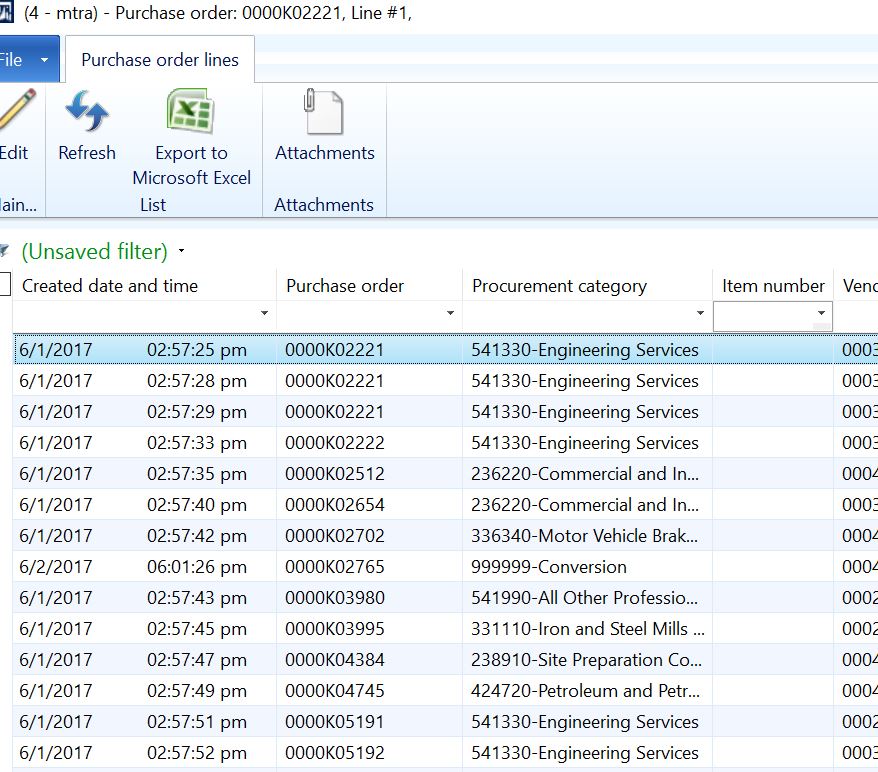
   I need to update Purchase Order Lines List page to view all the records with the item Number column not empty. I only need those lines listed on the listpage which have the item number present. How can I achieve this ?

Please take a look at the screen shot.
Capture3333.JPG

As you can see these records have no Item numbers. I need to remove these records from the list page when the list page is opened.

Any help is appreciated.

Thanks

*This post is locked for comments

I have the same question (0)
  • Suggested answer
    Andrew Xu Profile Picture
    3,877 on at

    Muhammad,

    You can put ?* in the filter box of Item Id and hit enter.

  • Muhammad_Ali Profile Picture
    353 on at

    Andrew -

      That is correct but the users don't want to manually enter the filter. The form should automatically open without the lines which have no Item numbers. ?

    Thanks

  • Suggested answer
    Andrew Xu Profile Picture
    3,877 on at

    You have these options I can think of,

    1. Save that filter and add that list page to favorites, and then edit the favorites to apply that saved query. So user can use that favorite to open the list page without manually enterting criterion.

    2. Change the query behind that form to exclude records without empty item id.

    3. Use XDS security framework to exclude the records without empty itemid for those users don't want to see.

  • Muhammad_Ali Profile Picture
    353 on at

    Thanks Sukrut

Under review

Thank you for your reply! To ensure a great experience for everyone, your content is awaiting approval by our Community Managers. Please check back later.

Helpful resources

Quick Links

Responsible AI policies

As AI tools become more common, we’re introducing a Responsible AI Use…

Neeraj Kumar – Community Spotlight

We are honored to recognize Neeraj Kumar as our Community Spotlight honoree for…

Leaderboard > 🔒一 Microsoft Dynamics AX (Archived)

#1
Martin Dráb Profile Picture

Martin Dráb 4 Most Valuable Professional

#1
Priya_K Profile Picture

Priya_K 4

#3
MyDynamicsNAV Profile Picture

MyDynamicsNAV 2

Last 30 days Overall leaderboard

Featured topics

Product updates

Dynamics 365 release plans
