web
You’re offline. This is a read only version of the page.
close
Skip to main content

Notifications

Announcements

No record found.

Community site session details

Community site session details

Session Id :
Service | Customer Service, Contact Center, Fie...
Suggested Answer

Field service mobile tracking help needed to set it up

(0) ShareShare
ReportReport
Posted on by 886

Hi,

I followed this guide, and i can get the real time tracking working (I can see the icon on the map on the schedule board)

1) However is there any way i can track a route (on a map) for a field technician? Ex. he starts in the morning by creating a booking, he later on finish it. He then drives to a new place etc etc. 

https://docs.microsoft.com/en-gb/dynamics365/field-service/geofencing

Also the follwong is the setup on the mobile client. 

2) Request position every 1 minutes - Is it suggested to have it at 1 minute? I guess it will drain more battery? And what are the disadvantanges of ex. setting it to 15?

3) User entity view, what is this used for and do i need to chnage it?

4) Visit entity view, what is this used for and do i need to chnage it? Shoud't this be changed to bookable resource bookings?
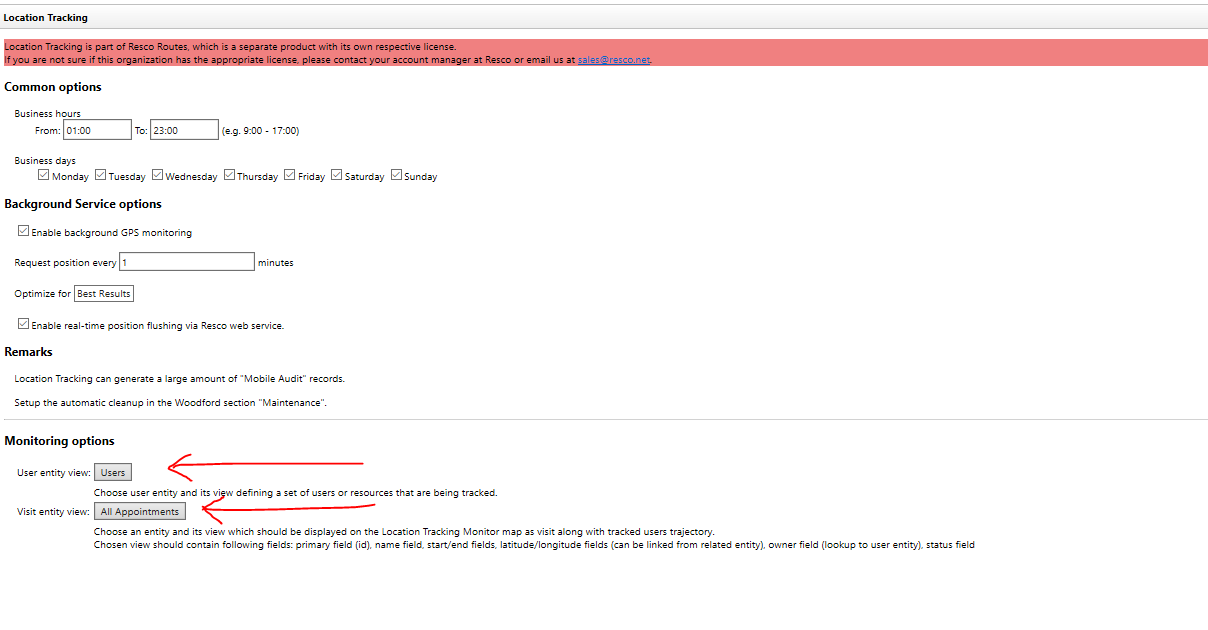
image001.png

I have the same question (0)
  • Suggested answer
    Al Iggs Profile Picture
    on at

    1) Location tracking write the location into the mobile audit entity. You could create a custom visualization, but data would likely not be granular enough. You could have a look at Resco Routes: www.resco.net/.../, there are also HW partners that provide dongles that connect to IoT Hub and provide location data of the vehicle, not the tech.

    2) Depends on your requirements. Do you get a lot of emergencies that require re-scheduling of techs? Then a shorter time makes sense. For a rough indication 5-15 minutes might be sufficient.

    3) and 4) from my PoV refer to Resco Routes. You can see that from the term "appointments", which do not play a role if FS.

  • rskadk1 Profile Picture
    886 on at

    Thanks for your answer. In regards to:

    1) Wird that there isn't developed something by microsoft or resco that vizualizes this.

    But i can see resco has something called "Location Tracking". Isn't this used for this purpose?

    --> Found this - however i cannot get it to show anything: https://us.hitachi-solutions.com/blog/track-easier-dynamics-field-service/

    2) We do get al lot of rescheduling. However most tasks is 2-4 hours.  So maybe 30min would be enough.

    However  do the real time positioning get affected by the "request position every x minutes"?

    3+4) As for now resco routes are not included in MS Field Service - so i will just leave dem as is.

Under review

Thank you for your reply! To ensure a great experience for everyone, your content is awaiting approval by our Community Managers. Please check back later.

Helpful resources

Quick Links

Responsible AI policies

As AI tools become more common, we’re introducing a Responsible AI Use…

Neeraj Kumar – Community Spotlight

We are honored to recognize Neeraj Kumar as our Community Spotlight honoree for…

Leaderboard > Service | Customer Service, Contact Center, Field Service, Guides

#1
Tom_Gioielli Profile Picture

Tom_Gioielli 75 Super User 2025 Season 2

#2
Siv Sagar Profile Picture

Siv Sagar 52 Super User 2025 Season 2

#3
Daniyal Khaleel Profile Picture

Daniyal Khaleel 42 Most Valuable Professional

Last 30 days Overall leaderboard

Featured topics

Product updates

Dynamics 365 release plans
