web
You’re offline. This is a read only version of the page.
close
Skip to main content

Announcements

News and Announcements icon
Community site session details

Community site session details

Session Id :
Small and medium business | Business Central, N...
Suggested Answer

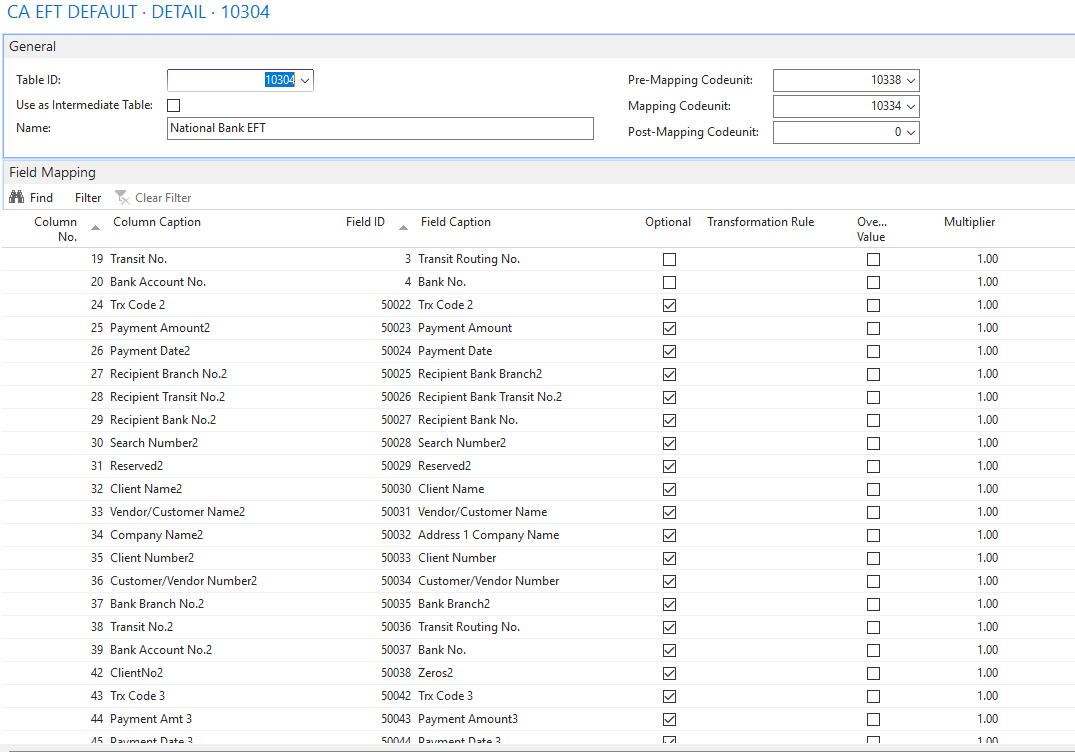
Tracing Custom Fields in Data Exchange Definition (Table 10304 / CA EFT DEFAULT)

(3) ShareShare
ReportReport
Posted on by 31
Hi folks,

I am working on a NAV to Business Central migration for a client who is using the Data Exchange Framework for EFT file generation (Canadian localization — CA EFT DEFAULT).

In the Data Exchange Definition, specifically in the DETAIL line field mappings, I can see several custom fields (5000-series) mapped against Table 10304 (EFT Staging Table). I need to trace back where these custom fields are getting their values from before the EFT file is exported.

Important constraint: I do not have access to the NAV code due to license limitations, so I need to investigate this through the UI only. I have already checked Vendor Bank Account (Table 288), Vendor (Table 23), Customer (Table 18), and Company Information (Table 79) but could not find anything related.

I understand there is likely a codeunit or event subscriber responsible for populating Table 10304 — but I need to first identify the source of these fields before diving into the code side.

Has anyone traced custom Data Exchange fields back to their source without code access? Any UI-based approach or pointers to the right area would be greatly appreciated!


I have the same question (0)
  • Suggested answer
    YUN ZHU Profile Picture
    101,948 Super User 2026 Season 1 on at
    I think you can find some useful information in system table 2000000041 "Field".
     
    Thanks.
    ZHU
  • Suggested answer
    Andrés Arias Profile Picture
    5,192 Super User 2026 Season 1 on at
    Hello,

    Does the payment process follow a specific sequence—such as buttons, steps, reports, etc.? That way, I could “check” the fields as I go.
     
    I hope this helps.
     
    Best regards,
     
    Andrés
  • Suggested answer
    Assisted by AI
    OussamaSabbouh Profile Picture
    17,460 Super User 2026 Season 1 on at
    Hello,
    UI-only, the shortest answer is: you usually won’t be able to fully trace custom 5000-series fields in EFT Staging (Table 10304) back to their source without code access, because standard Business Central lets you see the Data Exchange Definition and the assigned Pre-/Mapping/Post-Mapping codeunits, but if those fields don’t exist on visible master data pages like Vendor, Customer, Bank Account, or Company Information, they are most likely being filled by custom logic during export rather than stored directly in a standard table; so the best UI approach is to identify the codeunits on the definition, run a small test export, change one visible source value at a time in the journal/vendor/bank/company setup, and compare the output to infer the source, but if nothing on the UI matches, the real source is almost certainly customization in the mapping process.
    Regards,
    Oussama Sabbouh
  • Suggested answer
    Khushbu Rajvi. Profile Picture
    22,792 Super User 2026 Season 1 on at

    From UI, you can check Data Exchange field mappings, Payment Journal, and use Page Inspection, but for custom (5000-series) fields, they are most likely filled via custom code. So without code access, it’s difficult to trace the exact source.


Under review

Thank you for your reply! To ensure a great experience for everyone, your content is awaiting approval by our Community Managers. Please check back later.

Helpful resources

Quick Links

Season of Sharing Community Challenge Launch!

Jump in, show your community spirit, and win prizes!

Women in Power Builds Momentum

Expanding mentorship, skilling, and AI innovation

Congratulations to the April Top 10 Community Leaders

These are the community rock stars!

Leaderboard > Small and medium business | Business Central, NAV, RMS

#1
OussamaSabbouh Profile Picture

OussamaSabbouh 2,250 Super User 2026 Season 1

#2
YUN ZHU Profile Picture

YUN ZHU 1,799 Super User 2026 Season 1

#3
AndrewThomas81 Profile Picture

AndrewThomas81 1,390

Last 30 days Overall leaderboard

Featured topics

Microsoft Training Manuals

Product updates

Dynamics 365 release plans



