web
You’re offline. This is a read only version of the page.
close
Skip to main content

Notifications

Announcements

No record found.

Community site session details

Community site session details

Session Id :
Microsoft Dynamics AX (Archived)

Index keys exceeds to the limit in table(SQL) : issue while running Upgrade checklist batch jobs :(

(0) ShareShare
ReportReport
Posted on by 30

Upgrading data from source(AX2009) to target(AX2012 ), I am receiving error while running upgrade checklist in ax2012 .

few batch jobs failed with the SQL error : 

The index 'I_104242DIMIDX' on table
'DBO.DMFINVENTDIMENTITY' has 17 columns in the key list. The maximum limit for index key column
list is 16.


i am unable to proceed with checklists now as other batch jobs are dependent to this batch job and this create a deadlock and leads to nowhere with the process of upgrade . Can some one review and suggest on same !!

Note:-

  • tried droping the fields from the index key using SQL doesn't work as it re creates and exceeds the limit everytime we resume the process .

  • we are unable to access development environment to troubleshoot the issue in ax2012.
  • upgrade checklist on source are already done .


I am grateful for the valuable suggestion in advance , Many Thanks.
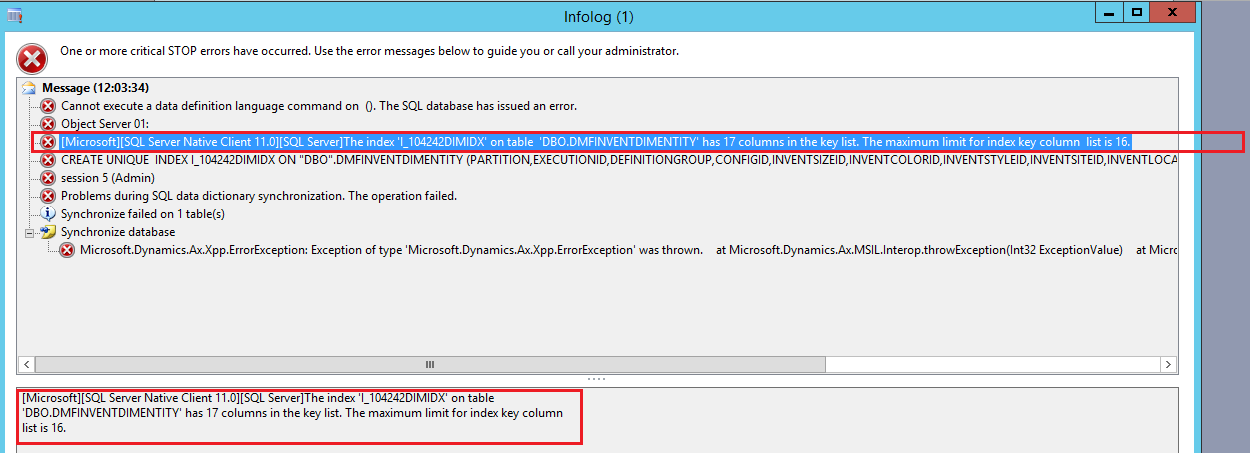
 sql-index-error.png

*This post is locked for comments

I have the same question (0)
  • Suggested answer
    guk1964 Profile Picture
    10,888 on at

    SQL has limit of 16 indexes of which two are outside your control in Ax so that leaves 14.

    Changes in Ax 2012 .e.g to support the new WMS meant more inventory dimensions were added.

    The options are to drop unwanted indexes (e.g those for Russian localisation) or to concatenate/ hash indexes together.

    Background: https://blogs.msdn.microsoft.com/dynamicsaxscm/2012/09/11/avoid-index-length-issues-with-inventdim/

    https://msdn.microsoft.com/en-us/library/dn495386.aspx

    https://dynamicsuser.net/ax/b/dynamics_ax_scm/posts/microsoft-dynamics-ax-r3-new-warehouse-management-solutions-impact-on-inventdim-extensibility-and-migration-scenarios?pi2085=2

    https://blogs.msdn.microsoft.com/dynamicsaxscm/2015/08/13/microsoft-dynamics-ax-r3-new-warehouse-management-solutions-impact-on-inventdim-extensibility-and-migration-scenarios/

    Useful blog posts:

    https://ievgensaxblog.wordpress.com/2016/07/17/ax-2012-r3-how-to-disable-inventory-dimension-hashing-to-improve-performance/ (covers how to drop of indexes not needed which is not as straightforward as it sounds).

    https://community.dynamics.com/ax/b/k3retailtechnicalblog/archive/2013/01/30/adding-a-dimension-to-inventdim-despite-the-limitation-of-16-fields-in-an-index which discusses also the alternative approach to use the  framework that Microsoft call “Stock Dimensions Extensibility”.

    For the future   see: https://blogs.msdn.microsoft.com/mfp/2017/08/10/extensible-inventory-dimensions/


  • Arpit Daxing Profile Picture
    30 on at

    Hi , thanks for your valuable suggestion and shared links .

    I understand that in many blogs it has been advised to drop some field from index .

    I dropped (deleted) some keys from table index ,using  SQL ,but it again gets  re created while I run upgrade checklist batch jobs .

    unfortunately when we are running the data upgrade cockpit , this doesn't allow us to access the development eviornment to delete them from AOT .

    any suggestion !!

  • Suggested answer
    Mea_ Profile Picture
    60,284 on at

    Do you have Dev license ? You should be able to open AOT and remove index fields if you have Dev license. Because deleting them from SQL won't help, AX recreates them during sync.

    Also you may try to disable config keys like dimensions extensibility or advanced warehouse temporary to reduce number of fields.

Under review

Thank you for your reply! To ensure a great experience for everyone, your content is awaiting approval by our Community Managers. Please check back later.

Helpful resources

Quick Links

Responsible AI policies

As AI tools become more common, we’re introducing a Responsible AI Use…

Neeraj Kumar – Community Spotlight

We are honored to recognize Neeraj Kumar as our Community Spotlight honoree for…

Leaderboard > 🔒一 Microsoft Dynamics AX (Archived)

#1
Priya_K Profile Picture

Priya_K 4

#1
Martin Dráb Profile Picture

Martin Dráb 4 Most Valuable Professional

#3
Ali Zaidi Profile Picture

Ali Zaidi 2

Last 30 days Overall leaderboard

Featured topics

Product updates

Dynamics 365 release plans



