Hello Rachel
I believe that this is a practical case that occurs quite often, nothing new or unusual about it.
Initially, allow me to distinguish between three different date; which are the keys to the process of adding an asset from the purchasing module.
1- Payable | Invoice Date: the date of the payable invoice based on which the liability of the company will be calculated. The due date will be calculated according to the document date as well, and more importantly the GL posting date (taking your setup into consideration)
2- Fixed Assets | Acquisition Date: it is simply the date at which the asset was acquired (regardless of the depreciation calculation and details). When adding an asset from the Purchasing module, the acquisition date will default from the payable invoice date explained above.
3- Fixed Asset | Place in Service Date: which is the driver for your depreciation calculation, based on which the depreciation amounts are calculated regardless of when the asset was acquired. So if you acquire an asset at 01/09/2014, the place in service data can simply be changed to 01/01/2015, and the depreciation of this asset will calculate starting from the place in service data accordingly.
Now back to your case, we all agree that the invoice date is xx/09/2014. and the Acquisition date will be xx/09/2014 as well. For the place in service date, you are the one that should know when the asset should start depreciation, and here I suppose two different scenarios
Scenario One
The asset should start depreciation from 01/01/2015. Therefore, you may simply change the place in service date to 01/01/2015.
Scenario Two
The asset should start depreciation from xx/09/2014, but the GL journals should be posted in 2015. In this essence, put the place in service date as xx/09/2014.
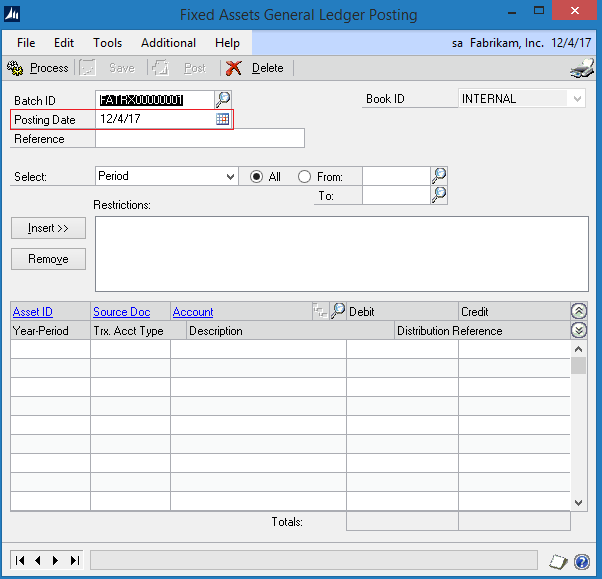
To generate the journal at the current year, change the posting date of the (GL POSTING) window (Microsoft Dynamics GP > Tools > Routines > Fixed Assets > GL Posting). The date at this window determines the posting date of the associated journal entry in the GL level. Here is a screen shot for the FA GL posting window and the associated date:
For further information, you may refer to the following detailed posts on how to add assets from the purchasing and payable module on a step by step bases
Adding Fixed Asset from Payable Management
Adding Fixed Assets from Purchase Order Processing module (Multiple assets per Shipment)
Your feedback is highly appreciated,





