web
You’re offline. This is a read only version of the page.
close
Skip to main content

Announcements

News and Announcements icon
Community site session details

Community site session details

Session Id :
Dynamics 365 Community / Forums / Finance forum / D365FO - How to setup ...
Finance forum

D365FO - How to setup PDF as option in "Print destination settings"

(0) ShareShare
ReportReport
Posted on by 730

Hi there!

Would you be so kind to advise how to setup printer Print destination settings so that in the Name drop down combo box it would be possible to select option to print to the PDF file. Here is what I have when the PDF option is absent:
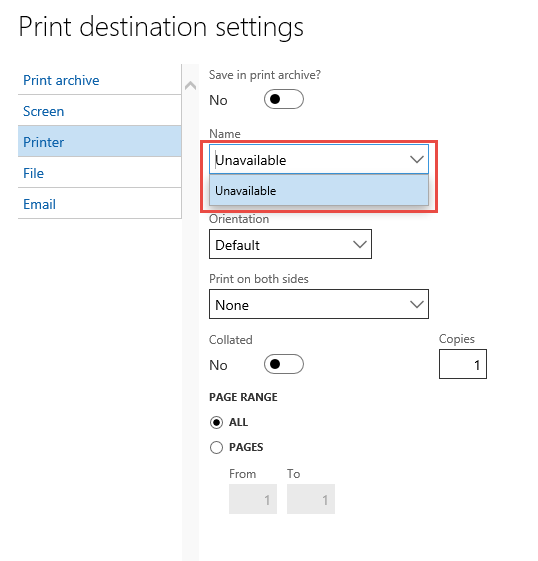
3630.PrintDestinationSettings.png

Adobe Reader is not installed. Never worked before in that particular environment.

Many thanks, in advance!

I have the same question (0)
  • Verified answer
    Mea_ Profile Picture
    60,286 on at

    Hi MarinaAX,

    If you want to print to PDF file you need to select "File" destination, not printer, then you can select file type and file name. If you want to print to the printer you need to install document routing agent on a local PC and do a setup to expose network printers to AX  docs.microsoft.com/.../install-document-routing-agent

  • MarinaAX Profile Picture
    730 on at

    Thank you very much for your advise, Ievgen! Highly appreciate it!

    In https://ax4erp.blogspot.com/2017/01/print-multiple-purchase-orders-from-ax.html I noticed it is possible somehow to set up the printer to Microsoft Print to PDF and I would highly appreciate if you advise me how to configure it, please. Here is how the desired functionality looks like:

    3343.4186.Print-management.png

    This functionality is necessary, because I set it up in the DEV environment which is not allowed to use any hardware printers and as a result we can't take advantage any other Printer options. And there is no any printers, then D365 does not save Print destination settings with the error: "A valid printer must be selected. Please choose a printer name in the 'Name' box."

    Many thanks for your help, in advance!

  • Mea_ Profile Picture
    60,286 on at

    So what is wrong with printing to a file ?

  • MarinaAX Profile Picture
    730 on at

    Hi Ievgen,

    Probably, there is nothing wrong with printing to file, but our developer refuses to present steady result if the Name does not contain any printer - physical or Print to PDF. He is not happy with the error message "A valid printer must be selected. Please choose a printer name in the 'Name' box."(5) which appears when you click on OK (4) in the screenshot, despite there is something in Commercial invoice \ Original <Default>.

    7651.Print-management-error.png

    So, I have no other options except configuring the Microsoft Print to PDF option or code myself, or look for another project/workplace :)

  • Mea_ Profile Picture
    60,286 on at

    You keep repeating the same. As far as I understand, you need to get pdf, so set printing to file instead of  printer and you won't get any error. If you requirement is different please elaborate it, so we can help you.

  • Verified answer
    Syed Fasih Profile Picture
    2,442 on at

    You can check *save in Print Archive* button in the screen option. You can go back to Organization administration > Inquiries> Print archive and then pull out the report from there. It will have the PDF version.

  • Suggested answer
    GSK Profile Picture
    70 on at

    This thread is probably retired by now, but you would install the Document routing agent and then install the Microsoft Print to PDF in the Network printers area. You can then select the PDF printer as any other printer in the Name field.

Under review

Thank you for your reply! To ensure a great experience for everyone, your content is awaiting approval by our Community Managers. Please check back later.

Helpful resources

Quick Links

November Spotlight Star - Khushbu Rajvi

Congratulations to a top community star!

Forum Structure Changes Coming on 11/8!

In our never-ending quest to help the Dynamics 365 Community members get answers faster …

Dynamics 365 Community Platform update – Oct 28

Welcome to the next edition of the Community Platform Update. This is a status …

Leaderboard > Finance

Last 30 days Overall leaderboard

Featured topics

Product updates

Dynamics 365 release plans
