web
You’re offline. This is a read only version of the page.
close
Skip to main content

Announcements

No record found.

News and Announcements icon
Community site session details

Community site session details

Session Id :
Customer experience | Sales, Customer Insights,...
Suggested Answer

Not able to update account field on the Lead form

(0) ShareShare
ReportReport
Posted on by 30

Hello everyone,


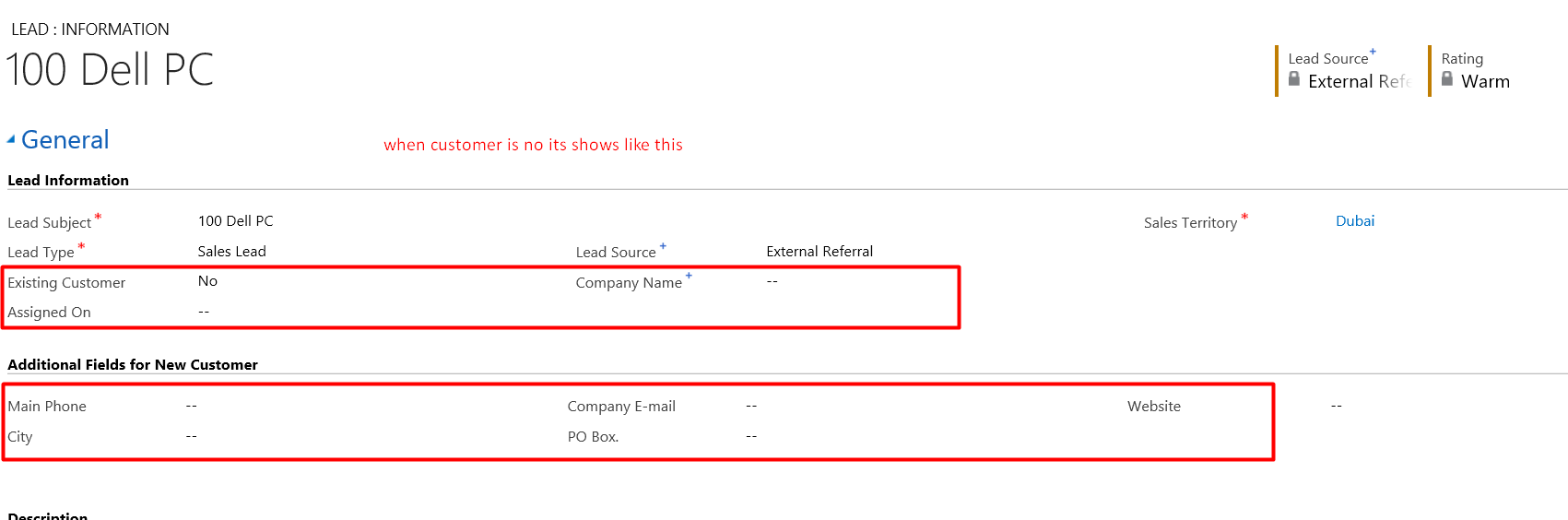
I have requirement to update account field when the lead is qualified, I have one field - Existing customer Yes or no option set,

IF exciting customer = NO it will hide the Account Lookup field from the form and show the field Company name (Text field)

We have one dialog on the Lead when the dialog is run for new customer it creates new account according to Company name and update existing customer = YES, Account Lookup = Company name,

But the problem is account gets created in CRM when user run the dialog lead gets qualified existing customer also update = YES but account lookup filed is not updating its showing blank

Can any one assist in this..
pastedimage1599138321238v1.png

pastedimage1599138413220v2.png

I have the same question (0)
  • Suggested answer
    Rawish Kumar Profile Picture
    13,758 on at

    Hi,

    Could you please share the information regarding the dialog you are referring to. Seems like once lead is qualified and account is created. the next step, we need to update this lead record back with the newly created account.

  • Neha pandey Profile Picture
    30 on at

    This is the Dailog Snap where If Existing Customer is NO and usef run the dailog.

    pastedimage1599196026954v1.png

    pastedimage1599196137678v2.png

    pastedimage1599196190567v3.png

  • Suggested answer
    Bipin D365 Profile Picture
    28,985 Moderator on at

    HI,

    Can you check audit history of the record to see if some custom code is running which is modifying the value to null?

    Also, Once Lead is qualified or disqualified Lead record will become read only and system will not allow to update any field.

    So my recommendation is to first create contact then update lead and then qualify lead.

    Please mark my answer verified if i were helpful

  • Suggested answer
    Community Member Profile Picture
    on at

    Hi Neha,

    This is the limition of dialog, it can’t update lookup field with record that just create.

    You can create an instant flow to achieve it.

    you can refer following picture, which is simple test of create and update records, you can add other action as your demand.

     pastedimage1599216393071v3.pngpastedimage1599216399042v4.png

    Save the flow, refresh and wait for several miniutes to run the flow.

    pastedimage1599216371987v1.png

    pastedimage1599216407110v5.png

    Regards,

    Leah Ju

    Please mark as verified if the answer is helpful. Welcome to join hot discussions in Dynamics 365 Forums.

  • Neha pandey Profile Picture
    30 on at

    Dear Thank you for ur Suggestion  but i am using MS CRM 2013 On premise version. and these things not possible in it.

  • Neha pandey Profile Picture
    30 on at

    Hey Bipin

    I had done that process also but won't work for me

Under review

Thank you for your reply! To ensure a great experience for everyone, your content is awaiting approval by our Community Managers. Please check back later.

Helpful resources

Quick Links

Introducing the 2026 Season 1 community Super Users

Congratulations to our 2026 Super Stars!

Meet the Microsoft Dynamics 365 Contact Center Champions

We are thrilled to have these Champions in our Community!

Congratulations to the April Top 10 Community Leaders

These are the community rock stars!

Leaderboard > Customer experience | Sales, Customer Insights, CRM

#1
ManoVerse Profile Picture

ManoVerse 107 Super User 2026 Season 1

#2
11manish Profile Picture

11manish 92

#3
Muhammad Shahzad Shafique Profile Picture

Muhammad Shahzad Sh... 69 Most Valuable Professional

Last 30 days Overall leaderboard

Product updates

Dynamics 365 release plans
