web
You’re offline. This is a read only version of the page.
close
Skip to main content

Announcements

News and Announcements icon
Community site session details

Community site session details

Session Id :
Customer experience | Sales, Customer Insights,...
Answered

"Resource not found for the segment 'owners'

(0) ShareShare
ReportReport
Posted on by

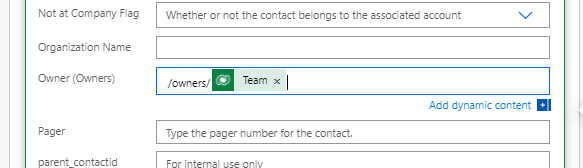
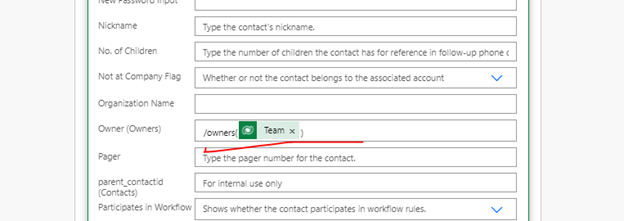
Hi I am using a flow to update the Contact entity's owner field with the created user's team.

When i set the team (GUID) like the attached images. All of the following ways were giving an error  "Resource not found for the segment 'owners'.".

I tried with Owners(Team) , Owner(Team), /owners(Team), /owners/Team as per some the forum suggestion. Those options were giving a similar message.  Can you advise me on how I can resolve it?

powerusers.microsoft.com/.../307528

pastedimage1622216190097v1.png

pastedimage1622216455544v2.png

pastedimage1622216473663v3.png

thank you, Siva

I have the same question (0)
  • Verified answer
    meelamri Profile Picture
    13,218 User Group Leader on at

    Hi Siva,

    If you want to assign a record to a team, you should use this expression: /teams(teamGuid)

    If you want to assign a record to a user, you should use this expression:

    /systemusers(userGuid)

  • Community Member Profile Picture
    on at

    Thank you for the info.

    when I use either /teams(teamGuid)  or teams(teamGuid), i am getting the following error.

    Principal team (Id=aa361417-cc41-eb11-bb23-000d3ae8e83c, type=9, teamType=0, privilegeCount=0), is missing prvReadContact privilege (Id=ba09ec92-12c4-4312-ba16-5715c2cbd6da) on OTC=2 for entity 'contact'. context.Caller=8c501997-c243-eb11-bb23-000d3ae8e991. Or identityUser.SystemUserId=f7584e40-7934-4df4-ae3a-82368e79e8a6, identityUser.Privileges.Count=3877, identityUser.Roles.Count=0 is missing prvReadContact privilege (Id=ba09ec92-12c4-4312-ba16-5715c2cbd6da) on OTC=2 for entity 'contact'.

  • Verified answer
    meelamri Profile Picture
    13,218 User Group Leader on at

    Hi, 

    This is related to the security roles of your team. It has no relation to your flow.

    Don't forget to verify my answer by clicking yes to close the thread, thanks.

Under review

Thank you for your reply! To ensure a great experience for everyone, your content is awaiting approval by our Community Managers. Please check back later.

Helpful resources

Quick Links

Season of Sharing Community Challenge Winners!

Congratulations to our community stars!

Women in Power Builds Momentum

Expanding mentorship, skilling, and AI innovation

Congratulations to the July Top 10 Community Leaders

These are the community rock stars!

Leaderboard > Customer experience | Sales, Customer Insights, CRM

#1
11manish Profile Picture

11manish 94 Super User 2026 Season 2

#2
Daniyal Khaleel Profile Picture

Daniyal Khaleel 68 Most Valuable Professional

#3
ParthPatel249 Profile Picture

ParthPatel249 62

Last 30 days Overall leaderboard

Product updates

Dynamics 365 release plans