web
You’re offline. This is a read only version of the page.
close
Skip to main content

Notifications

Announcements

No record found.

Community site session details

Community site session details

Session Id :
Microsoft Dynamics AX (Archived)

Could not load assembly with report business logic

(0) ShareShare
ReportReport
Posted on by

Dear Master,

Hi master I am newbie in Dynamics AX, i have problem when Running Dynamics AX Service.
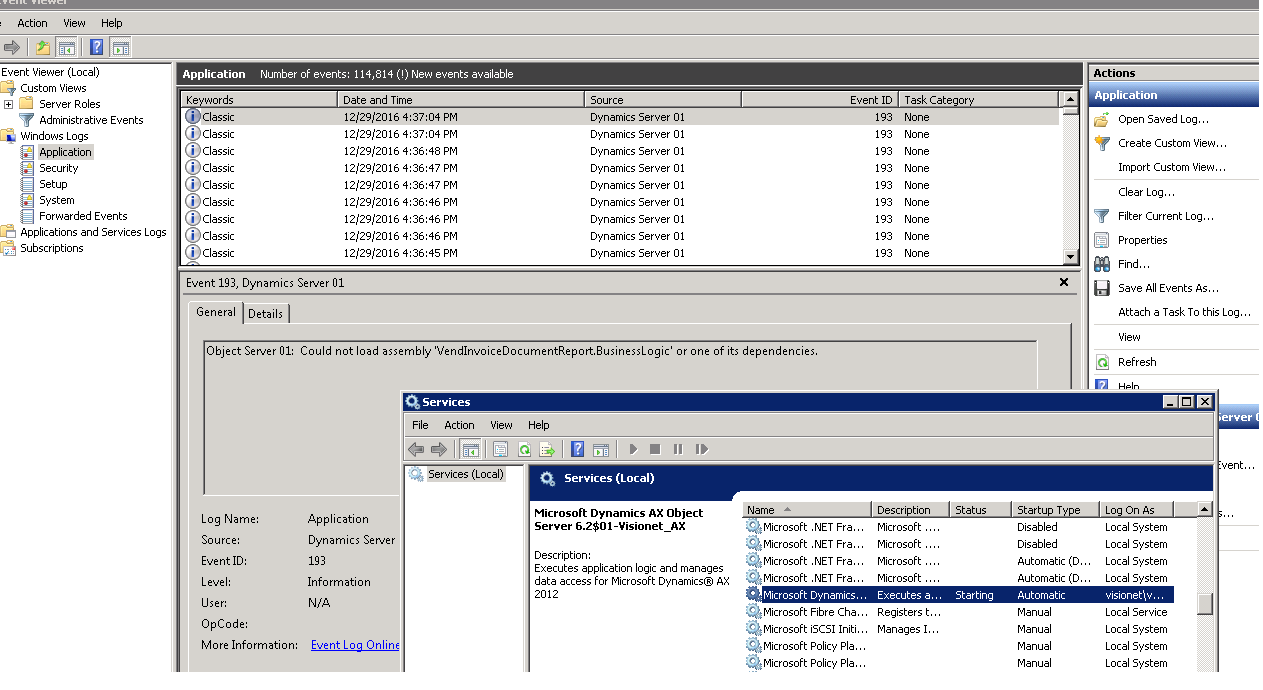
3223.1.png

Before reinstal for Microsoft Dynamics AX Client, can I copy for file DLL from another PC Server?

And what file DLL can I copied to solved this Error?

Solution to reinstal Dynamics AX Client is second choice, and the fisrt choice is copy for DLL file.

Thanks for help.

*This post is locked for comments

I have the same question (0)
  • Suggested answer
    Vilmos Kintera Profile Picture
    46,149 on at

    This is not an error, but an information. AX assemblies are getting automatically deployed which are required, no need to copy anything.

  • Martin Dráb Profile Picture
    237,801 Most Valuable Professional on at

    You can use Assembly Binding Log Viewer to find out why the assembly can't be loaded.

    By the way, assemblies with report business logic have nothing to do with AX client, therefore reinstalling the client wouldn't fix it.

  • Suggested answer
    Tommy Skaue Profile Picture
    Moderator on at

    You can safely ignore those information messages. 

  • Community Member Profile Picture
    on at

    Thanks for respons master,

    Thanks for your corection, I will try it and update later.

    Yes, Service Ax did not run because this info log.

  • Community Member Profile Picture
    on at

    Dear Martin Drab,

    Assembly Binding Log Viewer use for find out the error. Can i use it to fix this error too?

    Thank you very much for your help.

  • Martin Dráb Profile Picture
    237,801 Most Valuable Professional on at

    You use the information from the log to fix the problem. For instance, the log reveals that one required library (such as Lib1.dll) can't be found, so you can go and install it.

  • Suggested answer
    Tommy Skaue Profile Picture
    Moderator on at

    First off, the AOS Service will fire off several information messages when the Service starts. The one you have highlighter is not something that would prevent the AOS from starting. I've seen it on several installs myself.

    There has to be some other reason why the Service does not start. The DLLs are deployed under the Dynamics AX Install Folder, under Server/Instance_name/bin/VSAssemblies. There is no need to copy the DLLs around, as it is the Service Startup that puts the most recent version of that DLL in that folder.

    Secondly, reinstalling the AX Client is irrelevant in regards to your issue. That will not have any impact on startup of the Service. When the AX Client starts up, any necessary (included custom) DLLs will either be in the client/bin folder, or be deployed under %localappdata%/Microsoft/Dynamics Ax/VSAssemblies{GUID}, and the client will load these in proper context. If there are new DLLs for the Client to consume, the Client Startup will create a new VSAssemblies{GUID}-folder.

    So regarding Service Startup, there has to be some other error/issue. Look at the logs again.

Under review

Thank you for your reply! To ensure a great experience for everyone, your content is awaiting approval by our Community Managers. Please check back later.

Helpful resources

Quick Links

Responsible AI policies

As AI tools become more common, we’re introducing a Responsible AI Use…

Neeraj Kumar – Community Spotlight

We are honored to recognize Neeraj Kumar as our Community Spotlight honoree for…

Leaderboard > 🔒一 Microsoft Dynamics AX (Archived)

#1
Martin Dráb Profile Picture

Martin Dráb 4 Most Valuable Professional

#1
Priya_K Profile Picture

Priya_K 4

#3
MyDynamicsNAV Profile Picture

MyDynamicsNAV 2

Last 30 days Overall leaderboard

Featured topics

Product updates

Dynamics 365 release plans



