web
You’re offline. This is a read only version of the page.
close
Skip to main content

Notifications

Announcements

No record found.

Community site session details

Community site session details

Session Id :
Microsoft Dynamics CRM (Archived)

Can't Download and Install Required Components in Dynamics 365 Version 9

(0) ShareShare
ReportReport
Posted on by

I just Download CRM Server Version 9 from this Link : https://www.microsoft.com/en-us/download/details.aspx?id=57478

But In Step Download and Install Required Components i can't download and install anything
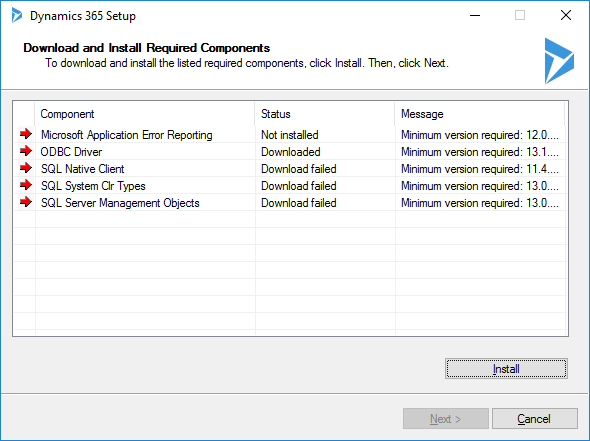
8561.crm365.png

When i use Old Version Install CRM 2016(https://www.microsoft.com/en-us/download/details.aspx?id=50372) on Premise in this step my server can download and install Completely
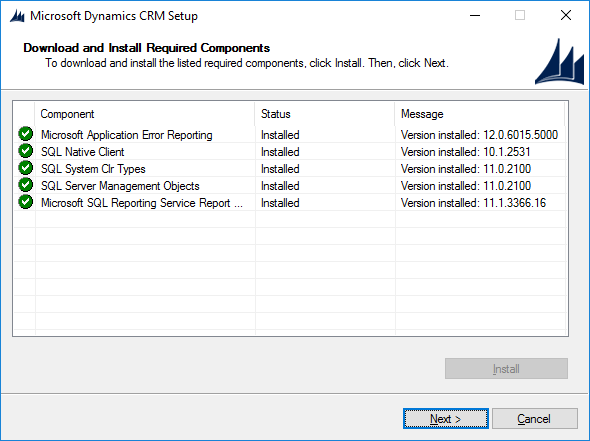
crm2016_5F00_1.png

How to setup before install Version 9?

OS : Windows Server 2016 Standard

Thank in advance.

*This post is locked for comments

I have the same question (0)
  • Suggested answer
    a33ik Profile Picture
    84,331 Most Valuable Professional on at

    Hello,

    I believe that you can use approach similar to following - blogs.msdn.microsoft.com/.../how-to-install-microsoft-dynamics-crm-2011-without-an-internet-connection

  • Community Member Profile Picture
    on at

    Thank you Andrew

    but Where is my Server, Client, EmailRouter and BIDSExtensions folders for create redist folder

    I think structure in CRM 9 doesn't same 2011

    CRM_5F00_365.png

  • Verified answer
    awalters Profile Picture
    3,079 on at

    Does the server have an internet connection?  If so, probably IE Enhanced Security Configuration is enabled on the server, preventing certain downloads.  Normally this is a good practice, but you may need to disable it briefly in certain scenarios where you know you need to download something.  It can be disabled on the Server Manager page (see here for screenshots:  tunecomp.net/disable-internet-explorer-enhanced-security-configuration-windows-server-2016)

  • Suggested answer
    nicoobianco Profile Picture
    on at

    Thanks Allison Walters, you must do this -> tunecomp.net/disable-internet-explorer-enhanced-security-configuration-windows-server-2016 (you must close the installation first) and after this steps start the instalation again. It's works for me. Thanks

  • Community Member Profile Picture
    on at

    Thank Allison  It's work for me now ,I mark this is answer.
    Thank you very much

    CRM_5F00_Complete.png

Under review

Thank you for your reply! To ensure a great experience for everyone, your content is awaiting approval by our Community Managers. Please check back later.

Helpful resources

Quick Links

Responsible AI policies

As AI tools become more common, we’re introducing a Responsible AI Use…

Neeraj Kumar – Community Spotlight

We are honored to recognize Neeraj Kumar as our Community Spotlight honoree for…

Leaderboard > 🔒一 Microsoft Dynamics CRM (Archived)

#1
SA-08121319-0 Profile Picture

SA-08121319-0 4

#1
Calum MacFarlane Profile Picture

Calum MacFarlane 4

#3
Alex Fun Wei Jie Profile Picture

Alex Fun Wei Jie 2

Last 30 days Overall leaderboard

Featured topics

Product updates

Dynamics 365 release plans



