web
You’re offline. This is a read only version of the page.
close
Skip to main content

Notifications

Announcements

No record found.

Community site session details

Community site session details

Session Id :
Finance | Project Operations, Human Resources, ...
Answered

1099 - multiple categories and printing to PDF for email send (2 questions)

(0) ShareShare
ReportReport
Posted on by 89

Hello all, 

I have 2 questions around 1099 i'm hoping I can get help with.

1. A Finance Consultant said a Vendor 1099 printout can only be produced for one category which is on the vendor, even if their 1099 codes on the transactions are different. In our testing we did Rent and other income as transactions and only 'Other Income' transactions was printed on the 1099. While the Consultant suggested this is by design and the vendor should have two vendor accounts, one for other income and one for Rent, this is not acceptable to the business, so i thought I would ask here if anyone else has this workaround in place or has got the 1099 to work with multiple categories.

2. We have a requirement to email PDF copies of the 1099 to vendors and the out of box reports do not contain the labels as it is only the values on the form that are printed on paper. I'm curious what the industry standard process is - does everyone using D365 F&O print to paper with pre-printed stationery and send in using snail-mail? Or use an ISV or create custom SSRS reports mimicking the out of box reports with labels?

Thanks

I have the same question (0)
  • Verified answer
    brjo Profile Picture
    on at

    Hello zkasmani,

    How are you going in to generate the Vendor 1099s?  Is it via this path:  AP > Periodic tasks > Tax 1099 > Tax 1099 detail report  ?

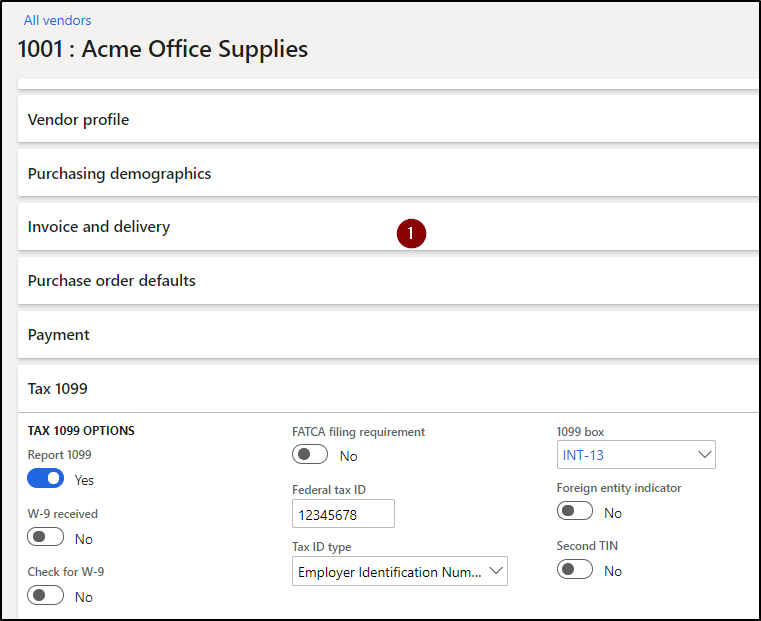
    In my example test, I took a vendor (1001) and gave them a single 1099 box of "INT-13".
    pastedimage1586557403481v1.png

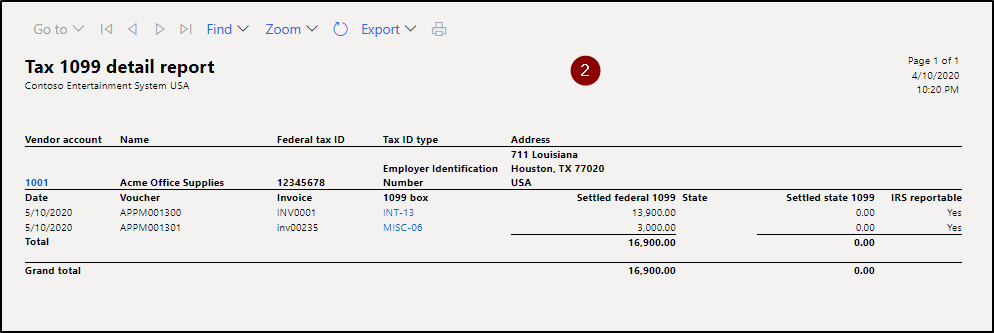
    Then I created 2 PO's for this vendor;  invoiced and paid both of them.  1 PO had a 1099 box = INT-13 (vendor default), the other had a 1099 box of "MISC-06".

    As we can see, they both pulled into my report.
    pastedimage1586557415791v2.png

    Also of note, in order for them to pull into the report, the total payments for that 1099 box will have to exceed the amount you have defined in your system:  AP > Periodic tasks > Tax 1099 > 1099 fields

    - this is where the threshold is stored for each box.

    In my scenario, any payments over $0.01 for INT-13 will populate our 1099 form.  And any total payments over $600.00 for MISC-06 will populate the form.

    Please let me know if this was what you're referring to.

    And please correct any misunderstandings / misinterpretations.

    Thanks so much!

  • zkasmani Profile Picture
    89 on at

    Thank you Brandon!

    It was AP> Periodic Tasks > Tax 1099 > Vendor Settlement for 1099s and Print to get the 1099 printout

     I think you're right that it was the tax 1099 threshold that was not configured properly. I will ask our SME to validate this.

    Thank you again!

    Any advice on how you manage email of 1099 with PDF? or everyone just prints to paper?

  • Suggested answer
    brjo Profile Picture
    on at

    Hi zkasmani,

    Glad I was able to shed some light on your 1st question!

    With regards to the 2nd question about emailing 1099s as PDF  vs.  printing & sending manually:

    • I did some searching and found there's no way out-of-the-box for D365 to send these 1099's to vendors as PDFs (or any other format).  This is something that would be a manual exercise, unfortunately.  Or perhaps can be done by using an ISV, as you mentioned.

    You can definitely get the printouts in the format you'd like;  and can then manually email to your respective vendors.  But that would be a tedious process, too, I'm sure.

    Thus, OOB there's no time-saving solution I can offer.

    I was hoping for someone else in the Community to speak to what they commonly see as users of D365 (i.e.  what the industry standard is;  what ISV is commonly used;  etc.)?

    Thanks!

  • zkasmani Profile Picture
    89 on at

    Thanks Brandon. I also did talk to another friend of mine who is a Finance consultant and got pretty much the same response. Just encouraging the SME to stick to the OOB process of printing to printer on pre-printed stationery.

    Thanks again

Under review

Thank you for your reply! To ensure a great experience for everyone, your content is awaiting approval by our Community Managers. Please check back later.

Helpful resources

Quick Links

Responsible AI policies

As AI tools become more common, we’re introducing a Responsible AI Use…

Neeraj Kumar – Community Spotlight

We are honored to recognize Neeraj Kumar as our Community Spotlight honoree for…

Leaderboard > Finance | Project Operations, Human Resources, AX, GP, SL

#1
Martin Dráb Profile Picture

Martin Dráb 664 Most Valuable Professional

#2
André Arnaud de Calavon Profile Picture

André Arnaud de Cal... 522 Super User 2025 Season 2

#3
Sohaib Cheema Profile Picture

Sohaib Cheema 303 User Group Leader

Last 30 days Overall leaderboard

Product updates

Dynamics 365 release plans
